

I just replace my Climate Control Lights thanks to the dudes who posted the step by step. My LCD lights were all burned out and 2 of my 3 button lights were dead. My plan was to put the lex 84999-60360 in for the buttons, and use 3 of the superbright LED's NEO5-GHP (1 led green) behind the LCD.
When I looked at the LED's, I'd noticed they had some clear plastic seal blobbed all over the bulb which I guess was to help seal the thing. Unfortunately this prevented me from removing the bulb from the housing in order for me to solder it to the board.
I ended up using the green LED's for the buttons and the Lex bulbs behind the LCD. Soldering went OK, but it took me quite a while to get the last remaining bit of solder out from the first hole. I've soldered only 1 thing on a circuit board a few years ago and used soldering wick, but man that was a PITA. The 2nd and 3rd bulb soldering went well, though.
I had to trim off a very small bit of the base on the LED lights to get them to screw in, but that wasn't a biggie.
Here's a pic and I really like the way they turned out. The LCD isn't the brightest thing in the world, but it's a helluva lot better than not seeing them at all...
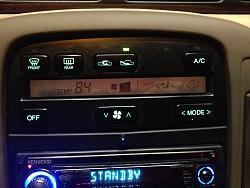
I have an LED replacement screen, but I'll wait until I practice more soldering and the screen to get worse before I tackle that.
There's probably another type of 'naked' LED bulb I could have used but I had it torn apart and wanted to get it back in without waiting for another part...
When I looked at the LED's, I'd noticed they had some clear plastic seal blobbed all over the bulb which I guess was to help seal the thing. Unfortunately this prevented me from removing the bulb from the housing in order for me to solder it to the board.
I ended up using the green LED's for the buttons and the Lex bulbs behind the LCD. Soldering went OK, but it took me quite a while to get the last remaining bit of solder out from the first hole. I've soldered only 1 thing on a circuit board a few years ago and used soldering wick, but man that was a PITA. The 2nd and 3rd bulb soldering went well, though.
I had to trim off a very small bit of the base on the LED lights to get them to screw in, but that wasn't a biggie.
Here's a pic and I really like the way they turned out. The LCD isn't the brightest thing in the world, but it's a helluva lot better than not seeing them at all...

I have an LED replacement screen, but I'll wait until I practice more soldering and the screen to get worse before I tackle that.
There's probably another type of 'naked' LED bulb I could have used but I had it torn apart and wanted to get it back in without waiting for another part...

Intermediate
Looks good man!
I'll return to this thread if my bulbs end up burning out
I'm still rocking the OEM bulbs
I'll return to this thread if my bulbs end up burning out
I'm still rocking the OEM bulbs

Thanks Shrug..
Banks, from the original post:
My LCD lights were all burned out and 2 of my 3 button lights were dead. My plan was to put the lex 84999-60360 in for the buttons, and use 3 of the superbright LED's NEO5-GHP (1 led green) behind the LCD.
I ended up using the green LED's for the buttons and the Lex bulbs behind the LCD..
Banks, from the original post:
My LCD lights were all burned out and 2 of my 3 button lights were dead. My plan was to put the lex 84999-60360 in for the buttons, and use 3 of the superbright LED's NEO5-GHP (1 led green) behind the LCD.
I ended up using the green LED's for the buttons and the Lex bulbs behind the LCD..


I might have to change mine out. 2 backlights have gone out, only one still living.


Thanks all !
Banks, they are definitely greener than they look in the pic. I really like the way the LED lit buttons turned out . It's nice and bright, but not enough to blind you. All buttons light up w/the same intensity.
So whatever color LED you buy will definitely show on the buttons...
Banks, they are definitely greener than they look in the pic. I really like the way the LED lit buttons turned out . It's nice and bright, but not enough to blind you. All buttons light up w/the same intensity.
So whatever color LED you buy will definitely show on the buttons...

Lexus Champion
lol i have the same exact headunit, except mine stopped working on one side, flipped the wires around and for some reason only the left channel on the headunit works. i think its time to upgrade to either an indash tablet or a double din. tablet is cheaper lol