

Hi, Need your help.
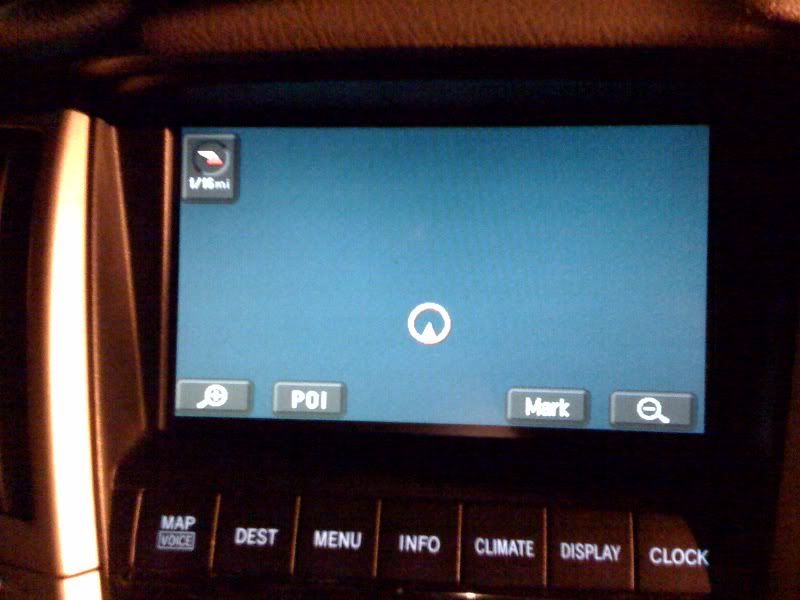
My friend has 2004 RX330 and his navigation acting weird. It does not show current location (map).
Here is the pics:
Is there anything he can do?
P.S. He does not have a warranty.
Thanks
My friend has 2004 RX330 and his navigation acting weird. It does not show current location (map).
Here is the pics:
Is there anything he can do?
P.S. He does not have a warranty.
Thanks
Quote:
We tried to eject and insert back map DVD but nothing changed. Originally Posted by jfelbab
Try reseating the DVD.
Any other options?


Lead Lap
Just a guess. But you might try disconnecting the battery. My XM radio died once. Everything else worked fine.
I did everything I could think of. It started working after I disconnected the battery for about 15 minutes.
Good Luck
I did everything I could think of. It started working after I disconnected the battery for about 15 minutes.
Good Luck
Quote:
I did everything I could think of. It started working after I disconnected the battery for about 15 minutes.
Good Luck
Done that, did not work.Originally Posted by KeysRx300
Just a guess. But you might try disconnecting the battery. My XM radio died once. Everything else worked fine.I did everything I could think of. It started working after I disconnected the battery for about 15 minutes.
Good Luck


Rookie
It looks like your system may not be getting a GPS signal, I believe it should show a little rectangle that says GPS under the directional compass in the upper left corner. I know in my GX it was because I installed an XM reciever that interfered with the GPS cable and its reception...you may need to go to the dealer to figure out what the problem is.


Driver School Candidate
KazakH,
I'm having problems also. On the Destination screen the "Area Map" does not show on the right side of the screen and the address button goaes nowhere. Interestingly I just had the battery replaced at Sears and this problem started. I disconnected the battery for 15 minutes but this did not help. Sure would like to know if you got yours resolved and how. Sorry for the lousy picture. It is very bright outside.
I'm having problems also. On the Destination screen the "Area Map" does not show on the right side of the screen and the address button goaes nowhere. Interestingly I just had the battery replaced at Sears and this problem started. I disconnected the battery for 15 minutes but this did not help. Sure would like to know if you got yours resolved and how. Sorry for the lousy picture. It is very bright outside.


Driver School Candidate
Did you guys ever figure this out? My LS430 Nav never shows the GPS signal anymore. I see the Nav computer is like $4k.

mandyfig
CL Community Team
close


Yesterday
- Join DateApr 2007
- LocationGA
- Posts:12,397
-
iTrader Positive Feedback0
-
iTrader Feedback Score(0)
-
Likes:142
-
Liked:453 Times in 395 Posts
You can get NAV computers for less than $500 on fleabay, just need to get the right one though.
My SC has the Gen2-3 and really would like to upgrade to Gen 4. That means I will have to get the GEN 4 10.1 Nav.
My SC has the Gen2-3 and really would like to upgrade to Gen 4. That means I will have to get the GEN 4 10.1 Nav.

Driver
Quote:
You can't upgrade your SC's gen3 system by inserting a gen4 disk, regardless of the map version.Originally Posted by mandyfig
My SC has the Gen2-3 and really would like to upgrade to Gen 4. That means I will have to get the GEN 4 10.1 Nav.
Gen numbers are hardware versions (each of which requires a disk for the correct hardware level), while numbers like 9.1 and 10.1 are map versions. You could only use a gen4 10.1 map disk in your SC if you managed to replace the gen3 hardware with a gen4 unit. I'd expect the connections, and possibly the gps antenna, are different between gen3 and gen4. Fwiw, a gen2-3 10.1 map disk is available, and works in either a gen2 unit or a gen3 unit. (It also works somewhat in my Cadillac XLR, but that's because it also has a Denso gen3 nav.)

Driver School Candidate
did anyone figure the solution? I am having the exact same problem on my 2004 RX

Lead Lap
If you are not getting GPS signal, is there a good chance that the GPS antenna cable is the cause ? You might need to pull out the unit and trace the GPS antenna cable.