


Phone book transfer


 Phone book transfer
Is there any way to transfer your existing phone book to the cars navi unit without having to punch in every single persons name and phone number. I got the navi to search for a phone book but I can't seem to find my iPhones function to transmit it to the navi


I could not figure out on this car or the LS600lh, I had to enter in all my dads contacts manually in his car
What a PITA, I couldn't get that phonebook transfer to work with his TMobile Dash (HTC Touch I think)
What a PITA, I couldn't get that phonebook transfer to work with his TMobile Dash (HTC Touch I think)

First of all, what phone are you using? I've tried the TMobile Dash, iPhone 2G, iPhone 3G, and now the iPhone 3GS, and they all failed. I haven't tried any other phone, but I'm sure that there are certain models that should work fine.

i transferred all my numbers using the transfer option on my blackberry and it worked fine. i think it mainly depends on the phone. check the bluetooth list of phones at the lexus website should be able to point out if u need to enter it manually or not. my problem is that i have a g1 and i can't use the handsfree option with this phone for some reason.

Trending Topics

i was able to transfer contacts using verizon dare.
you have to start by not connecting the phone and then on the navi unit allow it to transfer data. then you connect the phone on the contacts menu not bluetooth menu. then you should see the numbers transfering on the phone. I have not tried using other phones but then if you need any help send me a pm. probably this isnt clear enough.
you have to start by not connecting the phone and then on the navi unit allow it to transfer data. then you connect the phone on the contacts menu not bluetooth menu. then you should see the numbers transfering on the phone. I have not tried using other phones but then if you need any help send me a pm. probably this isnt clear enough.
 Ph.Book Transfer Via BT
Some People asked me how to transfer ph books via BT for verizon phones. so... here is lil bit more detailed instructions.
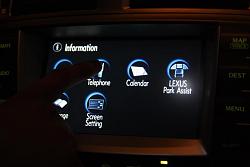
1. click info then Telephone
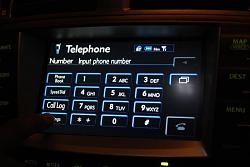
2. Go to settings
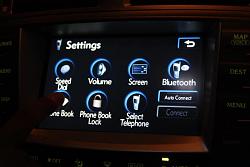
3. click phone book
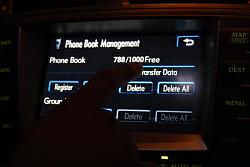
4. click transfer data
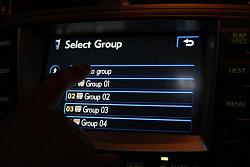
5. click on desired group (no group usually works fine unless you wish to seperate ph numbers)
1. click info then Telephone

2. Go to settings

3. click phone book

4. click transfer data

5. click on desired group (no group usually works fine unless you wish to seperate ph numbers)

Last edited by n0th1ng; Aug 9, 2009 at 02:18 AM.
Ph book
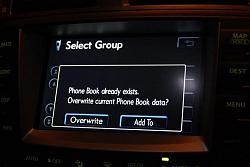
6. Since i alrdy had phone book data this screen poped. but if you dont have anything within the navi unit this shouldnt pop
7. If you see this screen you are rdy to transfer using the phone
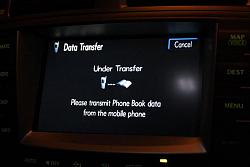
8.Once the transfer screen appeares you will notice the BT will disconnect.
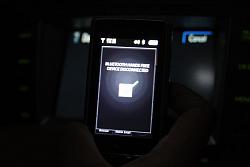
9. Go into contacts in your phone and click on MARK ALL. (this will select every contact you have in your phone)
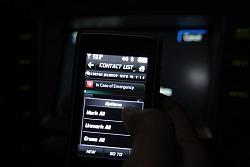
10. Click on send name card


7. If you see this screen you are rdy to transfer using the phone

8.Once the transfer screen appeares you will notice the BT will disconnect.

9. Go into contacts in your phone and click on MARK ALL. (this will select every contact you have in your phone)

10. Click on send name card
 phbook
11. Click on Via Bluetooth
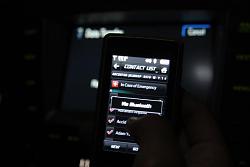
12. click on your vehicle bluetooth. for my case i named it LEXY
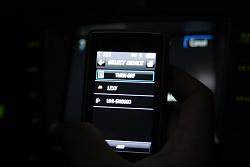
After you click on the your vehicle you will see ***/*** on the phone, which means its transfering the contacts.
Before you do this process you actually have to connect the bluetooth between phone and car and during the process it will disconnect it once.
and then connect again during transfer and disconnects again after.
Hope this helped. i used my phone which is Verizon Dare. I dont know how to do it on the other phones but i believe it will be similar process.
-Tony

12. click on your vehicle bluetooth. for my case i named it LEXY

After you click on the your vehicle you will see ***/*** on the phone, which means its transfering the contacts.
Before you do this process you actually have to connect the bluetooth between phone and car and during the process it will disconnect it once.
and then connect again during transfer and disconnects again after.
Hope this helped. i used my phone which is Verizon Dare. I dont know how to do it on the other phones but i believe it will be similar process.
-Tony
How do you use voice dial? Everytime I use the command button on the steering wheel it keeps asking for the number and not the contact name. So when I hit the button and ask fir a contact I have in my phone book it hears it as a number and not as a contact name

Thread
Thread Starter
Forum
Replies
Last Post
