


Frozen Navigation Screen Fix DIY


Rookie
Joined: Feb 2009
Posts: 80
Likes: 0
From: Ca

Hey there DX3 few months ago my touchscreen stopped responding but as of yesterday everything went dead including my A/C, Heater, screen, and the buttons dont even respond. Does this mean I need a whole complete unit or can I just buy one of those unit you just bought on ebay?
Bare with me because I'm not mechanically inclined.
Bare with me because I'm not mechanically inclined.


Driver School Candidate
Joined: Jul 2011
Posts: 13
Likes: 0
From: Texas
Hey there DX3 few months ago my touchscreen stopped responding but as of yesterday everything went dead including my A/C, Heater, screen, and the buttons dont even respond. Does this mean I need a whole complete unit or can I just buy one of those unit you just bought on ebay?
Bare with me because I'm not mechanically inclined.
Bare with me because I'm not mechanically inclined.

Driver School Candidate
Joined: Dec 2012
Posts: 1
Likes: 0
From: TX
Hey guys, so I replaced the lcd screen with the screen from Japan. Now the screen doesn't even turn on, and the Auto AC button stays on green even when the car is off. Any suggestions? I check the fuses the best I could and none that I could see were broke. Thanks.

Driver School Candidate
Joined: May 2009
Posts: 8
Likes: 0
From: CA
I pulled mine out a couple of weeks ago and was scared to death when I a flat cable came off. I think there are a couple of these cables that are held on to the connectors by clips, not soldered on. I suggest you pull the unit out and check all the cables and connectors. Good luck.

Driver School Candidate
Joined: Jul 2011
Posts: 13
Likes: 0
From: Texas
So - check the cables, push them in gently to make sure they are in all the way and seated, even if they look normal from outside and then with a small probe, push on the bezel to lock it in. The locking bezil is on the left/right outside of the connector on some and another one of them is like a pull down latch from the top. If you didn't loosen the latch when removing the flex cables then they are likely still closed and will inhibit the ability of the new flex cable from getting into the connector completely and making the necessary contacts. As well, the latch on the connector on the new LCD probably came from the supplier in a closed position and needs to be opened before inserting the cable.
Need to be careful and assess which type of latch is on the connector because those are fragile and you sure don't want to break them and create another issue. Don't force it, take what it gives you and have a soft touch. A good idea is to look at your old LCD assembly first to see what kind of latches are on those connectors.
Rookie
Joined: Feb 2009
Posts: 80
Likes: 0
From: Ca
Sounds like a fuse to me since the buttons don't work and they are external to the touch screen, if you had attempted to open it up it could also be that a cable didn't get plugged in correctly during reassembly. First thing I'd do is to check the fuse that is for the fan.

Driver School Candidate
Joined: Nov 2012
Posts: 1
Likes: 0
From: Ca
Well all I can say is what a PIA this was, first I tried the fix and for me it caused more problems, I did not know how to disconnect the cables and broke the connector of the board and lucky for me i found a circuit repair company and cost me $125 to repair it, then ordered a new touch screen from E-Bay and today put it all together and its back in service, after 2 weeks and almost $500 my IS250 is now back in service. Just an FYI Lexus has an exchange program now that you can exchange you console for a re manufactured one for $1895 plus labor but must be a good core that mine was not due to my trying to fix on my own. so be very careful when disconnecting the cables.


Driver School Candidate
Joined: Dec 2010
Posts: 35
Likes: 1
From: CA
Just finished mine today, after tracing the circuit and letting it dry the whole day, I still didn't get any reading from my multimeter so I decided to just put everything back together. When I first turned it on, it wasn't responding to my touch, after a few minutes, half of the screen was good, so I let it sit for another hour and it worked 

Driver School Candidate
Joined: Dec 2012
Posts: 1
Likes: 0
From: ca
i have the same issue for my 07 is250 - breakwater blue with tan interior.. just decided to stop working after sitting in my driveway, during a wet rainy weekend, where it wasn't driven at all.. grrr!!

Driver School Candidate
Joined: Dec 2012
Posts: 4
Likes: 0
From: NSW
 John Murray
Regards Touch Screen Failure.
I have just replaced the touch screen on my LX470 2004 model in Australia.
Follow the removal instructions as shown in previous posts ,remove touch screen from LCD Screen with razor blade . New screen can be purchased from Top electronic parts in Hong Kong for $70US with free delivery to your door . I am a retired 74 year old farmer and i replaced mine today in about an hour and it works perfectly .
I could have bought a touch screen and lcd screen together for $195 from dame supplier.
My Lexus Dealer in Australia quoted me $2000 + to repair mine.As you can imagine i am very chuffed with my result. I found these people via Google and i had about 6 emails from them and they were so helpful and prompt .
The email address is top.electronic.parts@gmail.com
I hope this info can help somebody else it sure saved me a lot of money.
Cheers JM.
PS, they have screens for every thing.
I have just replaced the touch screen on my LX470 2004 model in Australia.
Follow the removal instructions as shown in previous posts ,remove touch screen from LCD Screen with razor blade . New screen can be purchased from Top electronic parts in Hong Kong for $70US with free delivery to your door . I am a retired 74 year old farmer and i replaced mine today in about an hour and it works perfectly .
I could have bought a touch screen and lcd screen together for $195 from dame supplier.
My Lexus Dealer in Australia quoted me $2000 + to repair mine.As you can imagine i am very chuffed with my result. I found these people via Google and i had about 6 emails from them and they were so helpful and prompt .
The email address is top.electronic.parts@gmail.com
I hope this info can help somebody else it sure saved me a lot of money.
Cheers JM.
PS, they have screens for every thing.
Driver School Candidate
Joined: Dec 2012
Posts: 4
Likes: 0
From: NSW
Hey all,
For those of you that have had the frozen navigation screen issue this is your one-stop shop for all of the information out there on fixing it yourself. Even though there are a ton of us that have hit this issue there doesn't seem to be a thread out there that explains this from start to finish (if there is a mod can move this to the appropriate thread, but I searched for awhile to no avail).
There is a well-known thread out on another forum about what to do once you get the navigation unit out on your table and how to do the electrical stuff, but there isn't much on how to get the thing out to begin with. So I'm combining the way that I got everything out with the information on doing the electrical repair.
First and Foremost:
Stuff You'll Need:
Instructions:
1) Remove the two silver trim pieces to the left and right of the shifter. They are held in by clips and come out by pulling them back toward the rear of the car.

2) Remove the shift **** by turning it counter-clockwise.

3) Push the ashtray door, center console door, and the cup holder door into the "open" position and pry the center console piece up from the front. It is also held in by clips.

4) If your car is equipped with heated/cooled seats then you will need to unplug two harnesses under the center trim piece.

5) Remove the two screws that are holding the ashtray/cigarette lighter piece then pull the piece out.

6) Unplug the harness under the ashtray piece and set it aside with the other stuff.

7) There are four clips holding the center air conditioner vents in. They need to be in the "down" position. Be very careful here as these clips will break pretty easily if you apply too much force. I accidentally broke one of them when it was still in the "up" position and it made it very difficult to pull the vents out. A very small piece of my dash was broken off in the process. It will take some wiggling to get the vents out just be patient.

8) There are four 10mm bolts holding the navigation assembly in. There are two 10mm bolts on the top and two on the bottom.


9) Once you pull the assembly out start unplugging everything.

10) When you have the navigation assembly out you will need to remove the two metal brackets that are on both sides of the assembly. They are held in by a bunch of 8mm bolts. They also have Philips heads but they were too tight and began stripping when I used a screwdriver. One side has a wire that is held on the the bracket, you'll need to slide the harness right off.


11) Remove the four Philips screws holding the navigation, CD, and radio hardware.


12) As you separate the pieces there are going to be 3 connections that need to be undone. Two are small wire harnesses and the other is a ribbon connector.

13) Almost done taking stuff apart! The navigation display assembly is held by four more screws.
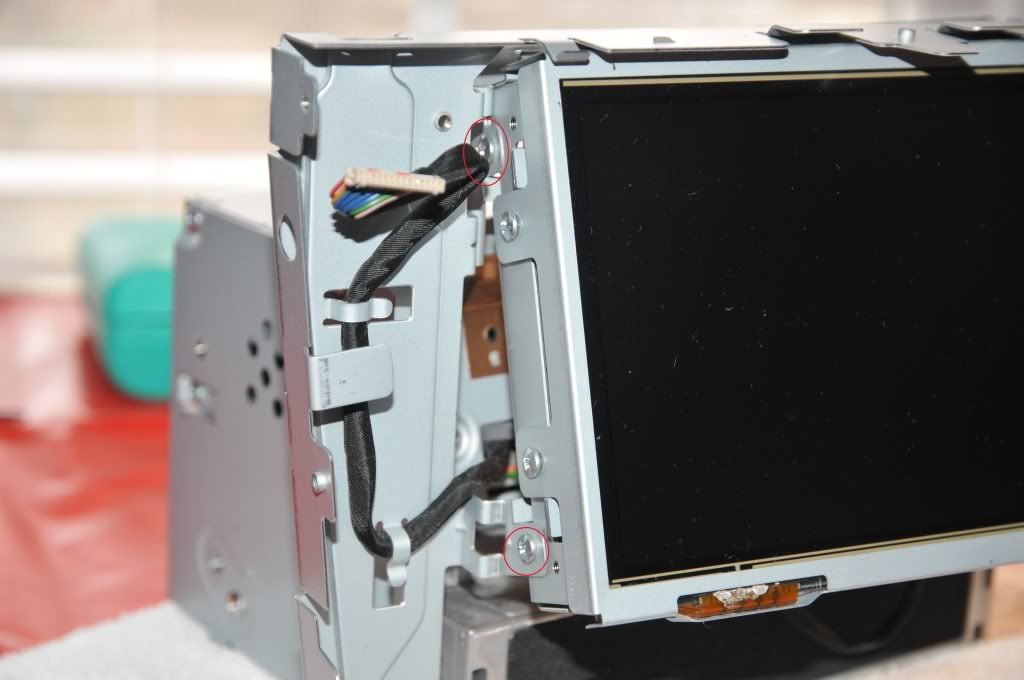

14) Once the display assembly is removed the last thing that you need to do is remove four screws that keep the display assembly together.

Now that everything is apart you can do the electrical part. I don't think that I can write this better than the other guy that did this so I'm just going to quote him.
Here are the pics that go along with that.
Once you do all that putting everything together is just the reverse of taking it apart. Good luck!
http://us.lexusownersclub.com/forums...howtopic=69937
For those of you that have had the frozen navigation screen issue this is your one-stop shop for all of the information out there on fixing it yourself. Even though there are a ton of us that have hit this issue there doesn't seem to be a thread out there that explains this from start to finish (if there is a mod can move this to the appropriate thread, but I searched for awhile to no avail).
There is a well-known thread out on another forum about what to do once you get the navigation unit out on your table and how to do the electrical stuff, but there isn't much on how to get the thing out to begin with. So I'm combining the way that I got everything out with the information on doing the electrical repair.
First and Foremost:
- This fix is for the issue of the navigation screen not responding to touch commands.
- If your car is still under warranty stop reading and have the dealership fix this. It is covered under warranty.
- If you are not under warranty the dealership will charge you a lot to fix this. I was quoted almost $2,500.
- Try this at your own risk!
Stuff You'll Need:
- CircuitWriter pen ($19.99 at RadioShack)
- Flathead screwdriver
- Philips head screwdriver
- 10mm socket
- 8mm socket
- Multimeter
Instructions:
1) Remove the two silver trim pieces to the left and right of the shifter. They are held in by clips and come out by pulling them back toward the rear of the car.
2) Remove the shift **** by turning it counter-clockwise.
3) Push the ashtray door, center console door, and the cup holder door into the "open" position and pry the center console piece up from the front. It is also held in by clips.
4) If your car is equipped with heated/cooled seats then you will need to unplug two harnesses under the center trim piece.
5) Remove the two screws that are holding the ashtray/cigarette lighter piece then pull the piece out.
6) Unplug the harness under the ashtray piece and set it aside with the other stuff.
7) There are four clips holding the center air conditioner vents in. They need to be in the "down" position. Be very careful here as these clips will break pretty easily if you apply too much force. I accidentally broke one of them when it was still in the "up" position and it made it very difficult to pull the vents out. A very small piece of my dash was broken off in the process. It will take some wiggling to get the vents out just be patient.
8) There are four 10mm bolts holding the navigation assembly in. There are two 10mm bolts on the top and two on the bottom.
9) Once you pull the assembly out start unplugging everything.
10) When you have the navigation assembly out you will need to remove the two metal brackets that are on both sides of the assembly. They are held in by a bunch of 8mm bolts. They also have Philips heads but they were too tight and began stripping when I used a screwdriver. One side has a wire that is held on the the bracket, you'll need to slide the harness right off.
11) Remove the four Philips screws holding the navigation, CD, and radio hardware.
12) As you separate the pieces there are going to be 3 connections that need to be undone. Two are small wire harnesses and the other is a ribbon connector.
13) Almost done taking stuff apart! The navigation display assembly is held by four more screws.
14) Once the display assembly is removed the last thing that you need to do is remove four screws that keep the display assembly together.
Now that everything is apart you can do the electrical part. I don't think that I can write this better than the other guy that did this so I'm just going to quote him.
Here are the pics that go along with that.
Once you do all that putting everything together is just the reverse of taking it apart. Good luck!
http://us.lexusownersclub.com/forums...howtopic=69937