

Notices
GS - 3rd Gen (2006-2011) Discussion about the 2006+ model GS300, GS350, GS430, GS450H and GS460

bluetooth mic

Old May 15, 2009 | 01:52 AM
  #1  
Johnnyz4's Avatar
Johnnyz4
Thread Starter
Driver
 
Joined: Feb 2009
Posts: 106
Likes: 0
From: CA
Default bluetooth mic

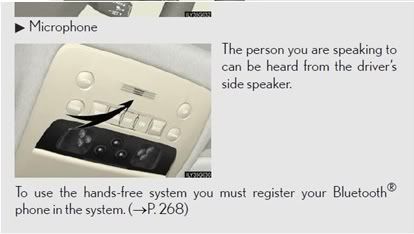
Where is the bluetooth mic located? on the steering wheel?
Reply
Old May 15, 2009 | 10:11 AM
  #2  
rominl's Avatar
rominl
exclusive matchup
20 Year Member
Liked
Community Favorite
Top Answer: 1
iTrader: (4)
 
Joined: May 2002
Posts: 81,852
Likes: 445
From: Lovely OC
Default

i thought it's up top by the doom lights?
Reply
Old May 15, 2009 | 10:23 AM
  #3  
IXI187IXI's Avatar
IXI187IXI
Lexus Fanatic
iTrader: (3)
 
Joined: May 2008
Posts: 8,386
Likes: 19
From: Philly
Default

your correct
Reply
Old May 15, 2009 | 12:50 PM
  #4  
DCNASER's Avatar
DCNASER
Pole Position
 
Joined: May 2009
Posts: 201
Likes: 0
From: AL
Default

I never used the bluetooth, but since i purchased the car few weeks ago, the "bluetooth connection failed" sign comes on the screen for few seconds whenever i crank the car. Anyway to get rid of it? If not, how do I use it? I have a phone with bluetooth, so I need the ear piece first and then settings? Sorry dumb question.
Reply
Old May 15, 2009 | 01:00 PM
  #5  
IXI187IXI's Avatar
IXI187IXI
Lexus Fanatic
iTrader: (3)
 
Joined: May 2008
Posts: 8,386
Likes: 19
From: Philly
Default

no ear piece, just sync it to your car. its in the manual. its pretty easy. i did mine in about 5 mins.
Reply
Old May 15, 2009 | 01:03 PM
  #6  
DCNASER's Avatar
DCNASER
Pole Position
 
Joined: May 2009
Posts: 201
Likes: 0
From: AL
Default

Thanks a lot. you are helpful and fast responding.
Reply
Old May 15, 2009 | 01:05 PM
  #7  
IXI187IXI's Avatar
IXI187IXI
Lexus Fanatic
iTrader: (3)
 
Joined: May 2008
Posts: 8,386
Likes: 19
From: Philly
Default

thats because i should be working lol
Reply
Old May 15, 2009 | 02:31 PM
  #8  
DCNASER's Avatar
DCNASER
Pole Position
 
Joined: May 2009
Posts: 201
Likes: 0
From: AL
Default

hmm. true. Go make some money.
Reply
Old May 15, 2009 | 08:39 PM
  #9  
TwentyTen's Avatar
TwentyTen
Lexus Champion
 
Joined: Sep 2003
Posts: 2,196
Likes: 1
From: United States
Default

Originally Posted by IXI187IXI
no ear piece, just sync it to your car. its in the manual. its pretty easy. i did mine in about 5 mins.
Maybe I am doing something wrong. I tried syncing three different phones (2 Blackberry Curves and an LG nv2) but the mic doesn't seem to work. I can hear THEM crystal clear but they cant hear me. I've toggled Mute on and off but no change.

Anyone know what I am doing wrong?

Darius

//
Reply
Old May 16, 2009 | 12:04 PM
  #10  
Kansas's Avatar
Kansas
Lead Lap
20 Year Member
Liked
Loved
Community Favorite
 
Joined: Jan 2004
Posts: 3,595
Likes: 271
From: Kansas
Default

Originally Posted by TwentyTen
Maybe I am doing something wrong. I tried syncing three different phones (2 Blackberry Curves and an LG nv2) but the mic doesn't seem to work. I can hear THEM crystal clear but they cant hear me. I've toggled Mute on and off but no change.

Anyone know what I am doing wrong?

Darius
You could try adjusting the microphone volume. This is from an IS forum but people have found that it works on other recent models:

"first hold the "info" button (I did it for about 5 secs) then switch your parking light switch from off-to parking lights-repeatedly while still holding the info button....it takes about 5-6 cycles...an poof the NAV screen enter yet another Service menu. From there I navigated to a bluetooth menu where I was able to adjust the Microphone volume higher so that people can hear me better!"

Be very careful when mucking around in the Service menus. Make a serious mistake and your navigation system can become broken and unrepairable.
Reply
Old May 16, 2009 | 02:49 PM
  #11  
arnieosp's Avatar
arnieosp
Racer
15 Year Member
Liked
Loved
Community Favorite
iTrader: (1)
 
Joined: Nov 2007
Posts: 1,286
Likes: 36
From: TX
Default

Or maybe something is wrong with your mic. If the car is still under warranty, take it in.
Reply
Old May 16, 2009 | 09:18 PM
  #12  
TwentyTen's Avatar
TwentyTen
Lexus Champion
 
Joined: Sep 2003
Posts: 2,196
Likes: 1
From: United States
Default

Originally Posted by Kansas
You could try adjusting the microphone volume. This is from an IS forum but people have found that it works on other recent models:

"first hold the "info" button (I did it for about 5 secs) then switch your parking light switch from off-to parking lights-repeatedly while still holding the info button....it takes about 5-6 cycles...an poof the NAV screen enter yet another Service menu. From there I navigated to a bluetooth menu where I was able to adjust the Microphone volume higher so that people can hear me better!"

Be very careful when mucking around in the Service menus. Make a serious mistake and your navigation system can become broken and unrepairable.
It worked but I got scared and backed out. I'm going to try again and press the service button. Im afraid that after having the car for just a week I'm going to render the nav unusable.

//
Reply
Old May 16, 2009 | 10:30 PM
  #13  
krava's Avatar
krava
Lead Lap
 
Joined: Mar 2009
Posts: 483
Likes: 0
From: la
Default bluetooth

can't get my phone to work either, and read the manual (have a degree in computer science) and still couldn't ge the thing to work, going to take it to the dealer could be messed up from a wreck or something I don't know
Reply
Old Oct 15, 2010 | 07:34 PM
  #14  
*Batman*'s Avatar
*Batman*
Lexus Champion
15 Year Member
 
Joined: Jul 2009
Posts: 3,277
Likes: 3
From: USA
Default

Can anyone provide a more precise location of the microphone? Is it in the overhead console or the mirror? Where specifically?
Reply
Old Oct 15, 2010 | 08:20 PM
  #15  
CAK 500's Avatar
CAK 500
Advanced
15 Year Member
 
Joined: Sep 2009
Posts: 664
Likes: 3
From: NC
Default

Originally Posted by batman75
Can anyone provide a more precise location of the microphone? Is it in the overhead console or the mirror? Where specifically?
I usually try to direct my voice towards it when I'm on the phone.

Reply

Thread Tools
Search this Thread

All times are GMT -7. The time now is 08:59 AM.