


HUD Install (Heads Up Display)


Thread Starter
Rookie
Joined: Jul 2013
Posts: 70
Likes: 0
From: NS
 HUD Install (Heads Up Display)
Hey my CL peeps, got another DIY for ya. Last weekend I installed my ebay HUD unit thought I would share. It was super easy!!! First off the package comes with the HUD unit an extended wire with plug that fits into the main unit harness. 3 Wire splice connectors or whatever you call them. Small piece of Velcro and a piece of 20% tint.
1- Take down covers under steering wheel to gain access to the VSS.
2- Find the 12v (Black with red), speed signal wire (purple) and ground (white with black) All located on the vss harness near the E-Brake peddle.
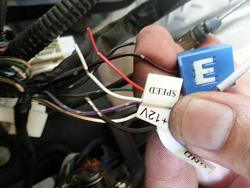
3 - Connect the HUD harness wires ( clearly labeled) to the wires I mentioned.
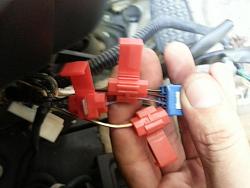
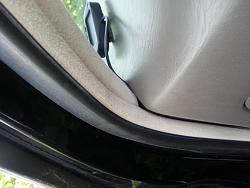
4 - Find a comfortable mounting position and mount the HUD. I ran my wire down the side of the dash and tucked it in the seam.
5 - If you don't have a tinted windshield you can use the small piece of tint that comes with the package.
That's it, very easy. It shows battery voltage for 5 sec after you turn the key on then goes to running mode. It can be programmed with speed warnings as well. currently I have no warning setup but wen I get to 40mph it beeps once then again at 60mph and once more every 20mph I increase.
Hope this is helpful.
Love this site and I just want to give back. Much thanks for all the productive helpful post here.
1- Take down covers under steering wheel to gain access to the VSS.
2- Find the 12v (Black with red), speed signal wire (purple) and ground (white with black) All located on the vss harness near the E-Brake peddle.

3 - Connect the HUD harness wires ( clearly labeled) to the wires I mentioned.

4 - Find a comfortable mounting position and mount the HUD. I ran my wire down the side of the dash and tucked it in the seam.

5 - If you don't have a tinted windshield you can use the small piece of tint that comes with the package.
That's it, very easy. It shows battery voltage for 5 sec after you turn the key on then goes to running mode. It can be programmed with speed warnings as well. currently I have no warning setup but wen I get to 40mph it beeps once then again at 60mph and once more every 20mph I increase.
Hope this is helpful.
Love this site and I just want to give back. Much thanks for all the productive helpful post here.



Thread Starter
Rookie
Joined: Jul 2013
Posts: 70
Likes: 0
From: NS
Thanks guys. I intend to tint my windshield with 35% so I can remove the single piece of tint that came with it plus provide UV protection for my interior. Its nice for those of us that drive laid back and don't want to lean forward to see the gauge.
It also has a light sensor that adjusts the contrast depending on the light outside.
It also has a light sensor that adjusts the contrast depending on the light outside.

pics of result.. preferably night time!!!! great DIY btw. been thinking about this and driving in the nights with all instruments lights gone but the hud like parker said. just me and my girlfriend lol
Trending Topics


Thread Starter
Rookie
Joined: Jul 2013
Posts: 70
Likes: 0
From: NS
Another thing is you cant see the numbers on the windshield from outside the car. Nice little thing about the tint they sent with it. I was going to do the DIY for the gauge but its not very easy and can F-UP your gauge if done wrong so I don't want to risk it.
Thread Starter
Rookie
Joined: Jul 2013
Posts: 70
Likes: 0
From: NS
http://www.ebay.com/itm/Universal-Head-up-display-HUD-IT-8008-type-Km-Mile-Switch-Over-speeding-warning-/130675072801?pt=Motors_Car_Truck_Parts_Accessories&hash=item1e6cd75f21&vxp=mtr
