



Techstream

Pole Position
Joined: Aug 2012
Posts: 209
Likes: 6
From: Worcs. UK

Like many folks I have an older Dell laptop hanging around with XP on it. So far most of the old files were deleted and most programs uninstalled. WiFi is disabled and it will not be connected my local internet, so not much chance of getting nasty things to mess up the system. My techstream has yet to arrive. I'll let you know how the driver install goes.
The workaround for 64bit is, to simplify the explanation of the process, manually copy the driver and let Windows know where the 32bit driver is. It's not hard but some of the guides out on the internet make it look harder than it is (at the end of the day, just follow the instructions and it's easy enough). It only take an extra few mins.

Lead Lap
Joined: Aug 2015
Posts: 769
Likes: 79
From: Florida
Can someone help me here.
I've installed Techstream and have the cable and everything is working fine.
Just one question, in the start-up menu I get the below selection to choose from:
Firstly "Radar Cruise" Which I select as my car has the PCS system and radar thingy.
Secondly is asks me to choose from a bunch of numbers, I have no idea what they are, I thought they could be the year of the car or something but I just always choose the last one "1008-"
Can someone tell me what those number stand for and which one I shoudl select?
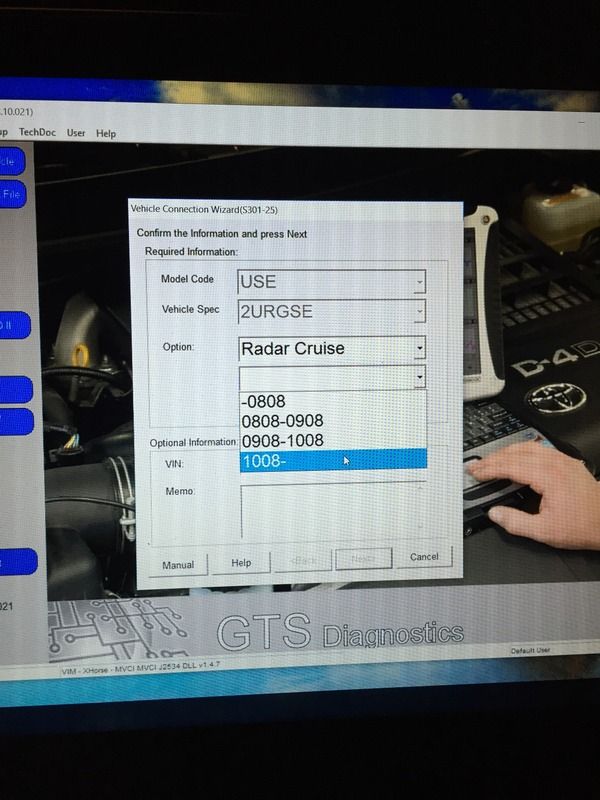
I've installed Techstream and have the cable and everything is working fine.
Just one question, in the start-up menu I get the below selection to choose from:
Firstly "Radar Cruise" Which I select as my car has the PCS system and radar thingy.
Secondly is asks me to choose from a bunch of numbers, I have no idea what they are, I thought they could be the year of the car or something but I just always choose the last one "1008-"
Can someone tell me what those number stand for and which one I shoudl select?

It usually doesn't ask you that if it can read the VIN from your vehicle. I think the only time I have gotten that is when the cable didn't connect with the car (or running it at the desk not connected to the car.)
If you think you still need to enter it, you will need to decode your VIN number to get that information.
I think you can do that for free at techinfo.toyota.com

Racer


Joined: Oct 2011
Posts: 1,512
Likes: 77
From: On a sand dune
^ Finally 
Thanks mate, appreciate the help.
Since mine is a 2013 ISF then I should select the last option (which I am).
Interesting you comment it shouldn't come up if it can read my VIN, I am using a cheap E-bay cable, but so far I haven't had any real issues data logging and checking error codes.
I just bought a newer cable (mongose or something) which I heard is better so let's see if that makes a difference.
Also my car is a GCC Spec (Middle East) spec which it's closer to the Jap spec Lexus, maybe that has something to do with it not being able to read my VIN.
Thanks once again
Thanks mate, appreciate the help.
Since mine is a 2013 ISF then I should select the last option (which I am).
Interesting you comment it shouldn't come up if it can read my VIN, I am using a cheap E-bay cable, but so far I haven't had any real issues data logging and checking error codes.
I just bought a newer cable (mongose or something) which I heard is better so let's see if that makes a difference.
Also my car is a GCC Spec (Middle East) spec which it's closer to the Jap spec Lexus, maybe that has something to do with it not being able to read my VIN.
Thanks once again
Lead Lap
Joined: Aug 2015
Posts: 769
Likes: 79
From: Florida
^ Finally
Thanks mate, appreciate the help.
Since mine is a 2013 ISF then I should select the last option (which I am).
Interesting you comment it shouldn't come up if it can read my VIN, I am using a cheap E-bay cable, but so far I haven't had any real issues data logging and checking error codes.
I just bought a newer cable (mongose or something) which I heard is better so let's see if that makes a difference.
Also my car is a GCC Spec (Middle East) spec which it's closer to the Jap spec Lexus, maybe that has something to do with it not being able to read my VIN.
Thanks once again
Thanks mate, appreciate the help.
Since mine is a 2013 ISF then I should select the last option (which I am).
Interesting you comment it shouldn't come up if it can read my VIN, I am using a cheap E-bay cable, but so far I haven't had any real issues data logging and checking error codes.
I just bought a newer cable (mongose or something) which I heard is better so let's see if that makes a difference.
Also my car is a GCC Spec (Middle East) spec which it's closer to the Jap spec Lexus, maybe that has something to do with it not being able to read my VIN.
Thanks once again
When I look at the diagrams for 2005+ SC430s, I don't see the CAN bus going to the network gateway, so there would be no path to the diagnostic systems. I don't know if this applies to the ISF, of course.
My point is that if it tries CAN communication first and gets a response (but not what it expects), then it might fail out thinking the ECM is not talking.
I don't remember where BGW70 and I left off in our testing, but I think he gave up and just ordered an older cable. He can correct me if my memory is wrong on this.
Last edited by Retroplay; Jun 23, 2016 at 12:20 PM.

Lexus Test Driver

Joined: Dec 2014
Posts: 8,213
Likes: 949
From: Fl
You are correct retro with one small exception, I already had the older v1.4.1 firmware cable and it worked fine but I thought the newer v2.0.4 firmware cable would be faster. It is not faster and didn't work with my 2002 SC430 but it does work with my relatives 2011 Camry.
Lead Lap
Joined: Aug 2015
Posts: 769
Likes: 79
From: Florida
You are correct retro with one small exception, I already had the older v1.4.1 firmware cable and it worked fine but I thought the newer v2.0.4 firmware cable would be faster. It is not faster and didn't work with my 2002 SC430 but it does work with my relatives 2011 Camry.
At any rate, we never figured out why it wasn't working for you. Not sure if I ever updated on that thread that mine worked without issues.
ClubLexus Stories
Celebrating Lexus & Toyota from Around the Globe

8 Tips for Improving Your Hybrid or Plug-in Hybrid's Efficiency!
Michael S. Palmer
10 Best Lexus Models No One Remembers
Joe Kucinski
TRD Off-Road Premium: Best 2026 4Runner, Except This One Thing
Michael S. Palmer
Top 10 Lexus & Toyotas to Drive Before You Die!
Joe Kucinski
Top 10 Lexus/Toyotas With The LEAST 5-Year Depreciation
Joe Kucinski
Lexus LC500 Convertible Auction: A Preview of Rising Values?
Brett Foote
GX 550 vs TX 550: Best 3-Row Luxury Lexus Family Hauler
Michael S. Palmer
9 Best Lexus Models You Can Buy for Half Price (And 1 You Shouldn't!)
Joe Kucinski
2026 Lexus NX Buyer's Guide: Models, Features, Prices & More!
Brett Foote
Lexus Test Driver
Joined: Dec 2014
Posts: 8,213
Likes: 949
From: Fl

Rookie
Joined: Jan 2016
Posts: 61
Likes: 2
From: SC
Thanks. I've toured that thread before, and did again as you suggested,---but the closest thing I saw to my specific question ---- was your successful use of a 2.0.4 cable on a 2011 Camry.
... Really was hoping someone here has a 2006-2010 SC and can provide a link to purchase this cable/software that has been proven to work with this car and Win 8.1....
... Really was hoping someone here has a 2006-2010 SC and can provide a link to purchase this cable/software that has been proven to work with this car and Win 8.1....


First, why are you still using W8.1. Windows 10 is available for free and much better than any version of W8. You have until the 29th to get it for free.
Here is the link to the cable a number of us are using that has the newest firmware. I have used this on an 06 SC with both 64 bit W7 and W10. There is no reason it would not work with W8.
http://www.aliexpress.com/snapshot/6...67355437975853
Here is the link to the cable a number of us are using that has the newest firmware. I have used this on an 06 SC with both 64 bit W7 and W10. There is no reason it would not work with W8.
http://www.aliexpress.com/snapshot/6...67355437975853
Rookie
Joined: Jan 2016
Posts: 61
Likes: 2
From: SC
First, why are you still using W8.1. Windows 10 is available for free and much better than any version of W8. You have until the 29th to get it for free.
Here is the link to the cable a number of us are using that has the newest firmware. I have used this on an 06 SC with both 64 bit W7 and W10. There is no reason it would not work with W8.
http://www.aliexpress.com/snapshot/6...67355437975853
Here is the link to the cable a number of us are using that has the newest firmware. I have used this on an 06 SC with both 64 bit W7 and W10. There is no reason it would not work with W8.
http://www.aliexpress.com/snapshot/6...67355437975853
Anyway, It looks like the link you posted is the actual device I purchased from Ali earlier this year, but mine doesn't appear to "connect" to the vehicle at this point. The tech stream software (10.00.028) won't connect w/o requiring me to purchase a subscription to their service. (See photo below).
So, this may be a dumb question, but do I need to buy a subscription for the software that came with the cable to actually work?
Is there a way to view the firmware version of the cable?
Is there a Google Drive (or dropbox folder) where I can download this software? I'm not opposed to purchasing a license to use this software, but a 2-day subscription for $55 seems a bit much...
Any additional help would be much appreciated
Lexus Test Driver
Joined: Dec 2014
Posts: 8,213
Likes: 949
From: Fl
No need to purchase, who ever you purchased from should have provided directions.
If you google techstream etc, you will find directions to install everything and some of it will be on other Toyota websites.
If you google techstream etc, you will find directions to install everything and some of it will be on other Toyota websites.
Pole Position
Joined: Aug 2012
Posts: 209
Likes: 6
From: Worcs. UK
Yes.
You'll find a utility program called FirmwareUpdateTool.exe in the C:\Program Files (x86)\XHorse Electronics\MVCI Driver for TOYOTA TIS folder (your exact path may vary).
That will display the the Firmware level.
You've installed and configured it wrong. Most likely by specifying a User/Dealer ID or something when you first ran the program after installation.
Uninstall Techstream and start again.
Ensure you follow the instructions (not the best written instructions, but they do work!), step by step
Rookie
Joined: Jan 2016
Posts: 61
Likes: 2
From: SC
unfortunately, no directions were provided with the cable and disk. Can you share the directions you received with yours?
I was able to find a site with software version 10.30.029 via your search suggestion. Installed the update, but got the same results....
Went ahead and ordered a new one from the link provided by iolmaster.
We'll see what happens when that one arrives...
I was able to find a site with software version 10.30.029 via your search suggestion. Installed the update, but got the same results....
Went ahead and ordered a new one from the link provided by iolmaster.
We'll see what happens when that one arrives...