


Tips, Tricks, DIY's, & How-To's

Thread Starter
Lexus Test Driver

Joined: Mar 2006
Posts: 821
Likes: 8
From: CA

Originally Posted by NewGS4me
When I follow the steps on the nav, and I get to the "override" button, I can hit it, but it does NOT highlight it or turn black or change in any way, so I still can't input destinations while driving. I just got my car last month...do you think something's different now?
Amy

Amy
Thread Starter
Lexus Test Driver
Joined: Mar 2006
Posts: 821
Likes: 8
From: CA
Rolling down front windows
OK, so this is REALLY stupid, completely lame, and I'll probably get flamed for this but here goes:
I usually accidentally roll down the rear windows rather than the front by accident (maybe I have short arms...) But I noticed that ONLY the front drivers window button has a "bump" on the window switch, so ever since then, I've been feeling for the bump and rolling down the right windows now...
I usually accidentally roll down the rear windows rather than the front by accident (maybe I have short arms...) But I noticed that ONLY the front drivers window button has a "bump" on the window switch, so ever since then, I've been feeling for the bump and rolling down the right windows now...

Driver School Candidate
Joined: May 2006
Posts: 38
Likes: 0
From: CA
 These are wrong instructions bacause they are impossible!
Originally Posted by Eternity3G
This will turn off your seat belt warning "beeping" for the driver and passenger side. This will only need to be done once in the lifetime of the car as it will retain in the vehicle memory.
1) Get into the car w/ ignition off and close the doors
2) Open the "flip console" to your left (mirror / gas lid console)
3) Set the LCD on the combination meter to the ODO display using the ODO/TRIP button
4) W/O applying the brakes, press the "Engine Start/Stop" button twice. You should see the check engine light and battery light on in the dash. (DO NOT START THE ENGINE)
5) Hold the ODO/TRIP button. Wait ten seconds, and while still holding the button, buckle the driver’s seat belt.
6) The LCD displays "Seat Belt Buzzer On/Off". Release the button. Pressing the ODO button toggles the On/Off
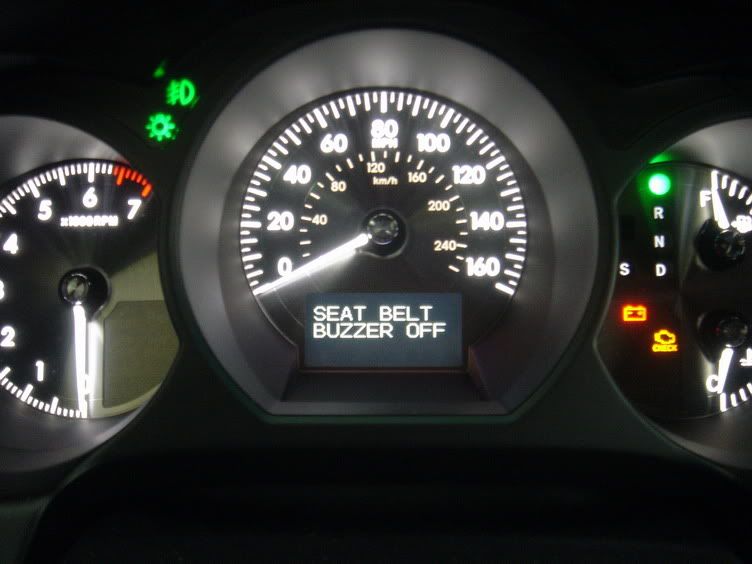
7) I believe you may need to repeat the process for the passenger side.
Drive safe!
1) Get into the car w/ ignition off and close the doors
2) Open the "flip console" to your left (mirror / gas lid console)
3) Set the LCD on the combination meter to the ODO display using the ODO/TRIP button
4) W/O applying the brakes, press the "Engine Start/Stop" button twice. You should see the check engine light and battery light on in the dash. (DO NOT START THE ENGINE)
5) Hold the ODO/TRIP button. Wait ten seconds, and while still holding the button, buckle the driver’s seat belt.
6) The LCD displays "Seat Belt Buzzer On/Off". Release the button. Pressing the ODO button toggles the On/Off
7) I believe you may need to repeat the process for the passenger side.
Drive safe!
If the ignition is off, and the doors are closed, you cannot do step 3. unless you push the START button. You simply cannot do step 3. I have a 06 GS300 and the seatbelt buzzer kills me. I can;t stand it.
So i tried it different ways and no luck. What is the solution?
Thanks in advance.
Last edited by sherif2; May 26, 2006 at 08:21 PM. Reason: Bad Spelling

Rookie
Joined: Feb 2001
Posts: 86
Likes: 0
From: San Francisco, CA
Originally Posted by sherif2
If the ignition is off, and the doors are closed, you cannot do step 3. unless you push the START button. You simply cannot do step 3. I have a 06 GS300 and the seatbelt buzzer kills me. I can;t stand it.
So i tried it different ways and no luck. What is the solution?
Thanks in advance.
So i tried it different ways and no luck. What is the solution?
Thanks in advance.

Driver
Joined: Nov 2005
Posts: 184
Likes: 0
From: CA
Is there a way to override the cell phone feature so i can dial while driving?
Anyone know a reliable shop in the San francisco bay area that can do my DVD mod? I don't want to do it myself no matter how easy it is. I suck at that kind of stuff. Knowing me everything will rattle when I'm done.
Anyone know a reliable shop in the San francisco bay area that can do my DVD mod? I don't want to do it myself no matter how easy it is. I suck at that kind of stuff. Knowing me everything will rattle when I'm done.

Pole Position
Joined: Feb 2005
Posts: 229
Likes: 0
From: FL
Originally Posted by thenod
Is there a way to override the cell phone feature so i can dial while driving?
Anyone know a reliable shop in the San francisco bay area that can do my DVD mod? I don't want to do it myself no matter how easy it is. I suck at that kind of stuff. Knowing me everything will rattle when I'm done.
Anyone know a reliable shop in the San francisco bay area that can do my DVD mod? I don't want to do it myself no matter how easy it is. I suck at that kind of stuff. Knowing me everything will rattle when I'm done.
ClubLexus Stories
Celebrating Lexus & Toyota from Around the Globe

Top 10 Most Confusing Things Lexus Has Ever Done!
Joe Kucinski
2026 Lexus ES Review: Lexus Re-Embraces Founding Principles
Michael S. Palmer
10 Lexus Bargains That are Cheaper Than a New Toyota RAV4
Joe Kucinski
8 Weirdest Things Lexus Has Ever Built
Verdad Gallardo
10 Lexus Designs That Have Aged Like Fine Wine
Verdad Gallardo
8 Tips for Improving Your Hybrid or Plug-in Hybrid's Efficiency!
Michael S. Palmer
10 Best Lexus Models No One Remembers
Joe Kucinski
TRD Off-Road Premium: Best 2026 4Runner, Except This One Thing
Michael S. Palmer
Top 10 Lexus & Toyotas to Drive Before You Die!
Joe Kucinski
Driver School Candidate
Joined: May 2006
Posts: 3
Likes: 0
From: CA
Traction Control
So here is one that I am not sure we can control, but just a thought. I have a 06 GS 300 and nearly every time I turn right around a corner and accelerate quickly, the traction control kicks in. I find I have to turn the traction control off a lot when I am driving around in town because this is WAY to sensitive (it is difficult but not impossible to slide this car). Does anyone know if there are settings on this to either 1. set the traction control a little less sensitive or 2. make the default when the car starts up to be traction off (I wouldn't recommend driving on the freeway without traction on btw... it is invaluable for quick moves at high speed).
Rookie
Joined: Feb 2001
Posts: 86
Likes: 0
From: San Francisco, CA
To moderators
This thread would be much more useful if it will contain Tips, Tricks, DIY's, & How-To's only. All discussions and questions could be posted in another thread(s).
Last edited by joedoe; Jun 9, 2006 at 01:32 PM.

Rookie
Joined: Apr 2005
Posts: 50
Likes: 0
From: CA
Originally Posted by gs450hjp2
I have a 2007 gs450h with dvd , I would really like to know how to make it so we can watch a movie on the nav screen , I am told this is possiable, however I need the "magic trick" how, can anybody help, thanks 

Pole Position
Joined: Sep 2005
Posts: 217
Likes: 0
From: WA
Originally Posted by joedoe
You should do steps 1 and 2, then instead of step 3 w/o applying the brakes press ignition key twice, set ODO/Trip to Trip2, press ignition key one more time to turn everything off and then continue with step 4.
I was able to get this to work in my 450h without problem. Once the seatbelt indicator comes onto the screen just press the odo button as indicated as a toggle switch to turn it on/off as desired. I always use the seatbelts so I don't need the reminder buzzer.
Thanks to those that posted this information. I have learned a number of good tricks in this thread so keep them coming.

Driver
Joined: Nov 2005
Posts: 184
Likes: 0
From: CA
Originally Posted by scottmyers
The NAV/Bluetooth mod gives you this functionality. You can dial while in motion.

Lexus Champion


Joined: Aug 2005
Posts: 1,736
Likes: 3
From: NY
Removing Door Panels
Credit goes to DrexLex.
If you have access to Repair Manual Volume 5, it is explained with figures on pages ED-66 and 67. The steps are, ver batim:
1) Remove door inside handle bezel.
(a) Using a screwdriver (tape the tip first) detach 3 claws and remove the 3 claws and remove the bezel plug.
2) Remove front door trim panel assembly.
(a) Detach the 2 claws and remove the trim lower cover. (This is a small panel located above the door pocket, below the handle.)
(b) Disconnect the connector
(c) Remove the 2 screws. (One is behind this lower trim cover, the other is behind the door handle bezel.)
(d) Remove the 9 clips and the trim cover (the entire door panel).
It makes more sense if you can see the figures. Claws are those little plastic clips molded into the edges of the bezels. I get the sense that the small screwdriver is used to depress the clip so it will disengage from the mounting surface.
If you have access to Repair Manual Volume 5, it is explained with figures on pages ED-66 and 67. The steps are, ver batim:
1) Remove door inside handle bezel.
(a) Using a screwdriver (tape the tip first) detach 3 claws and remove the 3 claws and remove the bezel plug.
2) Remove front door trim panel assembly.
(a) Detach the 2 claws and remove the trim lower cover. (This is a small panel located above the door pocket, below the handle.)
(b) Disconnect the connector
(c) Remove the 2 screws. (One is behind this lower trim cover, the other is behind the door handle bezel.)
(d) Remove the 9 clips and the trim cover (the entire door panel).
It makes more sense if you can see the figures. Claws are those little plastic clips molded into the edges of the bezels. I get the sense that the small screwdriver is used to depress the clip so it will disengage from the mounting surface.