


Navigation Problem: Destination button is greyed out


Thread Starter
Lexus Test Driver


Joined: Jun 2001
Posts: 1,580
Likes: 19
From: California
 Navigation Problem: Destination button is greyed out
Permission from moderator to leave this post here for a while. I put a similar one over at electronics forum but it's not getting any response. Perhaps this is an issue exclusive to SC430 and other owners might be able to help me.
I can't input a destination address, the region map is greyed out- no selection highlighted, and no POI (POI also greyed out) when at a standstill. I'm using a genuine ver 05.1 navi disc. This problem has occured a few times in the past only to fix itself shortly later. This time, it fixed itself after couple of days only to go back to the problem a short time later. Pulling the fuses and disconnecting the battery did not help. Any ideas?
I can't input a destination address, the region map is greyed out- no selection highlighted, and no POI (POI also greyed out) when at a standstill. I'm using a genuine ver 05.1 navi disc. This problem has occured a few times in the past only to fix itself shortly later. This time, it fixed itself after couple of days only to go back to the problem a short time later. Pulling the fuses and disconnecting the battery did not help. Any ideas?
Last edited by whitels; Jan 8, 2008 at 04:35 PM.



Joined: Feb 2001
Posts: 31,944
Likes: 2,737
From: North Carolina
That's normal behavior for Lexus navigation for all cars since they've put nav in. No destination entry allowed while driving.
There are several workarounds. If you have 5.1 you can override manually (looking for link)
here's a link to a post with a video for a 2004 LS showing the override steps
https://www.clublexus.com/forums/sho...ation+override
This is not a permanent override and needs to be done each time. On my LS I added a product called a Coastaltech lockpick which will automate the override.
also
PS I'm guessing at your nav version / year of your SC430 by the version of the nav dvd you posted.
There are several workarounds. If you have 5.1 you can override manually (looking for link)
here's a link to a post with a video for a 2004 LS showing the override steps
https://www.clublexus.com/forums/sho...ation+override
This is not a permanent override and needs to be done each time. On my LS I added a product called a Coastaltech lockpick which will automate the override.
also
PS I'm guessing at your nav version / year of your SC430 by the version of the nav dvd you posted.
Last edited by DaveGS4; Jan 8, 2008 at 04:18 PM.
Thread Starter
Lexus Test Driver
Joined: Jun 2001
Posts: 1,580
Likes: 19
From: California
Hi Dave,
Sorry I did not word the problem right the first time so I've edited it. Thanks Dave for catching it. The greyed out destination button and no areas selected issues happen when the car is not moving or at a standstill.
BTW, I found this post which has similar issue to mine but but I know I have the correct disc. I have been using it for 1.5 years now.
https://www.clublexus.com/forums/sho...ht=disc+update
.
Sorry I did not word the problem right the first time so I've edited it. Thanks Dave for catching it. The greyed out destination button and no areas selected issues happen when the car is not moving or at a standstill.
BTW, I found this post which has similar issue to mine but but I know I have the correct disc. I have been using it for 1.5 years now.
https://www.clublexus.com/forums/sho...ht=disc+update
.
Last edited by whitels; Jan 8, 2008 at 04:44 PM.


Thread Starter
Lexus Test Driver
Joined: Jun 2001
Posts: 1,580
Likes: 19
From: California
It shows the letters GPS and a green thin bar.
BTW, as I researched this, I came across information that suggests- you actually suggested it - that Gen 4 nav ECU will actually replace and work on the Gen2 system- straight plug and play. The part number that superceded a gen 4 ecu- 86841-50090---> is 86841-0E010. Do you think I can use this newer part should I need a new nav ecu?
BTW, as I researched this, I came across information that suggests- you actually suggested it
- that Gen 4 nav ECU will actually replace and work on the Gen2 system- straight plug and play. The part number that superceded a gen 4 ecu- 86841-50090---> is 86841-0E010. Do you think I can use this newer part should I need a new nav ecu?
I have the feeling that your gen2 nav computer is going bad.
You can install gen4 computer in your 02 for sure.
Just remenber to get dvd map disc for gen4, your old gen 2/3 dvd won't work in gen4 computer.
If you also want to have voice command and bluetooth, You need to upgrade the head unit and get the adapter kits as well.
PM lexusaudio for details. He is an expert in Lexus navigation/audio stuffs.
If you want to get Gen3, then you can still keep your old dvd map disc.
FYI, a microphone can be added to gen3 computer for voice commands even though it did not come that way from 03 to 04.
The 03-04 JDM soarer has voice command nav from Toyota. I think Jasonj has mentioned it before.
I didn't get the mic kit from lexusaudio because I knew I had no use of it.
Your 02 only uses 3 of the connectors on the back of the nav computer.
Gen2 part#86841-50010
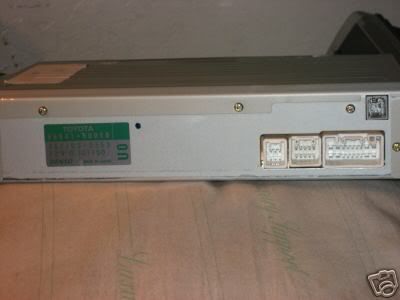
Gen3 part#86841-33060

Gen4 part#86841-50090
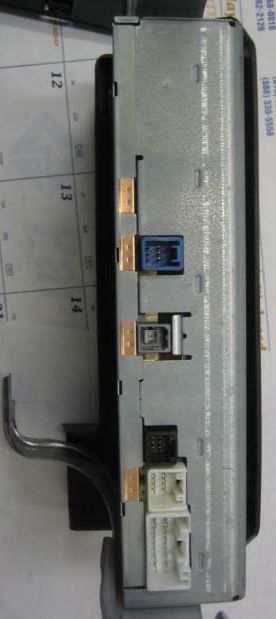
You can install gen4 computer in your 02 for sure.
Just remenber to get dvd map disc for gen4, your old gen 2/3 dvd won't work in gen4 computer.
If you also want to have voice command and bluetooth, You need to upgrade the head unit and get the adapter kits as well.
PM lexusaudio for details. He is an expert in Lexus navigation/audio stuffs.
If you want to get Gen3, then you can still keep your old dvd map disc.
FYI, a microphone can be added to gen3 computer for voice commands even though it did not come that way from 03 to 04.
The 03-04 JDM soarer has voice command nav from Toyota. I think Jasonj has mentioned it before.
I didn't get the mic kit from lexusaudio because I knew I had no use of it.
Your 02 only uses 3 of the connectors on the back of the nav computer.
Gen2 part#86841-50010
Gen3 part#86841-33060
Gen4 part#86841-50090
Trending Topics

I already told you whom you should ask for the info.
I didn't install that mic kit, so I am not able to share the experience with you.
However, I did install a gen3 and a gen4 plus went through a lot of craps without help.
I have done my homework and that is why I am so confident to BS here. haha
Please do come back and post pics and instructions after you finish it.
I didn't install that mic kit, so I am not able to share the experience with you.
However, I did install a gen3 and a gen4 plus went through a lot of craps without help.
I have done my homework and that is why I am so confident to BS here. haha
Please do come back and post pics and instructions after you finish it.
Thread Starter
Lexus Test Driver
Joined: Jun 2001
Posts: 1,580
Likes: 19
From: California
 Hey Talwang, thanks for the great info and pictures. If my navi ecu is indeed going bad, then I'd say it's a blessing in disguise because a gen4 upgrade is going to be a nice mod after all The ability to see silhouette of buildings is a huge, definite plus for me. Woo-hooh! I can't wait for my gen2 to totally self-destruct
I could get one now- it is a gen4 with part number 86841-0E010. I researched this and it replaced the gen 4 86841-50090. In other words, later models of gen 4 cars were using the 86841-0E010. Do you think it will plug'n'play with my gen 2 system?
Hey, thanks again!
I am not sure about 86841-0E010.
You should pm lexusaudio to comfirm before you buy.
I bought an used nav gen3 unit from lexusaudio and he gave me an unbeatable two year warranty.
My friend bought a used gen4 from junkyard with only 30 day warranty.
Lexus dealers only give you one year warranty.
You should pm lexusaudio to comfirm before you buy.
I bought an used nav gen3 unit from lexusaudio and he gave me an unbeatable two year warranty.
My friend bought a used gen4 from junkyard with only 30 day warranty.
Lexus dealers only give you one year warranty.

Pit Crew
Joined: Dec 2007
Posts: 102
Likes: 0
From: WA
Um...what are the benefits of the Gen4 over Gen2/3? Shaded buildings? I hadn't seen that mentioned before...what I saw was more detail, more memory for POI, faster, and voice / bluetooth integration.
I wonder...would upgrading to Gen4 allow you to use LockPick?
I wonder...would upgrading to Gen4 allow you to use LockPick?
