


iPhone call volume issues using CarPlay


Thread Starter
Instructor


Joined: Feb 2020
Posts: 794
Likes: 581
From: CT
 iPhone call volume issues using CarPlay
Not sure if anyone else has been having this issue but until today I was having very annoying issue with iPhone volume when I would call or receive a call on my iPhone connected to CarPlay.
I could hear the other caller but they could not hear me. After some research it looks like the update to iOS 18 was causing problems for some Toyota/Lexus owners. I have a 2020 RX with a wired connection to CarPlay. My BT phone connections are fine, and everything else was working perfectly....just other people hearing my call with CarPlay.
I searched this forum and everywhere else and found others with the problem, but no solutions. Finally I found someone on a CarPlay FB group with the solution.
Apparently I still had an older version of the head unit software. I was able to visit the Lexus website and find the updated software (free). Download to a stick and then installed it into my vehicle with the USB in the center box. After about 10 minutes of download, and a restart to the system, all is good.
I don't bring my vehicle to a Lexus dealership for service, and not sure if they would update automatically anyway, so that may have made the solution not obvious to me.
Anyway. Just letting others know in case anyone else has the same issue.
Love my RX and using CarPlay.
I could hear the other caller but they could not hear me. After some research it looks like the update to iOS 18 was causing problems for some Toyota/Lexus owners. I have a 2020 RX with a wired connection to CarPlay. My BT phone connections are fine, and everything else was working perfectly....just other people hearing my call with CarPlay.
I searched this forum and everywhere else and found others with the problem, but no solutions. Finally I found someone on a CarPlay FB group with the solution.
Apparently I still had an older version of the head unit software. I was able to visit the Lexus website and find the updated software (free). Download to a stick and then installed it into my vehicle with the USB in the center box. After about 10 minutes of download, and a restart to the system, all is good.
I don't bring my vehicle to a Lexus dealership for service, and not sure if they would update automatically anyway, so that may have made the solution not obvious to me.
Anyway. Just letting others know in case anyone else has the same issue.
Love my RX and using CarPlay.
Last edited by Quantum501; Dec 17, 2025 at 10:38 AM.


Advanced


Joined: Apr 2015
Posts: 585
Likes: 89
From: NJ
You can manually install or automatically get updates added to your vehicle OTA. This is for vehicles with Nav and no it does not include map updates. There is a setting that will turn on auto updates.
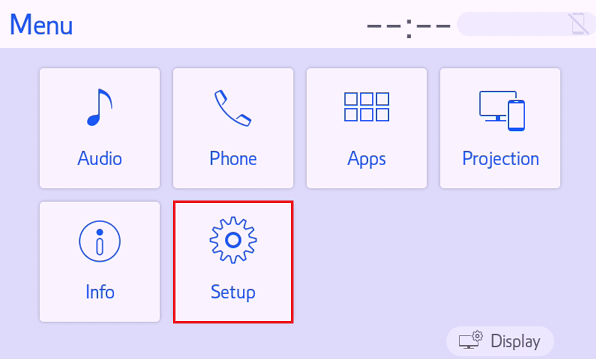
- With the vehicle audio multimedia unit powered on, press the MENU hard button beside the screen / touchpad.
*Some models will not have a Menu button, in this case press HOME - Once the Menu screen is displayed, select SETUP or SETTINGS depending on your multimedia screen.
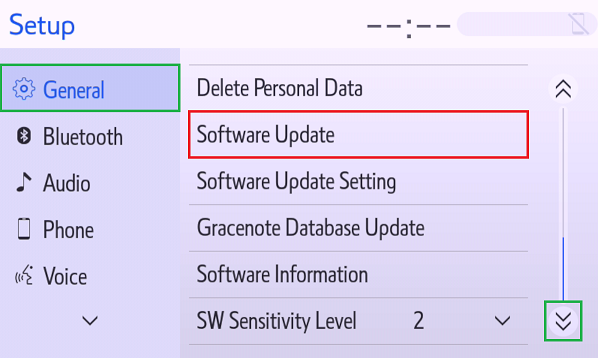
- Select GENERAL, and scroll down until Software Update is visible. Click on SOFTWARE UPDATE.
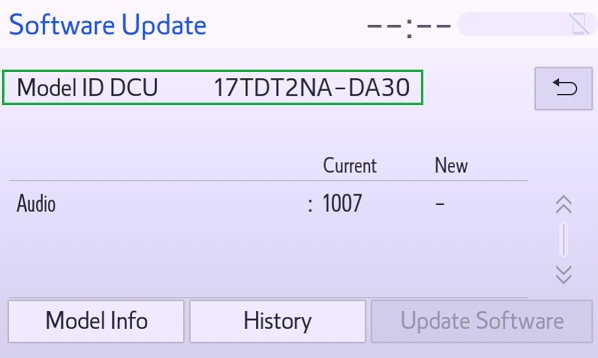
- On the Software Update screen, the Infotainment MODEL ID (DCU) will be visible.
*Some vehicles will have a Multimedia / Navigation (DCM) Model.
Thread Starter
Instructor
Joined: Feb 2020
Posts: 794
Likes: 581
From: CT
In my particular case I do not have Navi, so I had to go manual mode. Same menu to see which version of the software is installed and what is on the Lexus site.
As mentioned in the maps thread, I actually prefer Google Maps to native nav systems, but obviously the update method needs to be manual.
Great information if others are having the same issue but have Navi.

Driver
Joined: Sep 2023
Posts: 60
Likes: 6
From: CA
You can manually install or automatically get updates added to your vehicle OTA. This is for vehicles with Nav and no it does not include map updates. There is a setting that will turn on auto updates.
- With the vehicle audio multimedia unit powered on, press the MENU hard button beside the screen / touchpad.
*Some models will not have a Menu button, in this case press HOME - Once the Menu screen is displayed, select SETUP or SETTINGS depending on your multimedia screen.
- Select GENERAL, and scroll down until Software Update is visible. Click on SOFTWARE UPDATE.
- On the Software Update screen, the Infotainment MODEL ID (DCU) will be visible.
*Some vehicles will have a Multimedia / Navigation (DCM) Model.
How does it grab software updates online? Do you have to have to data service for your Lexus through AT&T?

Thread
Thread Starter
Forum
Replies
Last Post
TheThinker
NX - 2nd Gen (2022-current)
3
Jul 24, 2024 12:03 PM
hdans
RX - 3rd Gen (2010-2015)
5
Jul 10, 2014 01:39 PM