


LS 460 USB input

Pole Position


Joined: May 2008
Posts: 2,210
Likes: 348
From: Tennessee

Driver School Candidate
Joined: Jan 2016
Posts: 3
Likes: 0
From: New Mexico

it doesn't. Started with the 2010. I've been contemplating this: http://www.oemautosound.com/p-71-lex...3-isty651.aspx
i had something similar in my ls430 and it worked great.
i had something similar in my ls430 and it worked great.
Pole Position
Joined: May 2008
Posts: 2,210
Likes: 348
From: Tennessee
hey man, im glad to hear you found something to play usb thumb drives. I want to throw in a terabyte flash drive in with every song i got on it and jam out. But i was wondering if youre able to put music videos and movies and suck on this device you have. Im in a 2007 ls460. Let me know. Id appreciate it. Late posting apologies.

Lexus Test Driver
Joined: Jan 2017
Posts: 946
Likes: 139
From: TX
hey man, im glad to hear you found something to play usb thumb drives. I want to throw in a terabyte flash drive in with every song i got on it and jam out. But i was wondering if youre able to put music videos and movies and suck on this device you have. Im in a 2007 ls460. Let me know. Id appreciate it. Late posting apologies.
Gonna keep it in there for music I don't want taking up space on my phone but will likely be using BT more given that I can play FLAC files and truly enjoy the ML sound.

Racer
Joined: Apr 2016
Posts: 1,846
Likes: 117
From: Sacramento, CA


Lexus Test Driver
Joined: Jan 2017
Posts: 946
Likes: 139
From: TX
Racer
Joined: Apr 2016
Posts: 1,846
Likes: 117
From: Sacramento, CA
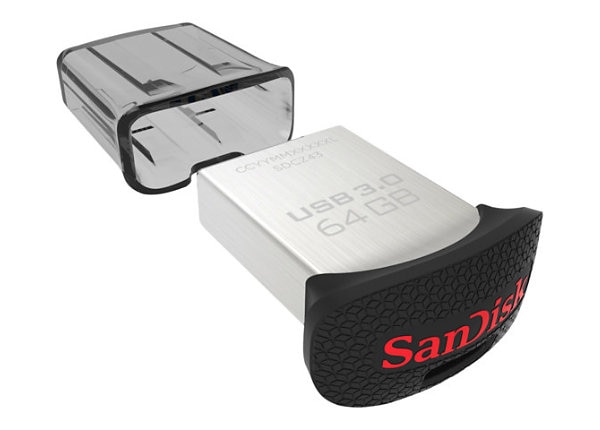
I have a 64Gb Sandisk Ultra USB drive with over 400 CDs on it ripped to MP3 at 320kbps (courtesy of my NAIM HDX) - that's over 4,000 songs. It takes about two minutes after turning on the ignition to register all the albums, artists and songs but after that it's not too bad. The more songs you have on there, the slower it gets!
Last edited by FatherTo1; Jun 30, 2017 at 01:45 PM.
ClubLexus Stories
Celebrating Lexus & Toyota from Around the Globe

Lexus NX 350h: A Fuel-Sipping Secret Hot Hatch???
Michael S. Palmer
5 Best & 5 Worst Lexus Daily Drivers
Joe Kucinski
Top 5 Hottest Lexus & Toyotas in 2026 (Hardest To Buy)
Brett Foote
2026 Lexus IS 350 F Sport Review: The Last of Its Kind Still Rocks
Michael S. Palmer
Top 10 Most Confusing Things Lexus Has Ever Done!
Joe Kucinski
2026 Lexus ES Review: Lexus Re-Embraces Founding Principles
Michael S. Palmer
10 Lexus Bargains That are Cheaper Than a New Toyota RAV4
Joe Kucinski
8 Weirdest Things Lexus Has Ever Built
Verdad Gallardo
10 Lexus Designs That Have Aged Like Fine Wine
Verdad Gallardo
I used one of the free web programs to format the the 64Gb drive in FAT format. Seems to work just fine. Unfortunately, the Lexus system won't play WAV files (tried it) so that's why I had to use MP3. I do hear a slight difference between CD and MP3, but since I'm over 65, I think I'm probably hearing a placebo effect(?!)

Racer


Joined: Apr 2002
Posts: 1,668
Likes: 212
From: Someplace in CT
Wish I could have this in my 2007 LS460L... It would be so much easier to bring music into my car...
I wonder if I could swap the ML head unit from a 2010, pull off the wood grain off my 2007, put it on there and drop this into the car., wire a USB cable in center console and I could have it...
sigh... anyone attempt this ?
I wonder if I could swap the ML head unit from a 2010, pull off the wood grain off my 2007, put it on there and drop this into the car., wire a USB cable in center console and I could have it...
sigh... anyone attempt this ?
Don't know if this is possible. You might just want to find a high end car stereo place to install one of the aftermarket adapters. I don't know anyone in CT but I'm sure you could find one. If not, there's Rich Inferra's CarTunes in Boston - try calling him - his reputation is one of the best in the business.

Intermediate
Joined: Mar 2006
Posts: 257
Likes: 42
From: CA
Wish I could have this in my 2007 LS460L... It would be so much easier to bring music into my car...
I wonder if I could swap the ML head unit from a 2010, pull off the wood grain off my 2007, put it on there and drop this into the car., wire a USB cable in center console and I could have it...
sigh... anyone attempt this ?
I wonder if I could swap the ML head unit from a 2010, pull off the wood grain off my 2007, put it on there and drop this into the car., wire a USB cable in center console and I could have it...
sigh... anyone attempt this ?
Don't bother. Order one of these:
http://www.vaistech.com/product-category/usb-aux-input/
It will come up as an additional CD Mp3 changer in the source list. I've had it in my 600h for the last three years and an earlier version in my LS430 for over 10 years. I have a couple old iPods that I just leave in the car but it supports mp3, wav files etc.
I tucked it between the carpet and the central transmission tunnel near the passenger seat; then ran the wires into the space under the center console.
You can swap the factory connector in the center console box for the later version with the USB / Aux input. You have to do some surgery on the usb extension cable that comes with the unit but it will fit. Wiring in the aux input was a bit of a challenge.
I put some details here:
https://www.clublexus.com/forums/ls-...ml#post9186242
It's pretty much bulletproof; I don't really care to do media management outside of iTunes but in theory a usb drive (or another USB android phone) would work.
I still have the CD changer (and the 1 dvd player in the back) so nothing's lost. The RSES won't see the additional source but I figure that's their problem.

Thread
Thread Starter
Forum
Replies
Last Post
andyville
Lexus Audio, Video, Security & Electronics
22
May 15, 2021 04:03 PM
DJWLDW
LS - 4th Gen (2007-2017)
19
Dec 13, 2015 01:04 PM
