


The stock SC stereo


 wav format works no problem.

Thread Starter
Pole Position
Joined: Feb 2008
Posts: 389
Likes: 0
From: Fl

wave format definitely is read by the factory 93 changer. when my changer was still connected it use to read burned cd's no problem. go to the folder that your music is in and click the "copy all items to audio cd." this will bring up the windows media player and you can burn the music that way.
good luck
good luck
5sp_jzz30,
I wanted to thank you for trying to help me with this. I followed your instructions and burned the CD. I put the CD in the CD cartridge this morning (with high hopes). Unfortunately I got the same "ERR" error on my screen. When I check the CD properties in Windows Explorer it tells me that the songs that I burned are CD audio tracks and not .WAV files. Have I done something wrong?
I've burned about 20 coasters so far without success. I wonder what I am doing wrong?
Thanks again ...
Last edited by lexdud; Jun 5, 2008 at 07:10 AM.

That's strange. I have a 93 SC with Pioneer system and I can play burned cd's in cd audio format in my changer without any issues. I am not sure if the cd has anything to do with it, but I am currently using Sony cdr's and burning with Nero. Nak's may just be more sensitive to burnt cds. I used to have a Nak cd45z (great h/u btw) on my old car and it would be sensitive to burnt cds as well. Maybe try using a quality cdr if you have not already.
Lately I have grown tired of burning cds so I am just using my Sansa clip mp3 player and a tape adapter.
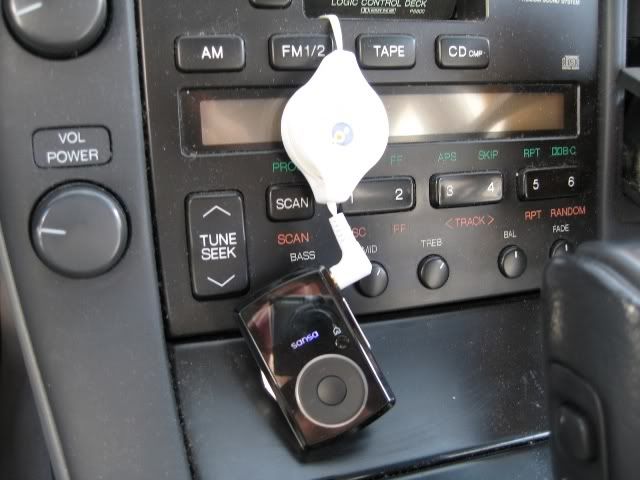
Lately I have grown tired of burning cds so I am just using my Sansa clip mp3 player and a tape adapter.
Thread Starter
Pole Position
Joined: Feb 2008
Posts: 389
Likes: 0
From: Fl
That's strange. I have a 93 SC with Pioneer system and I can play burned cd's in cd audio format in my changer without any issues. I am not sure if the cd has anything to do with it, but I am currently using Sony cdr's and burning with Nero. Nak's may just be more sensitive to burnt cds. I used to have a Nak cd45z (great h/u btw) on my old car and it would be sensitive to burnt cds as well. Maybe try using a quality cdr if you have not already.
Lately I have grown tired of burning cds so I am just using my Sansa clip mp3 player and a tape adapter.
Lately I have grown tired of burning cds so I am just using my Sansa clip mp3 player and a tape adapter.
Great minds think alike, I guess. I too am currently using an MP3 player with cassette adapter. It's functional but ugly. I am also using Sony CD-Rs to burn. My question is when you use Windows Explorer to view what is on the burnt CD ... what does it show? Are there CD Audio tracks or .WAV files?
When I use windows explorer I see "Audio CD" on my drive and cd tracks. More specifically they are winamp media files probably because I set them to be associated that way so your computer may show different. What program are you using to burn?
Thread Starter
Pole Position
Joined: Feb 2008
Posts: 389
Likes: 0
From: Fl
I used Windows Media Player and I too see "Audio CD" and CD tracks within Win Explorer. No matter what I try I get that damn "ERR" on my screen. SC, you've given me an idea. I'll try Winamp later this evening and give it a try.
... At least I can still use my MP3 player through the cassette deck (as ugly as it is).
I am actually using Roxio to burn and not winamp. Have you messed around with the windows media player settings? If you go to Tools > Options > Rip Music, you can adjust what format to rip. I would say using "Windows Media Audio Lossless" is probably best cd quality. I am using WMP 11 by the way.
Good luck with it!
Good luck with it!

Driver School Candidate
Joined: Jun 2008
Posts: 49
Likes: 0
From: Florida
Buy an aftermarket CD changer that will play MP3 and any audio format you want. Keep the factory HU and its still stock. I can play WAV's with no problems most of the time but every once and a while while changing tracks I get an ERR. Its just because the CD changers in the cars werent made to support Burnt CD's. Plus they are 15 years old, what do you expect?

Thread
Thread Starter
Forum
Replies
Last Post
PB430
Lexus Audio, Video, Security & Electronics
5
Dec 12, 2003 09:02 PM
