


Official Hijack your Rear Camera Input HOW TO DIY!!!


Thread Starter
Driver School Candidate
Joined: Nov 2006
Posts: 34
Likes: 0
From: Texas
 Official Hijack your Rear Camera Input HOW TO DIY!!!
OK Since some of you asked for this. I am going to start a new thread about this. I will try and make it as simple as possible.
1.) First take out your navigation unit. There is a great write up on this located on this thread.
https://www.clublexus.com/forums/sho...d.php?t=193739
2.) Next, you need to do the rear camera manual activation hack. There is a awesome how to on this thread and also a diagram that Lexellent provided.
https://www.clublexus.com/forums/sho...7&postcount=28
3.) Once that is complete...we can move on to intercept the camera input.
First lets look at the back of the nav unit and find the J51 connector, as that is the one that we will use. (Photo by Sam_IS, pilfered from another thread)

Once you locate this plug...you will need to locate two wires.
White on pin#14
Red on pin#27
The red wire is the signal wire from the camera and the white wire is the signal ground from the camera.
Thinking really simply...if the camera had an rca connector, the red would be the inside large pin and the white would be the surrounding outside.
Refer to the diagram on how to cut and connect the new wires.
http://www.geocities.com/steve-pak@s..._Intercept.pdf
Hope this works for you folks...as it worked for me.
By the way the audio can be inputed through the AUX under the arm rest.
Here are some vids of the hack working
http://www.geocities.com/steve-pak@s.../rca-is250.asf
http://www.geocities.com/steve-pak@s.../is-moving.avi
http://www.geocities.com/steve-pak@s...test-video.avi
Copy the video links and paste it into your address bar and then you should be able to download them.
1.) First take out your navigation unit. There is a great write up on this located on this thread.
https://www.clublexus.com/forums/sho...d.php?t=193739
2.) Next, you need to do the rear camera manual activation hack. There is a awesome how to on this thread and also a diagram that Lexellent provided.
https://www.clublexus.com/forums/sho...7&postcount=28
3.) Once that is complete...we can move on to intercept the camera input.
First lets look at the back of the nav unit and find the J51 connector, as that is the one that we will use. (Photo by Sam_IS, pilfered from another thread)
Once you locate this plug...you will need to locate two wires.
White on pin#14
Red on pin#27
The red wire is the signal wire from the camera and the white wire is the signal ground from the camera.
Thinking really simply...if the camera had an rca connector, the red would be the inside large pin and the white would be the surrounding outside.
Refer to the diagram on how to cut and connect the new wires.
http://www.geocities.com/steve-pak@s..._Intercept.pdf
Hope this works for you folks...as it worked for me.
By the way the audio can be inputed through the AUX under the arm rest.
Here are some vids of the hack working
http://www.geocities.com/steve-pak@s.../rca-is250.asf
http://www.geocities.com/steve-pak@s.../is-moving.avi
http://www.geocities.com/steve-pak@s...test-video.avi
Copy the video links and paste it into your address bar and then you should be able to download them.
Last edited by sepukku; Sep 20, 2008 at 11:58 AM.

Lexus Test Driver
Joined: Jul 2006
Posts: 960
Likes: 2
From: San Diego, CA
thanks! but can you give the short and sweet version for us ML owners that just wanna be able to use the backup camera anytime? (w/no aftermarket video system) ooh and items to buy would be great, if possible. i'm not to electrical savvy, so i'm pretty clueless about wiring. i'm gonna have a friend do it for me. i just need to give a list of materials and simple instructions.
Thread Starter
Driver School Candidate
Joined: Nov 2006
Posts: 34
Likes: 0
From: Texas

Rookie
Joined: Oct 2006
Posts: 54
Likes: 0
From: Paris


Rookie
Joined: Jun 2006
Posts: 72
Likes: 0
From: NJ
Anyone know which wires are for the Video and Audio if we have ML
If I can figure that out... I can just tap that instead of the backup camera.
To activate the video I can probably just play a DVD , but have the video source tap to something else.
then I can avoid the "Check Surrounding" message
If I can figure that out... I can just tap that instead of the backup camera.
To activate the video I can probably just play a DVD , but have the video source tap to something else.
then I can avoid the "Check Surrounding" message
Thread Starter
Driver School Candidate
Joined: Nov 2006
Posts: 34
Likes: 0
From: Texas
Anyone know which wires are for the Video and Audio if we have ML
If I can figure that out... I can just tap that instead of the backup camera.
To activate the video I can probably just play a DVD , but have the video source tap to something else.
then I can avoid the "Check Surrounding" message
If I can figure that out... I can just tap that instead of the backup camera.
To activate the video I can probably just play a DVD , but have the video source tap to something else.
then I can avoid the "Check Surrounding" message
if you have the ML version you need to tap into the J52 connector.
that is the blue connector right next to the J51 connector.
check here
https://www.clublexus.com/forums/sho...32&postcount=6
Last edited by sepukku; Nov 30, 2006 at 12:13 PM.
Trending Topics
Rookie
Joined: Jun 2006
Posts: 72
Likes: 0
From: NJ
sepukku,
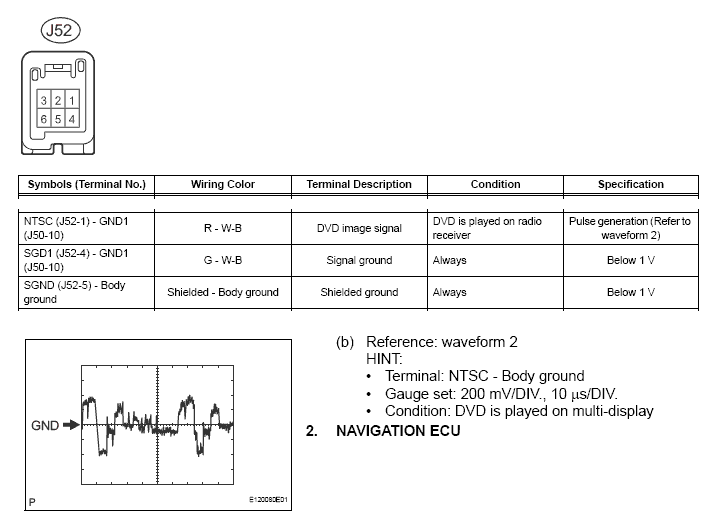
Thanks for the link. Two Quick follow up questions.
There's 3 pins. # 1, 4, 5
Am I correct to assume that If I had an RCA connector, pin #1 would be connected to the inside large pin and Pin #4 would be connected to the surrounding outside?
What do I do with the Third Pin # 5?
Am I correct to assume that I would still need to tap the Aux for the audio?
Thanks for you help !
Thanks for the link. Two Quick follow up questions.
There's 3 pins. # 1, 4, 5
Am I correct to assume that If I had an RCA connector, pin #1 would be connected to the inside large pin and Pin #4 would be connected to the surrounding outside?
What do I do with the Third Pin # 5?
Am I correct to assume that I would still need to tap the Aux for the audio?
Thanks for you help !
Thread Starter
Driver School Candidate
Joined: Nov 2006
Posts: 34
Likes: 0
From: Texas
your pin assignments are correct.
but i do not know if you can use the aux when you are in the dvd mode.
that you will just have to try..
i don't see why it wouldn't work though..
otherwise if it does not then you will have to tap into the dvd audio pin on
the receiver or amp connector.
the receiver connector is s1 and the pin number is 1
the amp connector for the dvd audio is t1 pin1
but i do not know what type of audio input this is ..weather it is a digital or analog audio signal...
i would assume this is a digital signal (ac3 or pcm) since the dvd is supposed to use 5.1
but i do not know if you can use the aux when you are in the dvd mode.
that you will just have to try..
i don't see why it wouldn't work though..
otherwise if it does not then you will have to tap into the dvd audio pin on
the receiver or amp connector.
the receiver connector is s1 and the pin number is 1
the amp connector for the dvd audio is t1 pin1
but i do not know what type of audio input this is ..weather it is a digital or analog audio signal...
i would assume this is a digital signal (ac3 or pcm) since the dvd is supposed to use 5.1


Driver School Candidate
Joined: Dec 2006
Posts: 1
Likes: 0
From: CA
Additional info with DVD changer connector pinouts
Well, this is a page from the ISX50 ML DVD changer service manual.
It shows you what the back of the DVD changer looks like.
I've also done quite a bit of study to DIY an external video input, so here's how far I've come...
The bottom middle connector (8 pins) is where the DVD image signal is sent to the Display Monitor. Of course, it only uses pin#'s 7,5,3 only to send DVD image signal, as you can see in the repair manual. But if you look at the connector pin#'s 8,6,4,2 , they are not used, while they're described as "NTS1, GND1, SLD1", which hints that there's an extra output from this DVD changer.
THen where does the input come from?
If you look at the bottom left connector (it looks exactly same as the connector P52 on Display Monitor), it is used for the audio AUX in, unlike the Non-ML CD-changer.
What's more, since ISX50 provides audio AUX IN only, it just uses Pin#'s 2,3,5,6, leaving 1 & 2 out.
1 & 2 are described as "VV+ & VV-". This is reserved for some kind of external video input. So I did hook up an external video source to it, but nothing happend.
From reading your threads and replies, I've come to one possible conculsion.
Yes, the back-up camera hijack works but you know it's still a hack.
What I need to figure out is how to trigger the AVC-LAN so that it opens up the monitor for external composite video connection.
Sorry I'm not an electro wiz, so maybe someone can read the schematics on this DVD-changer manual and find a solution for it.
If you guys want it i can scan the DVD changer service manual and upload it.
I'm sure it does have enough resource to get this thing going!
ciao for now
It shows you what the back of the DVD changer looks like.
I've also done quite a bit of study to DIY an external video input, so here's how far I've come...
The bottom middle connector (8 pins) is where the DVD image signal is sent to the Display Monitor. Of course, it only uses pin#'s 7,5,3 only to send DVD image signal, as you can see in the repair manual. But if you look at the connector pin#'s 8,6,4,2 , they are not used, while they're described as "NTS1, GND1, SLD1", which hints that there's an extra output from this DVD changer.
THen where does the input come from?
If you look at the bottom left connector (it looks exactly same as the connector P52 on Display Monitor), it is used for the audio AUX in, unlike the Non-ML CD-changer.
What's more, since ISX50 provides audio AUX IN only, it just uses Pin#'s 2,3,5,6, leaving 1 & 2 out.
1 & 2 are described as "VV+ & VV-". This is reserved for some kind of external video input. So I did hook up an external video source to it, but nothing happend.
From reading your threads and replies, I've come to one possible conculsion.
Yes, the back-up camera hijack works but you know it's still a hack.
What I need to figure out is how to trigger the AVC-LAN so that it opens up the monitor for external composite video connection.
Sorry I'm not an electro wiz, so maybe someone can read the schematics on this DVD-changer manual and find a solution for it.
If you guys want it i can scan the DVD changer service manual and upload it.
I'm sure it does have enough resource to get this thing going!
ciao for now


