


FIX: iPhone iOS Bluetooth & Dock Connectivity issues Music Streaming


Thread Starter
Rookie
Joined: Sep 2008
Posts: 85
Likes: 0
From: California
 FIX: iPhone iOS Bluetooth & Dock Connectivity issues Music Streaming
Problem:
ios 5 + car + dock + bt = problem
I've identified it to be a iPhone iOS7+ related issues more so than the car's navi itself.
Cars I've tried:
-2010 Nissan 370z Sport Touring package w/ Navi
-2010 Toyota Prius w/ Nav
-2014 Lexus IS350 F-Sport and both of these cars have the same problem.
My 370z & Prius have been connecting with bluetooth (for audio) and thru its USB docking cable for charging and it's been working perfect for me since 2010.
Ever since I upgrade my iPhone 4s to iOS 7 (Now I have a iPhone 5s) it's been really buggy with not connecting to the phone. Like if I'm on the Bluetooth channel on my audio system, the iPhone would still be sending thru its audio thru the Docking USB cable.
One might ask, "why would I still want to use Bluetooth for Audio"? Well, iPhone APPS like Spotify, Pandora don't work with most car's audio system when you connect it thru the car's iPhone USB port. Especially with my 2014 Lexus IS350's Lexus Enform (iHeartRadio, Pandora, etc) Issue is very apparent.
Solution:
-A simple solution would be to not connect your iPhone to the car's USB port rather an external USB charger to charger your phone if you are to stream music.
-If you like to deal with the B.S. then you can still plug it in, but you'll have to play around with iPhone's airplay audio output setting.
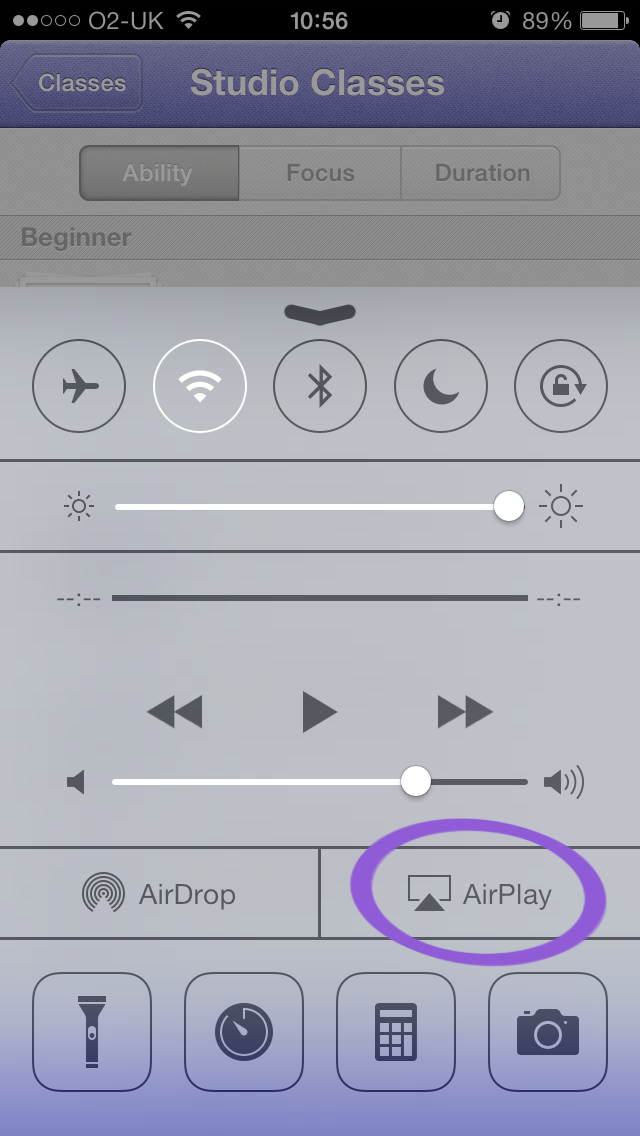
But I hate doing this because sometimes this just does not work and it's frustrating. I would flip through the Audio source on my car's radio and the car's audio becomes buggy and would play my iPhone music via Bluetooth when it's in my Nissan's Built in "Jukebox" or "Radio" source mode. Sometimes the Bluetooth just won't work until you turn off the car/iphone. It's really lame if you got in your car and started going on the freeway for a 1hr drive in traffic to work and need to turn off your car to fix this just so you can listen to your iphone. (Note: Sometimes turning off the car won't do the trick, and also this connectivity issue could arise anytime in the middle of the song)
-Last solution that i'm excited to try out. There is an app in the app store called A2DPblocker that can help you with a temporary fix. The app "blocks the Bluetooth Stereo Profile (A2DP - Advanced Audio Distribution Profile) from connecting on a Bluetooth enabled iOS device without completely disabling the Bluetooth hardware, which enables the iOS device to continue to perform other Bluetooth functions like make calls over Bluetooth and wirelessly control the iPod with a paired AVRCP enabled Bluetooth accessory."
Check these links out:
AnswersQi Solution
ios 5 + car + dock + bt = problem
Please chime in if you guys have better ways to resolve this. Happy Holidays!
ios 5 + car + dock + bt = problem
I've identified it to be a iPhone iOS7+ related issues more so than the car's navi itself.
Cars I've tried:
-2010 Nissan 370z Sport Touring package w/ Navi
-2010 Toyota Prius w/ Nav
-2014 Lexus IS350 F-Sport and both of these cars have the same problem.
My 370z & Prius have been connecting with bluetooth (for audio) and thru its USB docking cable for charging and it's been working perfect for me since 2010.
Ever since I upgrade my iPhone 4s to iOS 7 (Now I have a iPhone 5s) it's been really buggy with not connecting to the phone. Like if I'm on the Bluetooth channel on my audio system, the iPhone would still be sending thru its audio thru the Docking USB cable.
One might ask, "why would I still want to use Bluetooth for Audio"? Well, iPhone APPS like Spotify, Pandora don't work with most car's audio system when you connect it thru the car's iPhone USB port. Especially with my 2014 Lexus IS350's Lexus Enform (iHeartRadio, Pandora, etc) Issue is very apparent.
Solution:
-A simple solution would be to not connect your iPhone to the car's USB port rather an external USB charger to charger your phone if you are to stream music.
-If you like to deal with the B.S. then you can still plug it in, but you'll have to play around with iPhone's airplay audio output setting.
But I hate doing this because sometimes this just does not work and it's frustrating. I would flip through the Audio source on my car's radio and the car's audio becomes buggy and would play my iPhone music via Bluetooth when it's in my Nissan's Built in "Jukebox" or "Radio" source mode. Sometimes the Bluetooth just won't work until you turn off the car/iphone. It's really lame if you got in your car and started going on the freeway for a 1hr drive in traffic to work and need to turn off your car to fix this just so you can listen to your iphone. (Note: Sometimes turning off the car won't do the trick, and also this connectivity issue could arise anytime in the middle of the song)
-Last solution that i'm excited to try out. There is an app in the app store called A2DPblocker that can help you with a temporary fix. The app "blocks the Bluetooth Stereo Profile (A2DP - Advanced Audio Distribution Profile) from connecting on a Bluetooth enabled iOS device without completely disabling the Bluetooth hardware, which enables the iOS device to continue to perform other Bluetooth functions like make calls over Bluetooth and wirelessly control the iPod with a paired AVRCP enabled Bluetooth accessory."
Check these links out:
AnswersQi Solution
ios 5 + car + dock + bt = problem
Please chime in if you guys have better ways to resolve this. Happy Holidays!

Rookie
Joined: Dec 2013
Posts: 99
Likes: 0
From: CA
Thanks for this. I've resorted to putting all my music on a USB stick because this issue is so annoying. Definitely curious to see if this works.
Problem:
ios 5 + car + dock + bt = problem
I've identified it to be a iPhone iOS7+ related issues more so than the car's navi itself.
Cars I've tried:
-2010 Nissan 370z Sport Touring package w/ Navi
-2010 Toyota Prius w/ Nav
-2014 Lexus IS350 F-Sport and both of these cars have the same problem.
My 370z & Prius have been connecting with bluetooth (for audio) and thru its USB docking cable for charging and it's been working perfect for me since 2010.
Ever since I upgrade my iPhone 4s to iOS 7 (Now I have a iPhone 5s) it's been really buggy with not connecting to the phone. Like if I'm on the Bluetooth channel on my audio system, the iPhone would still be sending thru its audio thru the Docking USB cable.
One might ask, "why would I still want to use Bluetooth for Audio"? Well, iPhone APPS like Spotify, Pandora don't work with most car's audio system when you connect it thru the car's iPhone USB port. Especially with my 2014 Lexus IS350's Lexus Enform (iHeartRadio, Pandora, etc) Issue is very apparent.
Solution:
-A simple solution would be to not connect your iPhone to the car's USB port rather an external USB charger to charger your phone if you are to stream music.
-If you like to deal with the B.S. then you can still plug it in, but you'll have to play around with iPhone's airplay audio output setting.
But I hate doing this because sometimes this just does not work and it's frustrating. I would flip through the Audio source on my car's radio and the car's audio becomes buggy and would play my iPhone music via Bluetooth when it's in my Nissan's Built in "Jukebox" or "Radio" source mode. Sometimes the Bluetooth just won't work until you turn off the car/iphone. It's really lame if you got in your car and started going on the freeway for a 1hr drive in traffic to work and need to turn off your car to fix this just so you can listen to your iphone. (Note: Sometimes turning off the car won't do the trick, and also this connectivity issue could arise anytime in the middle of the song)
-Last solution that i'm excited to try out. There is an app in the app store called A2DPblocker that can help you with a temporary fix. The app "blocks the Bluetooth Stereo Profile (A2DP - Advanced Audio Distribution Profile) from connecting on a Bluetooth enabled iOS device without completely disabling the Bluetooth hardware, which enables the iOS device to continue to perform other Bluetooth functions like make calls over Bluetooth and wirelessly control the iPod with a paired AVRCP enabled Bluetooth accessory."
Check these links out:
AnswersQi Solution
ios 5 + car + dock + bt = problem
Please chime in if you guys have better ways to resolve this. Happy Holidays!
ios 5 + car + dock + bt = problem
I've identified it to be a iPhone iOS7+ related issues more so than the car's navi itself.
Cars I've tried:
-2010 Nissan 370z Sport Touring package w/ Navi
-2010 Toyota Prius w/ Nav
-2014 Lexus IS350 F-Sport and both of these cars have the same problem.
My 370z & Prius have been connecting with bluetooth (for audio) and thru its USB docking cable for charging and it's been working perfect for me since 2010.
Ever since I upgrade my iPhone 4s to iOS 7 (Now I have a iPhone 5s) it's been really buggy with not connecting to the phone. Like if I'm on the Bluetooth channel on my audio system, the iPhone would still be sending thru its audio thru the Docking USB cable.
One might ask, "why would I still want to use Bluetooth for Audio"? Well, iPhone APPS like Spotify, Pandora don't work with most car's audio system when you connect it thru the car's iPhone USB port. Especially with my 2014 Lexus IS350's Lexus Enform (iHeartRadio, Pandora, etc) Issue is very apparent.
Solution:
-A simple solution would be to not connect your iPhone to the car's USB port rather an external USB charger to charger your phone if you are to stream music.
-If you like to deal with the B.S. then you can still plug it in, but you'll have to play around with iPhone's airplay audio output setting.
But I hate doing this because sometimes this just does not work and it's frustrating. I would flip through the Audio source on my car's radio and the car's audio becomes buggy and would play my iPhone music via Bluetooth when it's in my Nissan's Built in "Jukebox" or "Radio" source mode. Sometimes the Bluetooth just won't work until you turn off the car/iphone. It's really lame if you got in your car and started going on the freeway for a 1hr drive in traffic to work and need to turn off your car to fix this just so you can listen to your iphone. (Note: Sometimes turning off the car won't do the trick, and also this connectivity issue could arise anytime in the middle of the song)
-Last solution that i'm excited to try out. There is an app in the app store called A2DPblocker that can help you with a temporary fix. The app "blocks the Bluetooth Stereo Profile (A2DP - Advanced Audio Distribution Profile) from connecting on a Bluetooth enabled iOS device without completely disabling the Bluetooth hardware, which enables the iOS device to continue to perform other Bluetooth functions like make calls over Bluetooth and wirelessly control the iPod with a paired AVRCP enabled Bluetooth accessory."
Check these links out:
AnswersQi Solution
ios 5 + car + dock + bt = problem
Please chime in if you guys have better ways to resolve this. Happy Holidays!

Thread
Thread Starter
Forum
Replies
Last Post
bdar
ES - 1st to 6th Gen (1990-2018)
6
Nov 5, 2010 10:32 AM
YotaCarFan
Lexus Audio, Video, Security & Electronics
3
Jul 6, 2010 01:33 AM
