Notices
IS - 2nd Gen (2006-2013) Discussion about the 2006+ model IS models

Is the new updated map disk has text to speech?

Thread Tools
 
Search this Thread
 
Old Jun 5, 2012 | 09:16 PM
  #1  
ohiois350's Avatar
ohiois350
Thread Starter
Pole Position
15 Year Member
Photogenic
Photoriffic
Liked
iTrader: (13)
 
Joined: Nov 2008
Posts: 2,406
Likes: 67
From: Ohio
Default Is the new updated map disk has text to speech?

Hi, i just wonder is the new updated map disk would have the text speech turn to turn direction? Or is it new for the newer Is? Mine is 07 but have the 10.1 version map upgraded, it didnt tell the street name, it just say turn left ahead? Not like my new LX 570 the nav say street name just like my garmin hiiii, i just wonder is the newer updated map does the same?
Reply
Old Jun 5, 2012 | 09:47 PM
  #2  
Kurtz's Avatar
Kurtz
Lexus Fanatic
iTrader: (1)
 
Joined: Aug 2007
Posts: 7,810
Likes: 14
From: NC
Default

Originally Posted by ohiois350
Hi, i just wonder is the new updated map disk would have the text speech turn to turn direction? Or is it new for the newer Is? Mine is 07 but have the 10.1 version map upgraded, it didnt tell the street name, it just say turn left ahead? Not like my new LX 570 the nav say street name just like my garmin hiiii, i just wonder is the newer updated map does the same?
far as I know you get nothing with updated discs other than newer maps.

(plus the I agree button goes away on its own if you're upgrading from a really old version)
Reply
Old Jun 6, 2012 | 04:10 AM
  #3  
Bichon's Avatar
Bichon
CL Community Team
20 Year Member
Liked
Loved
Community Favorite
 
Joined: Dec 2005
Posts: 5,707
Likes: 342
From: NJ
Default

Kurtz is correct; with the exception of removing the need to acknowledge the disclaimer screen, there have been no changes to features or functionality between map discs.
Reply
Old Jun 6, 2012 | 05:12 AM
  #4  
ydnandy's Avatar
ydnandy
Pole Position
 
Joined: Jan 2012
Posts: 264
Likes: 0
From: NC
Default

Here is a pdf that details the map updates between 10.1 and 11.1:

http://lexusnavigation.com/pdf_docs/...2011144147.pdf
Reply
Old Jun 6, 2012 | 05:15 AM
  #5  
ohiois350's Avatar
ohiois350
Thread Starter
Pole Position
15 Year Member
Photogenic
Photoriffic
Liked
iTrader: (13)
 
Joined: Nov 2008
Posts: 2,406
Likes: 67
From: Ohio
Default

Thanks guys, it kinda suck for the 5 gen nav system, i wonder is it different with the 6 gen on the newer IS? Do they tell the street name on the 6 gen nav system? On my new LX570 it tell turn by turn with street name too
Reply
Old Jun 6, 2012 | 06:02 AM
  #6  
ydnandy's Avatar
ydnandy
Pole Position
 
Joined: Jan 2012
Posts: 264
Likes: 0
From: NC
Default

I believe 2010 and newer (all models) is gen 6 navigation

http://lexusnavigation.com/what_to_order.php
Reply
Old Jun 6, 2012 | 06:27 AM
  #7  
Hondadna4's Avatar
Hondadna4
Rookie
iTrader: (2)
 
Joined: May 2012
Posts: 88
Likes: 0
From: MA
Default

no with the updated navi disc you wont need to press the accept button any longer when starting the car up???
Reply
Old Jun 6, 2012 | 06:35 AM
  #8  
ydnandy's Avatar
ydnandy
Pole Position
 
Joined: Jan 2012
Posts: 264
Likes: 0
From: NC
Default

Originally Posted by Hondadna4
no with the updated navi disc you wont need to press the accept button any longer when starting the car up???
Correct, the "I Accept" button is no longer required with the newest nav disc
Reply
Old Jun 6, 2012 | 01:58 PM
  #9  
4wheelin's Avatar
4wheelin
Rookie
 
Joined: May 2012
Posts: 63
Likes: 0
From: OK
Default

Ohio, go ahead and buy the 11.1 and I'll buy your 10.1 for $60, that means you will only need to spend $90 and you'll have the latest and greatest!
Reply
Old Jun 6, 2012 | 03:46 PM
  #10  
TimboIS's Avatar
TimboIS
Liquid Bra Champion
 
Joined: Aug 2005
Posts: 2,831
Likes: 145
From: ƒ(x)
Default

Does updating the nav with a new disc change the interface at all (colors, buttons, etc)? I really hate the look of the new UI on the Lexus display, and want to preserve the dark look on my '06.
Reply
Old Jun 6, 2012 | 04:26 PM
  #11  
ydnandy's Avatar
ydnandy
Pole Position
 
Joined: Jan 2012
Posts: 264
Likes: 0
From: NC
Default

TimboIS - I updated soon after I got my IS, so not sure what the old version looks like. If you let me know what you want a pic of, i'll go take one for you to reference.
Reply
Old Jun 6, 2012 | 05:03 PM
  #12  
TimboIS's Avatar
TimboIS
Liquid Bra Champion
 
Joined: Aug 2005
Posts: 2,831
Likes: 145
From: ƒ(x)
Default

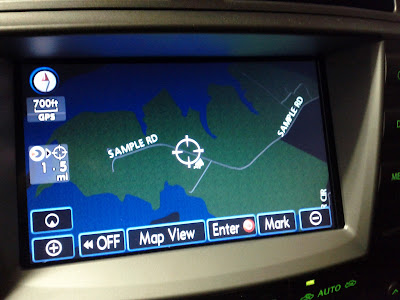
My nav looks like this (dark buttons)...


The new systems look like this (light buttons), fugly..


I want to be sure, that updating the nav DVD does NOT change the button style.
Reply
Old Jun 6, 2012 | 06:11 PM
  #13  
ydnandy's Avatar
ydnandy
Pole Position
 
Joined: Jan 2012
Posts: 264
Likes: 0
From: NC
Default

Dark buttons remain, here is a pic of the day time and night time views in version 11.1.


Reply
Old Jun 6, 2012 | 06:32 PM
  #14  
K3RRYB's Avatar
K3RRYB
Lead Lap
20 Year Member
iTrader: (7)
 
Joined: Nov 2003
Posts: 543
Likes: 1
From: California
Default

The update does not change the user interface. The new version NAV disc/usb ONLY updates information e.g. streets, fwy, poi,.
Reply
Old Jun 6, 2012 | 06:57 PM
  #15  
TimboIS's Avatar
TimboIS
Liquid Bra Champion
 
Joined: Aug 2005
Posts: 2,831
Likes: 145
From: ƒ(x)
Default

Originally Posted by ydnandy
Dark buttons remain, here is a pic of the day time and night time views in version 11.1.


Originally Posted by K3RRY
The update does not change the user interface. The new version NAV disc/usb ONLY updates information e.g. streets, fwy, poi,.
Thanks for the info guys. Makes me feel relieved.
Reply
Related Topics
Thread
Thread Starter
Forum
Replies
Last Post
Whippet
LX - 3rd Gen (2008-2021)
7
Jul 6, 2017 01:34 PM
rjmalm
RC F (2015-present)
3
Jan 4, 2016 07:49 AM
NXOwner
NX - 1st Gen (2015-2021)
6
Nov 16, 2015 08:37 PM
zes
ES - 1st to 6th Gen (1990-2018)
1
Mar 15, 2015 07:31 AM
thx10
GX - 1st Gen (2003-2009)
6
May 6, 2014 04:37 PM


All times are GMT -7. The time now is 11:43 AM.