


Navigation map color....


Thread Starter
Lexus Champion
Joined: Mar 2012
Posts: 1,812
Likes: 14
From: ★ᚱᚱ²²★
 Navigation map color....
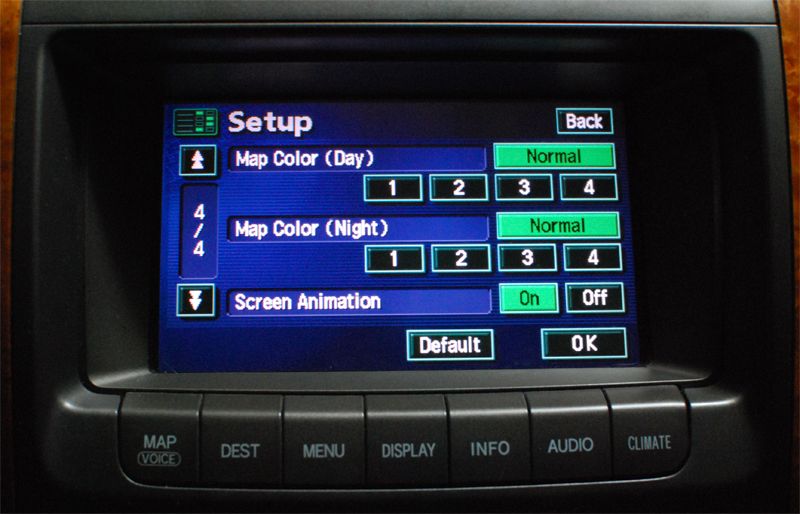
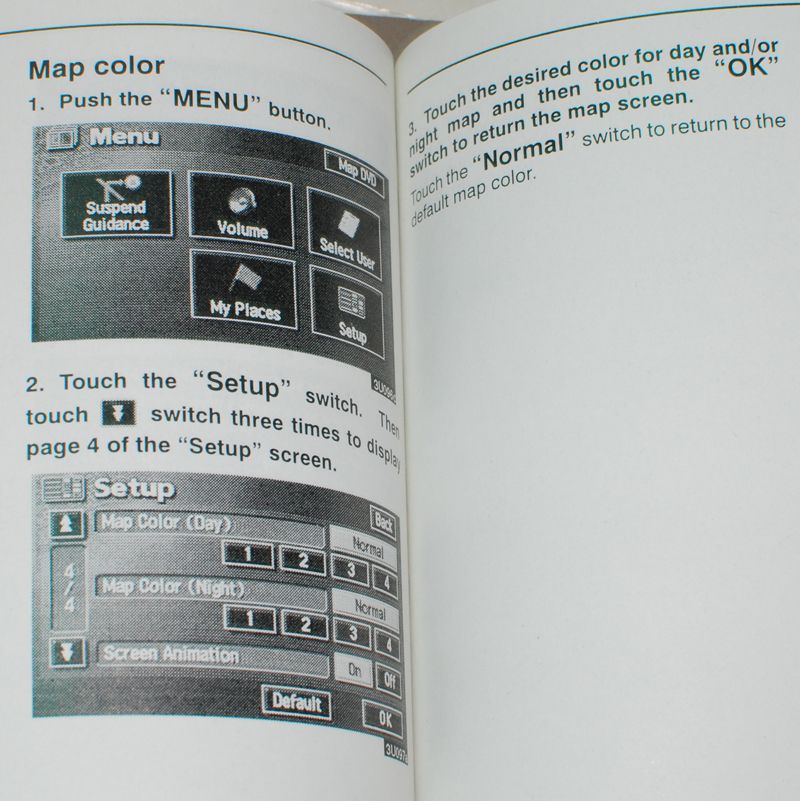
....What's it for? I've pressed 1-4 during the day and at night and I don't notice any change in color vs the normal button. Am I missing something? The map background stays white during the day and black at night. The Navigation manual isn't any help since it doesn't say what that function actually does.


Pole Position
Joined: Nov 2007
Posts: 2,625
Likes: 66
From: Pa
....What's it for? I've pressed 1-4 during the day and at night and I don't notice any change in color vs the normal button. Am I missing something? The map background stays white during the day and black at night. The Navigation manual isn't any help since it doesn't say what that function actually does.
This is a question I also would like the answer. I dont see any differance

Pit Crew

Joined: May 2003
Posts: 143
Likes: 8
From: Connecticut
Convoluted fix
Yup had the same problem but figured it out a couple months ago
Start the car
Headlights in Auto-mode
Be in a dark space so the headlights turn on
Press Display button on console
At the top you will see a button appear called "Day mode" press to turn it off.
I have my map colors in AUTO
The Day mode only appears if the headlights are on via Auto lamp.
2003 GX470
Start the car
Headlights in Auto-mode
Be in a dark space so the headlights turn on
Press Display button on console
At the top you will see a button appear called "Day mode" press to turn it off.
I have my map colors in AUTO
The Day mode only appears if the headlights are on via Auto lamp.
2003 GX470
Pole Position
Joined: Nov 2007
Posts: 2,625
Likes: 66
From: Pa
Yup had the same problem but figured it out a couple months ago
Start the car
Headlights in Auto-mode
Be in a dark space so the headlights turn on
Press Display button on console
At the top you will see a button appear called "Day mode" press to turn it off.
I have my map colors in AUTO
The Day mode only appears if the headlights are on via Auto lamp.
2003 GX470
Start the car
Headlights in Auto-mode
Be in a dark space so the headlights turn on
Press Display button on console
At the top you will see a button appear called "Day mode" press to turn it off.
I have my map colors in AUTO
The Day mode only appears if the headlights are on via Auto lamp.
2003 GX470
for night. ??":? And the color never seems to change
Thread Starter
Lexus Champion
Joined: Mar 2012
Posts: 1,812
Likes: 14
From: ★ᚱᚱ²²★
Yup had the same problem but figured it out a couple months ago
Start the car
Headlights in Auto-mode
Be in a dark space so the headlights turn on
Press Display button on console
At the top you will see a button appear called "Day mode" press to turn it off.
I have my map colors in AUTO
The Day mode only appears if the headlights are on via Auto lamp.
2003 GX470
Start the car
Headlights in Auto-mode
Be in a dark space so the headlights turn on
Press Display button on console
At the top you will see a button appear called "Day mode" press to turn it off.
I have my map colors in AUTO
The Day mode only appears if the headlights are on via Auto lamp.
2003 GX470
Pressing the day mode will just turn the navi into a brighter mode at night. What I'm asking about is the 4 different color options in day and night mode. And FYI the day time button appears anytime the lights are on (parking lights only, lights on, AUTO) not just in AUTO mode.
Funny you brought that up though because I just helped another GX owner figure out how to put his display in night mode because his day mode button was pressed.

http://forum.ih8mud.com/120-series-t...ml#post8949740

Trending Topics

Instructor


Joined: Apr 2006
Posts: 1,213
Likes: 67
From: EARTH
Maybe Try to diagnose your color bar check within the Nav unit
1. Start the "Diagnosis System"
2. Select "Menu"( pressing this switch activates the Display check)
3. Select "Display Check"
4. Select "Color Bar Check"
5. Make sure that each color name is corresponding to each color on the bar.
Hint Select Black, Red, Green,Blue ,White and stripe to display selected colors and stripe on the entire screen.
6. Compare with the Color Bar Check in the Navigation Check and make sure no difference is found.
1. Start the "Diagnosis System"
2. Select "Menu"( pressing this switch activates the Display check)
3. Select "Display Check"
4. Select "Color Bar Check"
5. Make sure that each color name is corresponding to each color on the bar.
Hint Select Black, Red, Green,Blue ,White and stripe to display selected colors and stripe on the entire screen.
6. Compare with the Color Bar Check in the Navigation Check and make sure no difference is found.


Pole Position
Joined: Nov 2007
Posts: 2,625
Likes: 66
From: Pa
Perhaps your not supposed to be able to change the color of the maps. I never looked at the menus when I changed the color in the settings I was looking for a color change in the maps.
I will ty and change the colors again and look at the other menus to see if in fact I do get different colors. They don't label the colors they just allow for 4 different settings . Do I have this right
Thread Starter
Lexus Champion
Joined: Mar 2012
Posts: 1,812
Likes: 14
From: ★ᚱᚱ²²★
When you say the colors change for the menus do you mean that if I select climate control and I have changed the color in the menu that allows us to choose between 4 different modes that now the background color for the climate control will say now be a different color from what it was. As well as any other menu I select like audio or menu etc.
Perhaps your not supposed to be able to change the color of the maps. I never looked at the menus when I changed the color in the settings I was looking for a color change in the maps.
I will ty and change the colors again and look at the other menus to see if in fact I do get different colors. They don't label the colors they just allow for 4 different settings . Do I have this right
Perhaps your not supposed to be able to change the color of the maps. I never looked at the menus when I changed the color in the settings I was looking for a color change in the maps.
I will ty and change the colors again and look at the other menus to see if in fact I do get different colors. They don't label the colors they just allow for 4 different settings . Do I have this right
Yes. If you press "INFO" button, then "Screen Setting", you have the option of changing background colors (Menu, Display, Info etc) from green, blue, gray, beige. It doesn't change the map color though. Pressing 1-4 in the map color does not change the background color above. Since it says day / night it's supposed to change the actual navigation map color but nothing happens.

Lead Lap
Joined: Aug 2013
Posts: 4,279
Likes: 1,032
From: Illinois
When you say the colors change for the menus do you mean that if I select climate control and I have changed the color in the menu that allows us to choose between 4 different modes that now the background color for the climate control will say now be a different color from what it was. As well as any other menu I select like audio or menu etc.
Perhaps your not supposed to be able to change the color of the maps. I never looked at the menus when I changed the color in the settings I was looking for a color change in the maps.
I will ty and change the colors again and look at the other menus to see if in fact I do get different colors. They don't label the colors they just allow for 4 different settings . Do I have this right
Perhaps your not supposed to be able to change the color of the maps. I never looked at the menus when I changed the color in the settings I was looking for a color change in the maps.
I will ty and change the colors again and look at the other menus to see if in fact I do get different colors. They don't label the colors they just allow for 4 different settings . Do I have this right
Lead Lap
Joined: Aug 2013
Posts: 4,279
Likes: 1,032
From: Illinois
Disregard what I said in my previous post. After posting, I went out and tried changing the colors. Doing so did nothing that I could see. After poking around more, I see that you can change the background color for the climate control, audio system, etc., but that is done by going to the "info" screen. Thus, like the others, I'm not seeing any change that results from changing the "map color" setting.
Last edited by lesz; Dec 7, 2013 at 01:31 PM.

Driver School Candidate
Joined: Sep 2020
Posts: 1
Likes: 0
From: California
Reviving the thread.....
Just picked up a used 2005 LX with enough miles to circle the globe 10 times (or at least well on it's way).
I have been researching this topic as well, thought my map colors were doing nothing too, and found out they actually ARE. It is an extremely subtle change when going through the numbers, from Green (1), Browns, and even Gray (3). I couldn't see the change at first, but while the car was in the garage with dim lighting saw the subtle difference.
It does work (barely), give it a try and you'll find NONE of the colors are pleasing, so just pick one.
Just picked up a used 2005 LX with enough miles to circle the globe 10 times (or at least well on it's way).
I have been researching this topic as well, thought my map colors were doing nothing too, and found out they actually ARE. It is an extremely subtle change when going through the numbers, from Green (1), Browns, and even Gray (3). I couldn't see the change at first, but while the car was in the garage with dim lighting saw the subtle difference.
It does work (barely), give it a try and you'll find NONE of the colors are pleasing, so just pick one.
Last edited by domcmcal1; Sep 23, 2020 at 11:56 AM.


Thread
Thread Starter
Forum
Replies
Last Post
sleepybobcat
Lexus Audio, Video, Security & Electronics
7
Oct 1, 2001 07:12 PM
