Notices
RX - 4th Gen (2016-2022) Discussion topics related to the 2016 and up RX350 and RX450h models

12.3 inch Navigation Versatility

Thread Tools
 
Search this Thread
 
Old Feb 17, 2016 | 07:25 PM
  #1  
go3Ds's Avatar
go3Ds
Thread Starter
Pit Crew
 
Joined: Jul 2012
Posts: 212
Likes: 10
From: AZ.
Default 12.3 inch Navigation Versatility

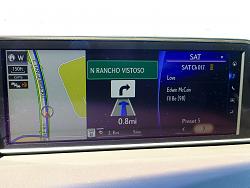
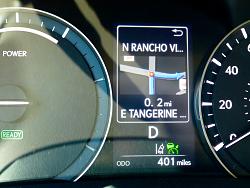
Amazing all thats available with the 12.3" split screens. This example alone shows map, turn by turn directions with posted speed limit, miles remaining and ETA, and radio with its info listed continuously. The turn by turn directions are also linked to the Multi Information Display once it's within the final 0.2 miles. I’m just barely getting into the manuals for all it can do, as well as looking forward to input from others. Easy to switch screens also, or just have the huge full screen only. Pardon the dust on my 12.3" navigation, will have to dust more often with the huge open display.

12.3 inch Navigation Versatility-p1010068.jpg


12.3 inch Navigation Versatility-p1010071.jpg
Reply
Old Feb 17, 2016 | 07:37 PM
  #2  
bootman's Avatar
bootman
Advanced
15 Year Member
Liked
Loved
 
Joined: Jun 2008
Posts: 505
Likes: 41
From: PA
Default

I agree. It still continues to amaze me.
Even in triple screen, a third of that is still standard in many vehicles.
Pixel count is very good (1200x900)
I haven't even played a movie on it yet.
Reply
Old Feb 18, 2016 | 05:00 AM
  #3  
GDragonfly's Avatar
GDragonfly
Driver School Candidate
 
Joined: Feb 2016
Posts: 6
Likes: 1
From: New York
Default

Originally Posted by bootman
I agree. It still continues to amaze me.
Even in triple screen, a third of that is still standard in many vehicles.
Pixel count is very good (1200x900)
I haven't even played a movie on it yet.
Wait, you can play movies on the screen? How?
Reply
Old Feb 18, 2016 | 09:22 AM
  #4  
ted920's Avatar
ted920
Lexus Champion
 
Joined: Feb 2001
Posts: 1,792
Likes: 2
From: Connecticut
Default

Originally Posted by GDragonfly
Wait, you can play movies on the screen? How?
Yes, how do you play movies on it? I WANT TO KNOW!
Reply
Old Feb 18, 2016 | 09:26 AM
  #5  
bootman's Avatar
bootman
Advanced
15 Year Member
Liked
Loved
 
Joined: Jun 2008
Posts: 505
Likes: 41
From: PA
Default

Take out your Navigation manual and look at page 175.
Reply
Old Feb 18, 2016 | 09:28 AM
  #6  
yardie876's Avatar
yardie876
Lexus Champion
 
Joined: Sep 2012
Posts: 3,438
Likes: 88
From: SoFlo
Default

Popping a dvd in the CD player while the car is in park should do the trick (on my 4GS anyways). Unfortunately they don't offer full screen playback. Just the larger portion on the left.
Reply
Old Feb 18, 2016 | 12:12 PM
  #7  
joe311's Avatar
joe311
Rookie
 
Joined: Nov 2015
Posts: 65
Likes: 4
From: ca
Default

dvd does not look very clear on the screen. It looks like the old non hd screen and not very good to look at. I rather not use it at all and just use an ipad.
Reply
Old Feb 19, 2016 | 08:36 AM
  #8  
Macs4RX's Avatar
Macs4RX
Driver
 
Joined: Sep 2003
Posts: 119
Likes: 3
From: MA
Default

I'm going to make sure I get the Panoramic View Monitor option on my RX. It should greatly facilitate tight parking maneuvers. Getting the 12.3" screen is a given. I do wish more vehicles would ship from the factory with the Panoramic View option.
Reply
Old Feb 19, 2016 | 09:31 AM
  #9  
RXOwner's Avatar
RXOwner
Lead Lap
 
Joined: Nov 2015
Posts: 701
Likes: 49
From: AMERICA!
Default

Originally Posted by Macs4RX
I'm going to make sure I get the Panoramic View Monitor option on my RX. It should greatly facilitate tight parking maneuvers. Getting the 12.3" screen is a given. I do wish more vehicles would ship from the factory with the Panoramic View option.
The PVM is awesome. It even allow you to zoom in on an area. The 12.3" screen was a huge selling point for me.
Reply
Old Feb 19, 2016 | 10:51 AM
  #10  
Legolas2's Avatar
Legolas2
Rookie
15 Year Member
 
Joined: Apr 2007
Posts: 51
Likes: 0
From: CA
Default


Umm, how do you enable this option to show up in the instrument cluster? I have the RX350 AWD w/ 12.3" nav option + Premium Pkg
Reply
Old Feb 19, 2016 | 06:50 PM
  #11  
bootman's Avatar
bootman
Advanced
15 Year Member
Liked
Loved
 
Joined: Jun 2008
Posts: 505
Likes: 41
From: PA
Default

Originally Posted by joe311
dvd does not look very clear on the screen. It looks like the old non hd screen and not very good to look at. I rather not use it at all and just use an ipad.
480p on a 21:9 1200 x900 screen should not look good.
but a good bluray @1080p ripped recoded and burned on a DVDs should and those instructions can be found on a different forum.
Reply
Old Feb 19, 2016 | 08:19 PM
  #12  
go3Ds's Avatar
go3Ds
Thread Starter
Pit Crew
 
Joined: Jul 2012
Posts: 212
Likes: 10
From: AZ.
Default

Originally Posted by legolas2


umm, how do you enable this option to show up in the instrument cluster? I have the rx350 awd w/ 12.3" nav option + premium pkg
I'm using the turn by turn arrow screen currently. Remember the Multi Information Screen display turn by turn will only show up the last 0.2 miles as to not interfere with the clock etc., whereas the Nav screen is whatever amount of miles to the next turn. Map mode settings work best with an active destination in place.

12.3 inch Navigation Versatility-p1010074.jpg

12.3 inch Navigation Versatility-p1010081.jpg
Reply
Related Topics
Thread
Thread Starter
Forum
Replies
Last Post
MARTINMKHS
Lexus Audio, Video, Security & Electronics
0
Apr 9, 2017 01:07 PM
Kenny1979
GS - 3rd Gen (2006-2011)
1
Mar 4, 2017 02:33 AM
Joseph22T
IS - 1st Gen (2001-2005)
2
Aug 27, 2013 10:58 AM
nbeihl
GX - 1st Gen (2003-2009)
8
Jan 10, 2011 11:00 AM
jaleels
GX - 2nd Gen (2010-2023)
1
Apr 20, 2010 06:18 PM


All times are GMT -7. The time now is 07:40 PM.