


Why is my parking assist muted?


 Why is my parking assist muted?
Hi there, i was wondering why i dont hear the beeping sound when i am parking my car? i just bought the car 3 days ago and have read the manual and did a forum search. I have pressed the "hold" button on the steering wheel and went to the display to make sure the parking assist volume is not at zero. however, WHY can't i hear the beep sound as i get close to objects? i would like to hear it since i am still getting used to the size of this vehicle.
Thanks in advance for your help!
Thanks in advance for your help!

Lead Lap
Joined: Jun 2012
Posts: 645
Likes: 8
From: Fl
Hi there, i was wondering why i dont hear the beeping sound when i am parking my car? i just bought the car 3 days ago and have read the manual and did a forum search. I have pressed the "hold" button on the steering wheel and went to the display to make sure the parking assist volume is not at zero. however, WHY can't i hear the beep sound as i get close to objects? i would like to hear it since i am still getting used to the size of this vehicle.
Thanks in advance for your help!
Thanks in advance for your help!


CL Community Team


Joined: Apr 2008
Posts: 2,222
Likes: 310
From: TX
On most of the cars, the Parking Assistant is enable/disabled by an alternate action switch on the dash. On my car, a 2007 LS460, that switch is labeled "P" with a sonar symbol on it and is just above the driver's left knee on the second switch tier. It's enable when the green light in the switch is lit.

no i dont see the display come on when i am backng up or getting close to any object. All i see is the camera come on when i am backing up.
The hold button on the steering wheel doesn't have anything to do with your sensors. The volume controls are in the nav system. Try the reverse mode to see if the rear ones work. You might have some type of electrical issue with those 600 lights, because the do have two types of 600 lights which effects different options cars.
On most of the cars, the Parking Assistant is enable/disabled by an alternate action switch on the dash. On my car, a 2007 LS460, that switch is labeled "P" with a sonar symbol on it and is just above the driver's left knee on the second switch tier. It's enable when the green light in the switch is lit.
Trending Topics
CL Community Team
Joined: Apr 2008
Posts: 2,222
Likes: 310
From: TX
After you check to be sure it is on then if your car is equipped with a Touch Screen press the "INFO" hard key in the left switch cluster and then select the "Parking Assistant" soft key on the screen. It should be intuitive from there.
i did. i have the volume in the center position. i dont hear anything and i dont even see the display come on showing me how close i am to a vehicle when i am parking..i have to believe it has to do with the "p" button by my left knee.
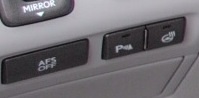 this is the button with the "P" that needs to be on.
Attachment 274889 this is the button with the "P" that needs to be on.
should i also be getting the image of the car on the naviagation display with bars in front and behind it ? or is that another setting that needs to be on as well?
Lead Lap
Joined: Jun 2012
Posts: 645
Likes: 8
From: Fl
so once that is on then i SHOULD be getting the beep noise as i get close to objects IF the volume is on of course.. correct?
should i also be getting the image of the car on the naviagation display with bars in front and behind it ? or is that another setting that needs to be on as well?
should i also be getting the image of the car on the naviagation display with bars in front and behind it ? or is that another setting that needs to be on as well?

Lead Lap

Joined: Jul 2010
Posts: 4,785
Likes: 154
From: The South
Maybe I am going overboard with this, but do you have an actual P button on the left lower side of dash as well as parking sensors that are visible around the front and rear bumpers? As long as that P switch is on, there are no other settings to make it display on the Nav screen or dash cluster as SBLexus said...I'm starting to wonder if you have that option altogether to be honest