


Why no map on Nav Screen?


Driver School Candidate
Joined: Nov 2012
Posts: 30
Likes: 0
From: MD

So I've been reading the forums and the consensus seems to be that you can upgrade through Generation 4 Navs and have them be plug and play with your older connections. The Gen 4 model is part number - 86841-50090
My thought is that I may as well get a newer one and hope that they're heartier/less likely to fail. The big difference is that it will require a newer disc in order to work properly. Honestly though, if I'm going to do all of this non-sense I would have gotten a new nav DVD anyways.
Also, some googling has revealed that the DVD drive is a Denso drive that's been used in a number of cars including Prius/Highlander etc. That being the case I'm sort of of the mind that I should hit the junk yard and see if I can find a wrecked SC/LS/Prius/Highlander etc. and see if I can rip the unit out of the back and buy it up for cheap.
I'm considering getting one off of ebay, but I can't see paying 500 bucks for a new disc drive. It just bothers me on principle.
My thought is that I may as well get a newer one and hope that they're heartier/less likely to fail. The big difference is that it will require a newer disc in order to work properly. Honestly though, if I'm going to do all of this non-sense I would have gotten a new nav DVD anyways.
Also, some googling has revealed that the DVD drive is a Denso drive that's been used in a number of cars including Prius/Highlander etc. That being the case I'm sort of of the mind that I should hit the junk yard and see if I can find a wrecked SC/LS/Prius/Highlander etc. and see if I can rip the unit out of the back and buy it up for cheap.
I'm considering getting one off of ebay, but I can't see paying 500 bucks for a new disc drive. It just bothers me on principle.

Rookie
Joined: Aug 2011
Posts: 56
Likes: 0
From: UK
bonsai, that part number you gave for the gen04, i see this is what the back looks like for the connections.
nZpCN!BQe,dK7rYg~~60_57.JPG)
from my CD it says the television camera ECU and shows the connection as being a 10pin plug, and then it shows another connector being 40pin connector, I've selected the LHD model aswell, strange. there is no 40pin connector on here that I can see.
ignore this as this is the connection into the ECU end for the camera, it has it's own ECU
from my CD it says the television camera ECU and shows the connection as being a 10pin plug, and then it shows another connector being 40pin connector, I've selected the LHD model aswell, strange. there is no 40pin connector on here that I can see.
ignore this as this is the connection into the ECU end for the camera, it has it's own ECU
Last edited by masterff; Nov 12, 2012 at 06:53 PM.
Rookie
Joined: Aug 2011
Posts: 56
Likes: 0
From: UK
for 2004.8 - models under the connector list If I select Navigation ECU to check the connectors it lists
N.5 Navigation ECU - 18pin
N6. Navigation ECU - 10pin
N8. Navigation ECU - 8pin
N9. Navigation ECU - 6pin
for the 2001.8 - 2003.6 it is
N5. Navigation ECU - 18pin
N6. Navigation ECU - 10pin
So the 2004 model has 2 more connections under nav ECU supposedly
confusing.
N.5 Navigation ECU - 18pin
N6. Navigation ECU - 10pin
N8. Navigation ECU - 8pin
N9. Navigation ECU - 6pin
for the 2001.8 - 2003.6 it is
N5. Navigation ECU - 18pin
N6. Navigation ECU - 10pin
So the 2004 model has 2 more connections under nav ECU supposedly
confusing.

Thread Starter
Driver School Candidate
Joined: Nov 2012
Posts: 25
Likes: 0
From: PA
There are four inputs (sockets) in the rear of my gen 2/3 ECU plus a fifth one for the power connection. However, my car only has three leads (plugs) aside from the power line so one socket goes unused. I do not have a backup camera. I wish I could get one.
Last edited by Bobjann; Nov 12, 2012 at 07:07 PM.
Rookie
Joined: Aug 2011
Posts: 56
Likes: 0
From: UK
i've installed a reverse camera on my car but not wired it in yet, I don't want to go down the route of a navtool. There must be a way to get the cars nav screen to switch to the reverse camera without having to buy one of them units.
You can do it on a honda accord as I did it on my dads car.
The input looks like this
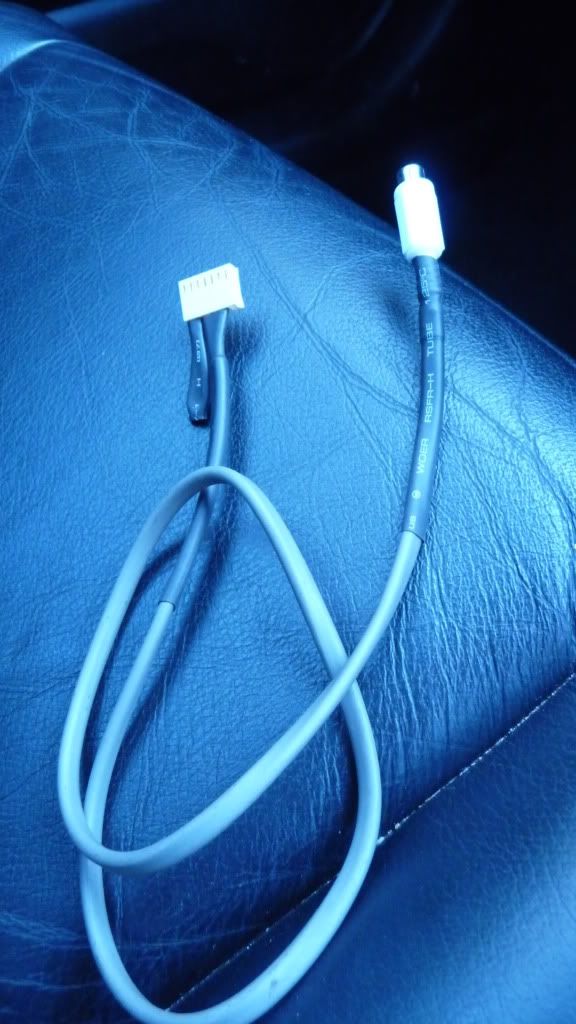
goes into the nav computer like this :
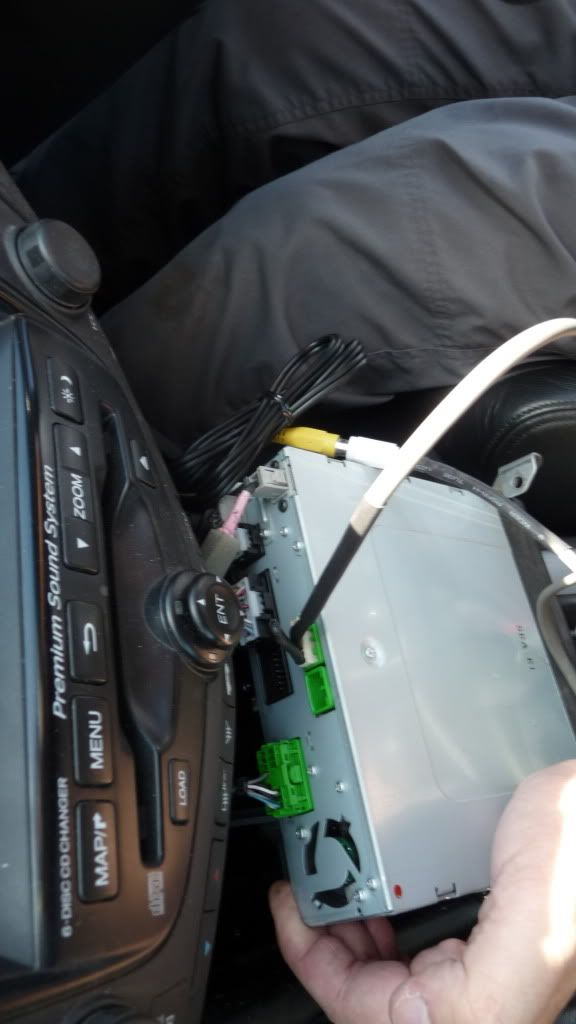
it involves making the connector and the output cable.
You can do it on a honda accord as I did it on my dads car.
The input looks like this
goes into the nav computer like this :
it involves making the connector and the output cable.

Rookie
Joined: Aug 2011
Posts: 56
Likes: 0
From: UK
brand snobbery at it's finest 
the nav systems are not made by toyota / lexus or indeed honda, so whats on the end of the hood doesn't matter.
The principles of the nav ECU's ( computers ) are the same, if you can cut into the reverse feed you should be able to get the screen to display the video when it's engaged.
the nav systems are not made by toyota / lexus or indeed honda, so whats on the end of the hood doesn't matter.
The principles of the nav ECU's ( computers ) are the same, if you can cut into the reverse feed you should be able to get the screen to display the video when it's engaged.
Rookie
Joined: Aug 2011
Posts: 56
Likes: 0
From: UK
Last edited by masterff; Nov 13, 2012 at 08:44 AM.
Driver School Candidate
Joined: Nov 2012
Posts: 30
Likes: 0
From: MD
Yeah, I know I put up the Gen 4 Nav part number. There was another post on these forums where people were saying that it was basically plug and play up through the Gen 4. After gen 4 the adapter changed. I will let you guys know how it goes. I ended up purchasing a Gen 4. I figure if it doesn't work I can always resell it. However, multiple people have stated that the Gen 4 was plug and play compatible with their gen 2/3 harness:
https://www.clublexus.com/forums/sc-...tected-11.html
https://www.clublexus.com/forums/sc-...tected-11.html

Thread
Thread Starter
Forum
Replies
Last Post
