


DIY - Updating your Navigation DVD with new version


Thread Starter

Joined: Feb 2001
Posts: 31,944
Likes: 2,737
From: North Carolina
 DIY - Updating your Navigation DVD with new version
Thanks to billnls430 who wrote up these original steps and my wife Krista who actually did the upgrade on our 2005 LS430 Ultra when I was out of town and took these pics (when I didn't expect her to do it).
keywords navigation update upgrade trunk
When I bought my LS a few weeks ago, I negotiated the inclusion of the latest and greatest Nav DVD as part of the deal

--------
Lift the trunk carpet on the right side.

Lift the cover over the spare tire and locate the panel to the right.


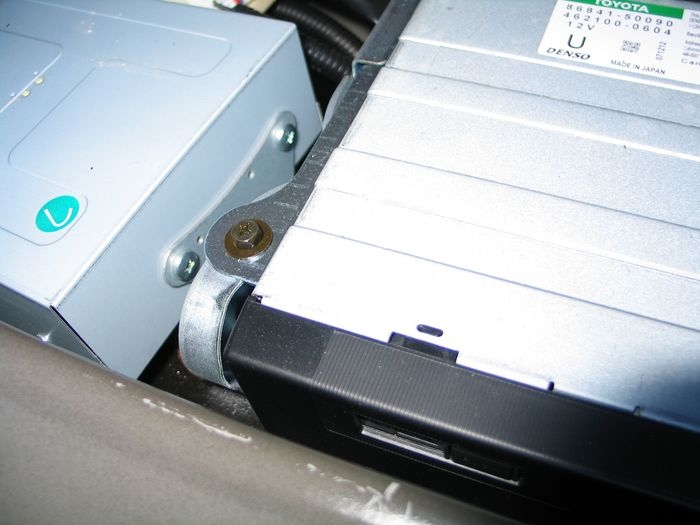
Pull the one plastic plug holding a panel to the right of the spare, the drive is now exposed.
Remove the two hex head screws with phillips slots.

keywords navigation update upgrade trunk
When I bought my LS a few weeks ago, I negotiated the inclusion of the latest and greatest Nav DVD as part of the deal
--------
Lift the trunk carpet on the right side.
Lift the cover over the spare tire and locate the panel to the right.
Pull the one plastic plug holding a panel to the right of the spare, the drive is now exposed.
Remove the two hex head screws with phillips slots.

Thread Starter
Joined: Feb 2001
Posts: 31,944
Likes: 2,737
From: North Carolina
Lift the front of the drive (side closest to the spare), rotating the front up.

Slide the open/close slide to the open position.

Turn the Ignition to on, the Nav screen will warn that the DVD door is open.

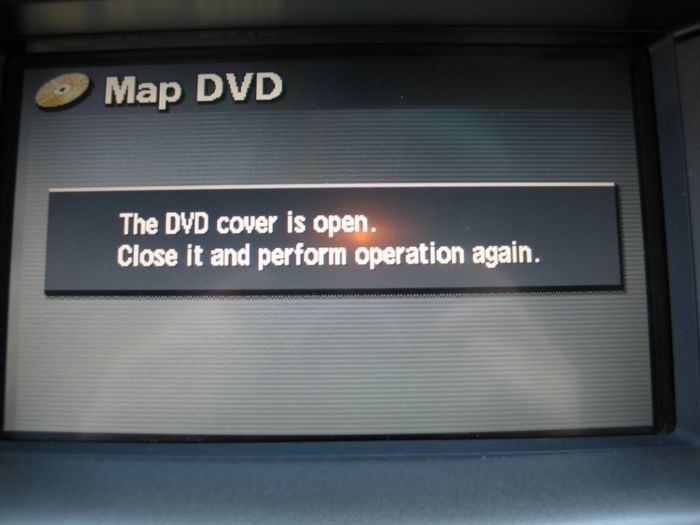
Push the button of the open/close slide and the drive will eject the DVD.

Once you put the new DVD in there is a quick message (passed by fast enough that Krista did not get a picture of it).
I'll ask her to review this post and make sure I got it right
Slide the open/close slide to the open position.
Turn the Ignition to on, the Nav screen will warn that the DVD door is open.
Push the button of the open/close slide and the drive will eject the DVD.
Once you put the new DVD in there is a quick message (passed by fast enough that Krista did not get a picture of it).
I'll ask her to review this post and make sure I got it right
Last edited by DaveGS4; Feb 5, 2007 at 08:49 PM.

Thread Starter
Joined: Feb 2001
Posts: 31,944
Likes: 2,737
From: North Carolina
And to be pre-emptive, the new nav versions are typically released every 12 - 18 months. They don't usually tweak a lot of the user interface or logic, but they add new roads and update / add POIs (points of interest). The data that is added is typically six months to a year old, so if you're looking for something that is new new, don't expect it to be there in the same year.

Pole Position
Joined: Jan 2007
Posts: 321
Likes: 1
From: St. Peters, Missouri
thank the wife for doing such a nice job along with the photos,,
was going to do my 05 but if the disk are not that current will wait another year before buying,, have only found a couple new subdivisions that were not on the present disk,,
was going to do my 05 but if the disk are not that current will wait another year before buying,, have only found a couple new subdivisions that were not on the present disk,,

Thanks for the write up Dave, and thank Krista for the detailed pics 
Im guessing you cannot do the manual override now correct? (without any electronic aid)
Its somewhat easier on the GS... only have to remove the shroud cover, which exposes the navi unit, but I think its smarter the way they've done it on the LS... tucking it in like that, creating more trunk room.
Im guessing you cannot do the manual override now correct? (without any electronic aid)
Its somewhat easier on the GS... only have to remove the shroud cover, which exposes the navi unit, but I think its smarter the way they've done it on the LS... tucking it in like that, creating more trunk room.

Racer


Joined: Apr 2002
Posts: 1,668
Likes: 211
From: Someplace in CT
In case anyone is wondering, it's done the same for the 01-03. I did the upgrade on my 01, and it's the same thing I did. By removing the 2 screws and lifting the DVD player, it brings it up just enough to remove and replace the DVD.
At least on mine, you can still do the manual override for the nav, not sure on the 04+
Nice post with pictures
At least on mine, you can still do the manual override for the nav, not sure on the 04+
Nice post with pictures

Driver

Joined: Jan 2007
Posts: 156
Likes: 15
From: TN
In case anyone is wondering, it's done the same for the 01-03. I did the upgrade on my 01, and it's the same thing I did. By removing the 2 screws and lifting the DVD player, it brings it up just enough to remove and replace the DVD.
At least on mine, you can still do the manual override for the nav, not sure on the 04+
Nice post with pictures
At least on mine, you can still do the manual override for the nav, not sure on the 04+
Nice post with pictures
Trending Topics


Driver
Joined: Jun 2006
Posts: 161
Likes: 0
From: NY
Thumbs up to Krista for the pictures.
Where can I buy these DVDs? And how many DVDs do we replace, two? I thought there was only one...

BTW, what is the box that has the green sticker?
mY 02 LS shows Parking Garages that no longer exists and does not show newly built ones in Manhattan. Sometimes I drive to a parking garage that had already turned into some other businesses. Very annoying when I need to get to a meeting on time. I hope they added and deleted parking garages in New York... this alone would make the update worth it for me.
Thumbs up to Krista for the pictures.
Where can I buy these DVDs? And how many DVDs do we replace, two? I thought there was only one...
BTW, what is the box that has the green sticker?
Thumbs up to Krista for the pictures.
Where can I buy these DVDs? And how many DVDs do we replace, two? I thought there was only one...
BTW, what is the box that has the green sticker?

Driver
Joined: Nov 2003
Posts: 126
Likes: 1
From: Washington
So the Nav override will be disabled if I install this http://www.lexus-parts.com/parts_det...id=90137&all=Y in my 2004?


Driver School Candidate
Joined: Aug 2008
Posts: 2
Likes: 0
From: WASHINGTON
If anyone lives near Seattle and has the DVD update for a 2001 LS430, I'll gladly pay you to let me use it to update my navigation. It seems crazy for everyone to have to buy one separately...


Pole Position
Joined: Jun 2008
Posts: 377
Likes: 0
From: Carlsbad, CA
Nice DIY, thank your wife for all of us. It is hard to tell which version you installed though (hard to read the print). I think the latest is ver 8.x? Override is disabled on the latest based on all the other forum threads on the subject.