


Non-Nav to Nav Conversion (merged threads)


Pole Position
Joined: Dec 2005
Posts: 243
Likes: 8
From: Kentucky

i'm not sure what the purpose of moving the deck into the glove box would be? if i did install a retractable screen in that area wouldn't i want to have the audio be controlled through the aftermarket unit?
sorry, i think i'm not getting what you're saying about the relocating. could you please explain more?
sorry, i think i'm not getting what you're saying about the relocating.
could you please explain more?
If the factory deck is removed, the air conditioning won't work. The A/C and audio system display panels above the deck are on one circuit board. If you unplug the deck then that whole circuit board shuts down.
So too keep your A/C working the deck needs to remain hooked up, even if you are not using is as your main audio source. The factory wiring is just long enough to reach over to the glovebox. The deck can be placed in the glovebox with a few modifications and left hooked up so the A/C can work. Then an aftermarket deck with a flipout screen and NAV like you are wanting can be placed at the bottom of the center instrument panel. There will have to be a custom trim panel made to intergrate the aftermarket deck with the dash. The whole installation process is going to be expensive.
Hope this explains things.


Ok I'll be waiting
BTW // I just ordered my Double Din Eclipse NAV unit and will attempt to have it fully customer installed
Pole Position
Joined: Dec 2005
Posts: 243
Likes: 8
From: Kentucky
Well the easiest way to add NAV without going through the trouble of buying a new center instrument panel and rewiring the 2IS is to add a portable NAV unit like from Tom Tom, Magellan, or Garmin. The portable NAV unit can be mounted to a cell phone mount made for the 2IS:
http://www.cellularmount.com/order/s...&CarMake=Lexus

On the back of the factory deck, the thick orange wire can be spliced into for an accessory wire, the thicker green wire for the battery, and the white w/black stripe for the ground to wire the portable NAV unit to the car’s ignition.
In my car I am using the cellular mount to hold an Alpine 5.8" LCD widescreen monitor. I added an Vehicle Hub Pro VPA-B222 as a master A/V head unit for my aftermarket audio system. I used some special speaker level to RCA converters made by David Navone to convert the audio signal from the factory amp so it could be ran into the Vehicle Hub Pro’s factory system inputs. The Vehicle Hub Pro also controls my Alpine 6 disk CD changer, Alpine 6 disk DVD changer, and has an extra input for a VCR or game station (PS2 or X-box). I connected a wire to plug directly in and charge an I-pod. With added modules I can add XM, Sirus, and HD radio capabilities, Bluetooth wireless, extra independent LCD monitors, and an Alpine navigation system.
The system is not completed yet but I will post some pics of the Vehicle Hub Pro and the dash mounted LCD monitor later tonight.
http://www.cellularmount.com/order/s...&CarMake=Lexus
On the back of the factory deck, the thick orange wire can be spliced into for an accessory wire, the thicker green wire for the battery, and the white w/black stripe for the ground to wire the portable NAV unit to the car’s ignition.
In my car I am using the cellular mount to hold an Alpine 5.8" LCD widescreen monitor. I added an Vehicle Hub Pro VPA-B222 as a master A/V head unit for my aftermarket audio system. I used some special speaker level to RCA converters made by David Navone to convert the audio signal from the factory amp so it could be ran into the Vehicle Hub Pro’s factory system inputs. The Vehicle Hub Pro also controls my Alpine 6 disk CD changer, Alpine 6 disk DVD changer, and has an extra input for a VCR or game station (PS2 or X-box). I connected a wire to plug directly in and charge an I-pod. With added modules I can add XM, Sirus, and HD radio capabilities, Bluetooth wireless, extra independent LCD monitors, and an Alpine navigation system.
The system is not completed yet but I will post some pics of the Vehicle Hub Pro and the dash mounted LCD monitor later tonight.
Last edited by cmusic; Sep 11, 2006 at 11:08 AM.

Lexus Test Driver
Joined: Apr 2006
Posts: 1,271
Likes: 0
From: IL
https://www.clublexus.com/forums/sho...=222063&page=2
not my car, but go halfway down.. pretty clean install if u ask me.
not my car, but go halfway down.. pretty clean install if u ask me.

Thread Starter
Driver
Joined: Aug 2006
Posts: 132
Likes: 0
From: Chicago, IL
https://www.clublexus.com/forums/sho...=222063&page=2
not my car, but go halfway down.. pretty clean install if u ask me.
not my car, but go halfway down.. pretty clean install if u ask me.
yeah, that's exactly what the installer said he was going to do. fabricate something at the bottom of the dash for a flip out screen like that.
thanks again, this really helped me out! now i've just got to pm tuan to see what he did with the radio.

Pole Position
Joined: Dec 2005
Posts: 243
Likes: 8
From: Kentucky
Ok, here's what I did:
The Alpine 5.8" LCD monitor is seen mounted to the cellular phone mount next to the center instrument panel and the commander to the Alpine Vehicle Hub Pro is attached to the center console with double sided tape.
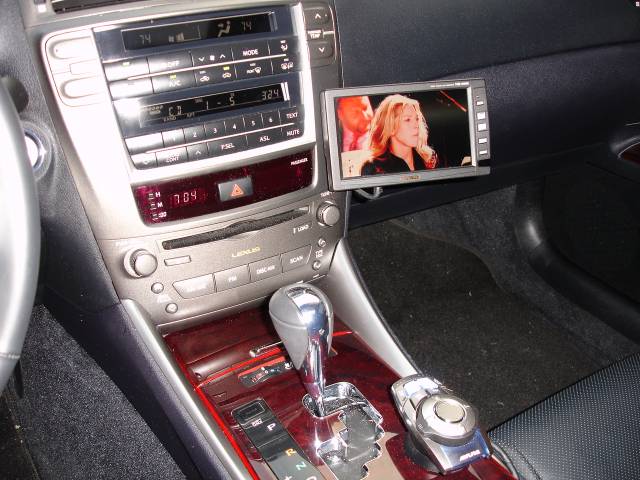
In my current system the Vehicle Hub Pro can control AM/FM radio, a 5 disk CD changer, the factory audio system, and a 6 disk DVD changer. It will also control an I-pod, which I plan to buy in the near future. All I have to do to change sources is to it the "source" button on the commander and scroll to my selection. When I pick "Factory Sys" the factory 2IS audio system plays as normal but I can control the master volume, tone contols, balance and fader with the Vehicle Hub Pro.

While installing the Vehicle Hub Pro I removed the AUX audio input from the center console storage bin and ran an I-pod wire into the bin from the Hub's brain unit mounted under the passenger seat. When I get an I-pod I can plug it in and leave it in the center console. The hub will then bring up all control of the I-pod on the screen and through the commander.

The Alpine 5.8" LCD monitor is seen mounted to the cellular phone mount next to the center instrument panel and the commander to the Alpine Vehicle Hub Pro is attached to the center console with double sided tape.
In my current system the Vehicle Hub Pro can control AM/FM radio, a 5 disk CD changer, the factory audio system, and a 6 disk DVD changer. It will also control an I-pod, which I plan to buy in the near future. All I have to do to change sources is to it the "source" button on the commander and scroll to my selection. When I pick "Factory Sys" the factory 2IS audio system plays as normal but I can control the master volume, tone contols, balance and fader with the Vehicle Hub Pro.
While installing the Vehicle Hub Pro I removed the AUX audio input from the center console storage bin and ran an I-pod wire into the bin from the Hub's brain unit mounted under the passenger seat. When I get an I-pod I can plug it in and leave it in the center console. The hub will then bring up all control of the I-pod on the screen and through the commander.
Thread Starter
Driver
Joined: Aug 2006
Posts: 132
Likes: 0
From: Chicago, IL
looks pretty cool cmusic. touch screen?
i wanted to keep the stock look as much as possible(that's why i wanted to get a stock nav system, and do the dvd hack). then when i found out that i couldn't do that(w/o spending TONS of money) i wanted something integrated into the dash. dunno, maybe it's just me
that ipod feature that shows/controls it on the screen is cool as ***** tho!
is the screen detachable from the mount?
i wanted to keep the stock look as much as possible(that's why i wanted to get a stock nav system, and do the dvd hack). then when i found out that i couldn't do that(w/o spending TONS of money) i wanted something integrated into the dash. dunno, maybe it's just me
that ipod feature that shows/controls it on the screen is cool as ***** tho!
is the screen detachable from the mount?

Pole Position
Joined: Dec 2005
Posts: 243
Likes: 8
From: Kentucky
looks pretty cool cmusic. touch screen?
i wanted to keep the stock look as much as possible(that's why i wanted to get a stock nav system, and do the dvd hack). then when i found out that i couldn't do that(w/o spending TONS of money) i wanted something integrated into the dash. dunno, maybe it's just me
that ipod feature that shows/controls it on the screen is cool as ***** tho!
is the screen detachable from the mount?
i wanted to keep the stock look as much as possible(that's why i wanted to get a stock nav system, and do the dvd hack). then when i found out that i couldn't do that(w/o spending TONS of money) i wanted something integrated into the dash. dunno, maybe it's just me
that ipod feature that shows/controls it on the screen is cool as ***** tho!
is the screen detachable from the mount?
There is a set screw that goes from behind the mounting bracket and into the monitor. I can unscrew the set screw, and unplug the single monitor cable, and have the monitor completely removed in a matter of seconds.
