


New Generation Navigation defeat????


Thread Starter
Driver School Candidate
Joined: Jun 2001
Posts: 39
Likes: 0
From: CA
 New Generation Navigation defeat????
I am a former member having had a 99 GS400 with lots of mods. Now I have Supercharged NSX-T and a 2006 Prius. Here is my question. On the 04 and 05 Prius with Nav you could easily defeat the nav by overriding the system. This worked for some Lexus models as well as for the Prius. You would just bring up the volume and then tap up, down, up, down, and then press the overirde for 5 seconds. Worked great. But! in the new generation nav system with many more colors etcetera there is no longer the same screen. We at the Prius Forum (Priuschat.com) have tried to find a way to defeat the system allowing one to input an address while driving. I am familiar with cutting the speed sensor and connecting it to a off and on switch. But that is not the ideal solution. Has anyone in the Lexus forum with the new Nav learned of a software defeat? I would be very happy indeed. And oh yes the supercharged NSX-t is offset by the Prius' good mileage and green nature. It fees both sides of my personality.
Thanks,
Manny
Thanks,
Manny



Joined: Feb 2001
Posts: 31,944
Likes: 2,737
From: North Carolina

Manny,
Please check the FAQ stickied at the top of this forum as well as other posts on hardwiring a switch
10) How to enable DVD,Phonebook,MP3 folder and etc. while moving.
11) Override to change navigation destination while in motion
PS please don't spam all the active forums please to ask this question.
Please check the FAQ stickied at the top of this forum as well as other posts on hardwiring a switch
10) How to enable DVD,Phonebook,MP3 folder and etc. while moving.
11) Override to change navigation destination while in motion
PS please don't spam all the active forums please to ask this question.
Last edited by DaveGS4; Mar 22, 2006 at 02:03 PM.
Thread Starter
Driver School Candidate
Joined: Jun 2001
Posts: 39
Likes: 0
From: CA
New Generation Navigation defeat
Hi, first off sorry if you feel I spamed your forum. I posted in three sections cause I was not sure which lexus vehicles have the new generation navigation system. Having said that both your recommendations #10 and #11 do not apply. Again I am talking about the new generation toyota navigation system that has improved colors etcetera. #11 deals with the older Navigation which I had in my 05 Prius. #10 does not allow one to input an address while driving. As far as voice recognition I think the system is very poor at best. I am hoping someone has found a way around the system.
Manny
Manny

Thread Starter
Driver School Candidate
Joined: Jun 2001
Posts: 39
Likes: 0
From: CA
Originally Posted by mofogasm
the new prius uses the 5th gen navigation system the same as the 2IS. Press Menu, Volume, then tape the screen in the right places.
Manny

Liquid Bra Champion
Joined: Aug 2005
Posts: 2,831
Likes: 145
From: ƒ(x)
Originally Posted by drmanny3
Again this is the new Toyota system that does not have that screen. My older 05 Prius did just what you are talking about. The new system is different. That is why I posted in several of the lexus models. So are you telling me that none of the new lexus models have this navigation system installed yet? Perhaps you won't get it until the 2007 models come out? This is the much improved 32,000 colors, 3 D look.
Manny
Manny
Trending Topics

Lexus Connoisseur


Joined: Mar 2001
Posts: 19,886
Likes: 604
From: USA
Originally Posted by drmanny3
Again this is the new Toyota system that does not have that screen. My older 05 Prius did just what you are talking about. The new system is different. That is why I posted in several of the lexus models. So are you telling me that none of the new lexus models have this navigation system installed yet? Perhaps you won't get it until the 2007 models come out? This is the much improved 32,000 colors, 3 D look.
Manny
Manny
The 5th Generation Navigation is simply a cleaner interface offering more colors, theres nothing really different other than aesthetic looks of the characters and screen interface and a few more added features. The NAV defeat from the 4th Generation Nav designed by Denso/Fujitsu-Ten for Toyota/Lexus works IDENTICAL for the 5th Generation Lexus Navigation system. As DaveGS4 mentioned in those two links, the same procedure works for the Gen 5 systems found in the New 2006 IS, Newest 2007 models i.e. The ES350, RX350, GS Series, and the LS460. This same nav interface is also found in the new 2007 Camry w/Nav.
 The New 2006 IS was the first Lexus model to feature the 5th Gen Nav. It will eventually be available across the board along with select Toyota models.
Please review this thread link below:
https://www.clublexus.com/forums/sho...8&postcount=65
Originally Posted by flipside909
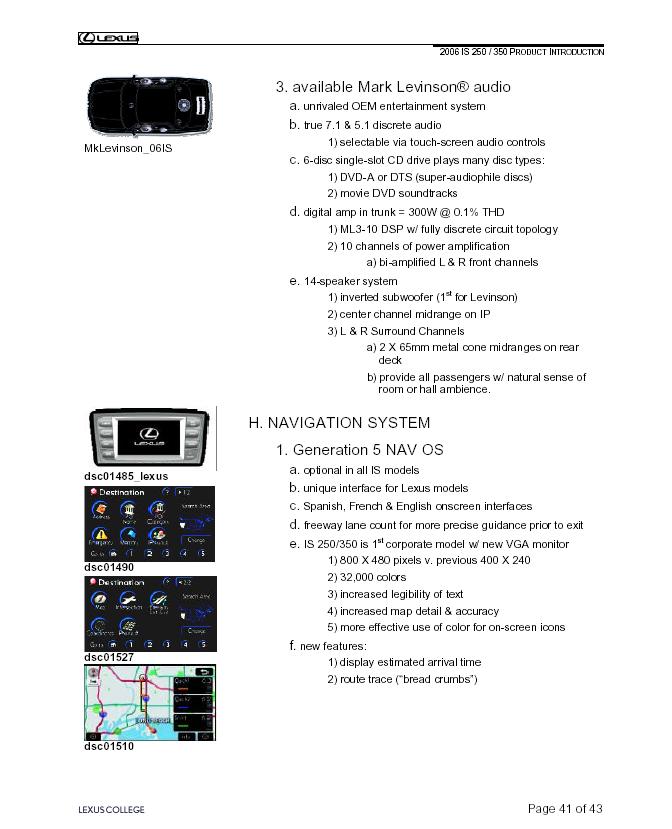

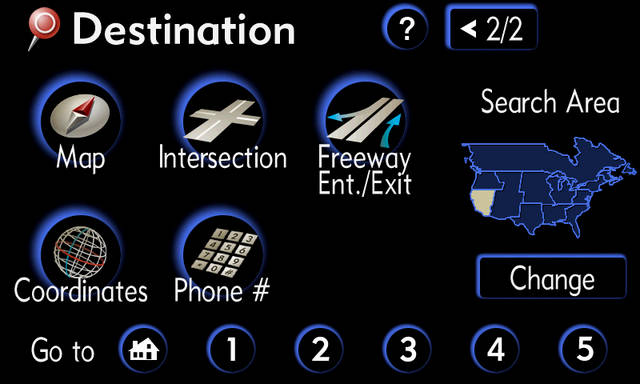

Courtesy of: Lexus USA

Thread Starter
Driver School Candidate
Joined: Jun 2001
Posts: 39
Likes: 0
From: CA
06 Prius Nav screens
I hope these come out ok. While you can still bring up the volume screen. Touching the screen top and bottom as outlined in the above replies no longer takes you to another menu. The only way I have been able to access a menu was to first punch the hard button Display. Then by tapping top, bottom, top, bottom, top, bottom you get the menu shown. So this menu required an extra top tap and a bottom tap to get. Note there is no override option. So do none of the Lexus models have this system. Note it is denso. Help
Manny
Manny

Lexus Test Driver
Joined: Dec 2005
Posts: 1,114
Likes: 0
From: Clearwater, FL
Originally Posted by tonydt1g3r
damn that nav screen looks so much better than mine. How does a prius have such a nice navi screen and my sc430 one is crap

Pole Position
Joined: Aug 2001
Posts: 231
Likes: 0
From: California
It so simple guys hit menu then click the sound icon then click the top left then bottom left then top left then bottom left then the maintenance window appears then click and hold the override icon for about 6 seconds
Thread Starter
Driver School Candidate
Joined: Jun 2001
Posts: 39
Likes: 0
From: CA
New Generation Navigation defeat
Did you look at the pictures I posted? I enclosed a pdf that has about 6 pictures of the nav screen. I swear to you I have tried the vol screen. As I had a 05 prius I am very familiar with the vol screen and the override option. I swear this does not have that same screen. I have tried many times. Are you sure that we are talking about the same system?
Manny
Manny

CL Community Team


Joined: Dec 2005
Posts: 5,709
Likes: 342
From: NJ
Originally Posted by drmanny3
Did you look at the pictures I posted? I enclosed a pdf that has about 6 pictures of the nav screen. I swear to you I have tried the vol screen. As I had a 05 prius I am very familiar with the vol screen and the override option. I swear this does not have that same screen. I have tried many times. Are you sure that we are talking about the same system?
Manny
Manny
I recognize the diagnostic menu you pulled up. We have that one too. I think on our cars, you have to hold the info button and turn the parking lights on and off rapidly (about 5 times). That's not the one with the navi override.
Thread Starter
Driver School Candidate
Joined: Jun 2001
Posts: 39
Likes: 0
From: CA
New Generation Navigation defeat
Yes, I am able to get to that menu by turning the parking lights on and off rapidly. For some particular reason the screen that is invoked by pressing volume does not respond as it did for the 04 and 05 Prius. It is not just my car. I have heard from a number of others who have 06 that are not able to get to the override screen. I was hoping someone would have a fix or an idea why it does not work. And I gather from you that yours does in fact give you the screen where you can touch override and hold it for ~5 seconds. I wonder why?