


How do I open a Smartkey to change battery?


Thread Starter
Driver School Candidate
Joined: Mar 2006
Posts: 35
Likes: 1
From: OH
 How do I open a Smartkey to change battery?
OK, I know that I will feel real stupid when someone tells me how. I have a 04 LS 430 with the Smartkey fob (see pic) 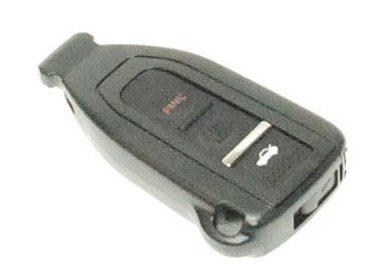
I can not see how to open this smartkey to change the battery? Any input/help.
Thanks,
Mike
I can not see how to open this smartkey to change the battery? Any input/help.
Thanks,
Mike
Last edited by mstrange; Dec 23, 2007 at 11:59 AM.

Driver School Candidate
Joined: Dec 2007
Posts: 7
Likes: 0
From: Rotterdam, The Netherlands
See the switch like slider on the bottom of device (bottom of your pic)
1. slide it to the left (only way it can go) as you slide it, you can see a pin move right to left.
2. with your other free hand/nail or something, there is a small grove still on the slide part on the right of it. Put your nail of something in there and as you slide left pull down or out on it.
3. that opens up compartment for battery replacement, uses standard battery found in watches and crap.
Cheers
1. slide it to the left (only way it can go) as you slide it, you can see a pin move right to left.
2. with your other free hand/nail or something, there is a small grove still on the slide part on the right of it. Put your nail of something in there and as you slide left pull down or out on it.
3. that opens up compartment for battery replacement, uses standard battery found in watches and crap.
Cheers

Do you see that release clip that frees the mechanical key?
Pull it as if you intended on releaseing the key, then pull that entire side (comes off like a hat.)
Then you pull the remote from inside, and you can get to the battery from there. Hope this makes sense.
Pull it as if you intended on releaseing the key, then pull that entire side (comes off like a hat.)
Then you pull the remote from inside, and you can get to the battery from there. Hope this makes sense.
Thread Starter
Driver School Candidate
Joined: Mar 2006
Posts: 35
Likes: 1
From: OH
Thanks!
See the switch like slider on the bottom of device (bottom of your pic)
1. slide it to the left (only way it can go) as you slide it, you can see a pin move right to left.
2. with your other free hand/nail or something, there is a small grove still on the slide part on the right of it. Put your nail of something in there and as you slide left pull down or out on it.
3. that opens up compartment for battery replacement, uses standard battery found in watches and crap.
Cheers
1. slide it to the left (only way it can go) as you slide it, you can see a pin move right to left.
2. with your other free hand/nail or something, there is a small grove still on the slide part on the right of it. Put your nail of something in there and as you slide left pull down or out on it.
3. that opens up compartment for battery replacement, uses standard battery found in watches and crap.
Cheers
Mike


Thread Starter
Driver School Candidate
Joined: Mar 2006
Posts: 35
Likes: 1
From: OH
Outer shell
I purchased my second key from Sewell, I would just call them and ask about the shell only. www.lexus-parts.com Hope this helps!
Mike
Mike

Trending Topics


Driver School Candidate
Joined: Oct 2012
Posts: 10
Likes: 0
From: TN
I hope you don't mind if I piggy-back on an old thread...
I was helping a friend, & when I pulled out remote battery, there were two(2) batteries in there !!! Crammed into the circiut board assy.!!! One(1) CR2016 and One(1) CR2025. They barely fit into the assy.!!! When I put in CR2032 the battery was loosey-goosey a little bit.
Now the remote does operate, but does not open the trunk.
I naturally have some questions:
1. Has anybody else run across this ?
2. Do you think the remote has been damaged irreverseably ?
3. When you stack 2ea. 3 volt batts like that, don't you now have 6 volts ?
4. What are the possible results of that ?
jim
I was helping a friend, & when I pulled out remote battery, there were two(2) batteries in there !!! Crammed into the circiut board assy.!!! One(1) CR2016 and One(1) CR2025. They barely fit into the assy.!!! When I put in CR2032 the battery was loosey-goosey a little bit.
Now the remote does operate, but does not open the trunk.
I naturally have some questions:
1. Has anybody else run across this ?
2. Do you think the remote has been damaged irreverseably ?
3. When you stack 2ea. 3 volt batts like that, don't you now have 6 volts ?
4. What are the possible results of that ?
jim
Last edited by JimBowNut; Oct 18, 2012 at 11:08 AM. Reason: punctuation :)

Thread
Thread Starter
Forum
Replies
Last Post
muzzman1
IS - 2nd Gen (2006-2013)
5
Jan 23, 2006 09:09 AM
