

View Poll Results: What Navigation/DVD Bypass Are You Using?
VAIS Technology ULM-071/081


14
41.18%
Beat-Sonic BB6223


9
26.47%
Beat-Sonic NT6223


7
20.59%
Other Vendor


3
8.82%
Jimmy Rigged (Custom)


1
2.94%
Voters: 34. You may not vote on this poll
Navigation and DVD Unlock/Bypass - Kits


Thread Starter
Driver
Joined: Feb 2015
Posts: 117
Likes: 4
From: FL
 Navigation and DVD Unlock/Bypass - Kits
Navigation and DVD Unlock/Bypass Kit
Club Lexus Members,
I'm putting this thread together to outline the available devices to unlock the navigation and/or video/DVD playback while the car is in motion. Again, as a disclaimer these modules are not intended for the driver to use while the vehicle is moving. Be smart and use responsibly. Thanks!
Vais Technology - ULM-81 (with Factory Navigation)
MSRP: $199.99
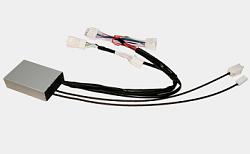
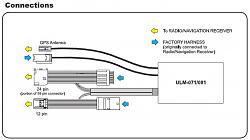
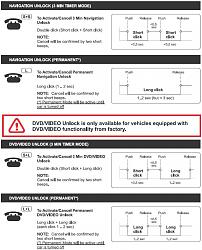
Features:
2014-2015 IS250/350, 2015 NX/NXh, 2015 RC/RC-F, 2015 IS-F/IS-C, 2014-2015 CT 200h/F Sport, 2015 LS 460/600hl, 2014-2015 GX 470/460, 2015 GS 350/430/460/450h. (Older Lexus models are available; see www.vaistech.com)
NEW!!!
Beat-Sonic NDS6223EP Navigation and DVD Control Bypass Module
MSRP: $239
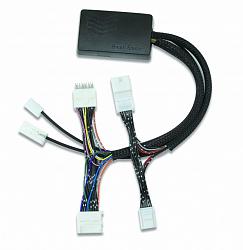
Features:
2013-2015 IS250/350 (w/ Factory Nav), 2015 NX/NXh, 2015 RC/RC-F, 2013-2016 CT 200h/F Sport, 2013-2015 LS 460/600hl, 2014-2016 GX 460, 2013-2015 GS 350/450h, 2013-2014 LX 570, 2013-2016 RX 350/450h, 2013-2016 ES 350/300h. (See Beat-Sonic USA for the most up-to-date information at http://www.beatsonicusa.com/nsd6223ep.html)
Beat-Sonic Navigation and DVD Control Bypass Module Combo - BB6223
MSRP: $240
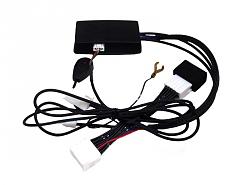
Features:
2013-2015 IS250/350 (w/ Factory Nav), 2015 NX/NXh, 2015 RC/RC-F, 2013-2015 CT 200h/F Sport, 2013-2015 LS 460/600hl, 2014-2015 GX 460, 2013-2015 GS 350/450h, 2013-2014 LX 570, 2013-2015 RX 350/450h, 2013-2015 ES 350/300h. (See Beat-Sonic USA for the most up-to-date information at http://www.beatsonicusa.com/bb6223.html)
Beat-Sonic Navigation and DVD Control Bypass Module Combo - NT6223
MSRP: $220
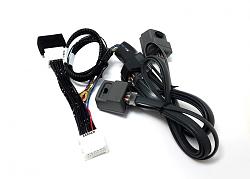
Features:
2013 IS250/350, 2015 NX/NXh, 2015 RC/RC-F, 2013-2015 CT 200h, 2013-2014 LS 460/600hl, 2013-2014 GS 350/450h, 2013-2014 LX 570, 2013-2014 RX 350/450h, 2013-2014 ES 350/300h. (See Beat-Sonic USA for the most up-to-date information at http://www.beatsonicusa.com/nt6223.html)
More to come when released...
Club Lexus Members,
I'm putting this thread together to outline the available devices to unlock the navigation and/or video/DVD playback while the car is in motion. Again, as a disclaimer these modules are not intended for the driver to use while the vehicle is moving. Be smart and use responsibly. Thanks!
Vais Technology - ULM-81 (with Factory Navigation)
MSRP: $199.99


Features:
- Seamless Integration with Factory Steering Wheel Controls
- Independent Navigation System Unlock
- Independent Video playback unlock
- Plug and Play design
- Retains all factory installed equipment
2014-2015 IS250/350, 2015 NX/NXh, 2015 RC/RC-F, 2015 IS-F/IS-C, 2014-2015 CT 200h/F Sport, 2015 LS 460/600hl, 2014-2015 GX 470/460, 2015 GS 350/430/460/450h. (Older Lexus models are available; see www.vaistech.com)
NEW!!!
Beat-Sonic NDS6223EP Navigation and DVD Control Bypass Module
MSRP: $239
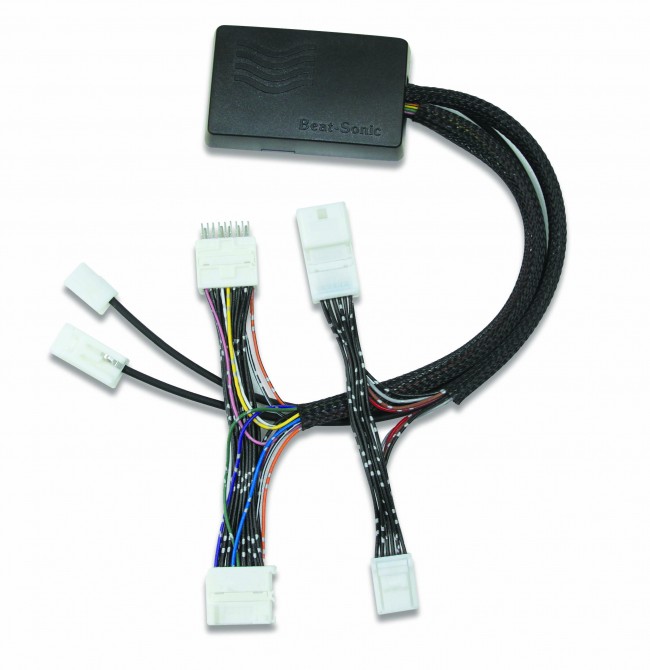
Features:
- Enable functions that lock out when car is in motion
- Plug and Play harness
- Full time video/DVD in motion WITHOUT the need to press any buttons
- EM steering wheel button activation to unlock navigation system and Lexus Enform App Suite
- Audible beep(s) from OEM navigation system to confirm bypass status
- Made in Japan
2013-2015 IS250/350 (w/ Factory Nav), 2015 NX/NXh, 2015 RC/RC-F, 2013-2016 CT 200h/F Sport, 2013-2015 LS 460/600hl, 2014-2016 GX 460, 2013-2015 GS 350/450h, 2013-2014 LX 570, 2013-2016 RX 350/450h, 2013-2016 ES 350/300h. (See Beat-Sonic USA for the most up-to-date information at http://www.beatsonicusa.com/nsd6223ep.html)
Beat-Sonic Navigation and DVD Control Bypass Module Combo - BB6223
MSRP: $240

Features:
- Enable functions that lock out when car is in motion
- Plug and Play harness
- One-touch button to easily override factory navigation system
- LED indicator on button to confirm bypass
- Active continuous DVD in motion
- Made in Japan
2013-2015 IS250/350 (w/ Factory Nav), 2015 NX/NXh, 2015 RC/RC-F, 2013-2015 CT 200h/F Sport, 2013-2015 LS 460/600hl, 2014-2015 GX 460, 2013-2015 GS 350/450h, 2013-2014 LX 570, 2013-2015 RX 350/450h, 2013-2015 ES 350/300h. (See Beat-Sonic USA for the most up-to-date information at http://www.beatsonicusa.com/bb6223.html)
Beat-Sonic Navigation and DVD Control Bypass Module Combo - NT6223
MSRP: $220

Features:
- Enable functions that lock out when car is in motion
- Plug and Play harness
- One-touch switch to easily override factory navigation system
- Control button that enables the DVD player bypass
- Made in Japan
2013 IS250/350, 2015 NX/NXh, 2015 RC/RC-F, 2013-2015 CT 200h, 2013-2014 LS 460/600hl, 2013-2014 GS 350/450h, 2013-2014 LX 570, 2013-2014 RX 350/450h, 2013-2014 ES 350/300h. (See Beat-Sonic USA for the most up-to-date information at http://www.beatsonicusa.com/nt6223.html)
More to come when released...
Last edited by shirosan; Jan 26, 2016 at 07:10 PM.

Driver
Joined: Jun 2014
Posts: 132
Likes: 1
From: Ontario
Thanks for the thread- something on my list as an upgrade.
Just to clarify, the beat sonics cannot integrate steering wheel controls?
My car displays text messages when stopped otherwise it only reads it out..I presume this would be an overridden feature as well?
Just to clarify, the beat sonics cannot integrate steering wheel controls?
My car displays text messages when stopped otherwise it only reads it out..I presume this would be an overridden feature as well?


For beatsonic, There is separate button you mount somewhere and press when you want to allow for operation as if you were parked.
Thread Starter
Driver
Joined: Feb 2015
Posts: 117
Likes: 4
From: FL
Edit: I ordered the Vais Tech ULM-81 since I really like the integrated steering wheel control. I will have to leave a review when I test it out.

Driver School Candidate
Joined: Mar 2015
Posts: 27
Likes: 0
From: GA
That's true on the separate button. Though I cannot confirm on the text option but it makes sense that it would let the system text when the bypass is engaged.
Edit: I ordered the Vais Tech ULM-81 since I really like the integrated steering wheel control. I will have to leave a review when I test it out.
Edit: I ordered the Vais Tech ULM-81 since I really like the integrated steering wheel control. I will have to leave a review when I test it out.
Last edited by trutano; Mar 21, 2015 at 10:54 AM. Reason: Incorrect reply

Trending Topics

Driver School Candidate
Joined: Mar 2015
Posts: 27
Likes: 0
From: GA
I was able to install my VAIS today and I'm very happy with it.
Yes, it does pause your navi. The trick is to cancel the bypass just before your hit the "Go" in the navi screen, it will resume smoothly. Otherwise, it will take a very long time to resume from a location that "is not real" and route it to your desired destination.
Everything is so easy because it's integrated in your steering wheel.
Something that I was not expecting (or I was not aware) is that it will bypass the restriction in the BING search engine. It is excellent in case you don't have the location in your map database.
Yes, it does pause your navi. The trick is to cancel the bypass just before your hit the "Go" in the navi screen, it will resume smoothly. Otherwise, it will take a very long time to resume from a location that "is not real" and route it to your desired destination.
Everything is so easy because it's integrated in your steering wheel.
Something that I was not expecting (or I was not aware) is that it will bypass the restriction in the BING search engine. It is excellent in case you don't have the location in your map database.

Driver School Candidate
Joined: Mar 2015
Posts: 5
Likes: 0
From: FL
I was able to install my VAIS today and I'm very happy with it.
Yes, it does pause your navi. The trick is to cancel the bypass just before your hit the "Go" in the navi screen, it will resume smoothly. Otherwise, it will take a very long time to resume from a location that "is not real" and route it to your desired destination.
Everything is so easy because it's integrated in your steering wheel.
Something that I was not expecting (or I was not aware) is that it will bypass the restriction in the BING search engine. It is excellent in case you don't have the location in your map database.
Yes, it does pause your navi. The trick is to cancel the bypass just before your hit the "Go" in the navi screen, it will resume smoothly. Otherwise, it will take a very long time to resume from a location that "is not real" and route it to your desired destination.
Everything is so easy because it's integrated in your steering wheel.
Something that I was not expecting (or I was not aware) is that it will bypass the restriction in the BING search engine. It is excellent in case you don't have the location in your map database.
Was the Vais $174.99? Or is their a group price available? Just wondering if it is worth it to get the VAIS for the integrated steering wheel controls, or to go with the beat-sonic for $100.
Driver School Candidate
Joined: Mar 2015
Posts: 27
Likes: 0
From: GA


Driver School Candidate
Joined: Apr 2015
Posts: 1
Likes: 0
From: Texas
VAIS Install
I was able to install my VAIS today and I'm very happy with it.
Yes, it does pause your navi. The trick is to cancel the bypass just before your hit the "Go" in the navi screen, it will resume smoothly. Otherwise, it will take a very long time to resume from a location that "is not real" and route it to your desired destination.
Everything is so easy because it's integrated in your steering wheel.
Something that I was not expecting (or I was not aware) is that it will bypass the restriction in the BING search engine. It is excellent in case you don't have the location in your map database.
Yes, it does pause your navi. The trick is to cancel the bypass just before your hit the "Go" in the navi screen, it will resume smoothly. Otherwise, it will take a very long time to resume from a location that "is not real" and route it to your desired destination.
Everything is so easy because it's integrated in your steering wheel.
Something that I was not expecting (or I was not aware) is that it will bypass the restriction in the BING search engine. It is excellent in case you don't have the location in your map database.
Driver School Candidate
Joined: Mar 2015
Posts: 27
Likes: 0
From: GA
It is not difficult if you know which screws need to be removed (there are not too many). Took me 30 mins and I'm not a professional installer.
Last edited by trutano; Apr 10, 2015 at 06:00 PM.

Driver School Candidate
Joined: May 2015
Posts: 43
Likes: 1
From: GREECE
Rx 450h eu model
i am currently investigating all possibilities to retrofit vim and tire pressure monitoring ,ACC and home link on my 2010 RX450H...
Since Lexus support will not even know how to give me the info i need (parts no etc)
Can any one assist with part numbers ?
in particular i am looking for the part number of the adaptive cruisecontrol radar and the steering wheel extra buttons for it ( i am not sure if itrequires a ecu to control the acc ) .i have located the service workshop cd andwaiting for delivery as well.
when it comes to vim i was told by most of the above mentioned companiesthat the EU version of the 6th generation navi for Eu models has not beentested yet...
i don’t see what the difference will be in functionality though ,since thesoftware only change ,but the hardware are the same as the US models?
Any technical thoughts will be appreciated
thx
ARI
GREECE
Thread Starter
Driver
Joined: Feb 2015
Posts: 117
Likes: 4
From: FL
Hello there
i am currently investigating all possibilities to retrofit vim and tire pressure monitoring ,ACC and home link on my 2010 RX450H...
Since Lexus support will not even know how to give me the info i need (parts no etc)
Can any one assist with part numbers ?
in particular i am looking for the part number of the adaptive cruisecontrol radar and the steering wheel extra buttons for it ( i am not sure if itrequires a ecu to control the acc ) .i have located the service workshop cd andwaiting for delivery as well.
when it comes to vim i was told by most of the above mentioned companiesthat the EU version of the 6th generation navi for Eu models has not beentested yet...
i don’t see what the difference will be in functionality though ,since thesoftware only change ,but the hardware are the same as the US models?
Any technical thoughts will be appreciated
thx
ARI
GREECE
i am currently investigating all possibilities to retrofit vim and tire pressure monitoring ,ACC and home link on my 2010 RX450H...
Since Lexus support will not even know how to give me the info i need (parts no etc)
Can any one assist with part numbers ?
in particular i am looking for the part number of the adaptive cruisecontrol radar and the steering wheel extra buttons for it ( i am not sure if itrequires a ecu to control the acc ) .i have located the service workshop cd andwaiting for delivery as well.
when it comes to vim i was told by most of the above mentioned companiesthat the EU version of the 6th generation navi for Eu models has not beentested yet...
i don’t see what the difference will be in functionality though ,since thesoftware only change ,but the hardware are the same as the US models?
Any technical thoughts will be appreciated
thx
ARI
GREECE
