


HDD Nav.... digging deeper...


Ok Guys... Here is what I got so far.... I created 2 partition on the drive. Both are FAT. One has the Navi Image on it, The other had a few vob files for DVD play back. The dvd is playing Flawless with out any problems. Unable to Play DIVX nor MP3. Also one more problem. When I launch the dvd files it plays fine but there is no way to stop the file unless I turn off the Navigation. I am also unable to toggle between the Navi image and VOB files. I might have to dig a bit deeper with this. In the mean while any comments or ideas any one wants to throw down my way I am all ears 


Ok Guys... Here is what I got so far.... I created 2 partition on the drive. Both are FAT. One has the Navi Image on it, The other had a few vob files for DVD play back. The dvd is playing Flawless with out any problems. Unable to Play DIVX nor MP3. Also one more problem. When I launch the dvd files it plays fine but there is no way to stop the file unless I turn off the Navigation. I am also unable to toggle between the Navi image and VOB files. I might have to dig a bit deeper with this. In the mean while any comments or ideas any one wants to throw down my way I am all ears

Just wondering if you were able to see the individual files that contain the NAV info, and if there are ways to manipulate the files to change the colors or the background of the whole GUI.

Last edited by GlobeCLK; May 8, 2008 at 11:30 PM.

Driver School Candidate
Joined: Jun 2005
Posts: 47
Likes: 0
From: LC
 NAV data files?
Hi All,
When you look at the HDD via a pc, can you see the NAV data files:
COVERAGE (folder)
IDX (folder)
ALLDATA.KWI
LOADING.KWI
The reason I ask is if I were to load an older LOADING.KWI file to enable the well known NAV hack, pull the fuse, and let the old NAV firmware load, would we see success?
Thanks,
Bill
When you look at the HDD via a pc, can you see the NAV data files:
COVERAGE (folder)
IDX (folder)
ALLDATA.KWI
LOADING.KWI
The reason I ask is if I were to load an older LOADING.KWI file to enable the well known NAV hack, pull the fuse, and let the old NAV firmware load, would we see success?
Thanks,
Bill
Update: I was able to play around with the Navi files but the only problem is that when I write them back to the HDD they do not get recognized by the Navi. Now if the original is loaded it takes it right away. Now for the DVD files. They are playing fine but I am still unable to forward or rewind through those files. The volume comes out from the Navi volume and I am unable to figure out a way to play around it. I will be taking the navi computer a part this weekend and play with it.
Driver School Candidate
Joined: Jun 2005
Posts: 47
Likes: 0
From: LC

Update: I was able to play around with the Navi files but the only problem is that when I write them back to the HDD they do not get recognized by the Navi. Now if the original is loaded it takes it right away. Now for the DVD files. They are playing fine but I am still unable to forward or rewind through those files. The volume comes out from the Navi volume and I am unable to figure out a way to play around it. I will be taking the navi computer a part this weekend and play with it.
Thanks,
Bill

Update: I was able to play around with the Navi files but the only problem is that when I write them back to the HDD they do not get recognized by the Navi. Now if the original is loaded it takes it right away. Now for the DVD files. They are playing fine but I am still unable to forward or rewind through those files. The volume comes out from the Navi volume and I am unable to figure out a way to play around it. I will be taking the navi computer a part this weekend and play with it.
For playing dvd movie, how u get that work? since u have 2 partitions in the hard drive, do you have to set the movie partition ACTIVE? vice versa for the navi?
Let us know any latest... THANK YOU for this great job!!!!

I was working with RTIS about a year ago on this.
I couldnt get any other laptop drive to work with the nav unit. Seems like the nav unit only reads 4000k drives. Let me know what drive model you're using.
I have the nav files backuped somewhere on my network if anyone wants a crack at the files. I couldnt find any software that would open these files to alter.
I couldnt get any other laptop drive to work with the nav unit. Seems like the nav unit only reads 4000k drives. Let me know what drive model you're using.
I have the nav files backuped somewhere on my network if anyone wants a crack at the files. I couldnt find any software that would open these files to alter.
i think there is a setting for the navigation volume (up/down) in 1 of those screens. i have to look it up tonight.
For playing dvd movie, how u get that work? since u have 2 partitions in the hard drive, do you have to set the movie partition ACTIVE? vice versa for the navi?
Let us know any latest... THANK YOU for this great job!!!!
For playing dvd movie, how u get that work? since u have 2 partitions in the hard drive, do you have to set the movie partition ACTIVE? vice versa for the navi?
Let us know any latest... THANK YOU for this great job!!!!

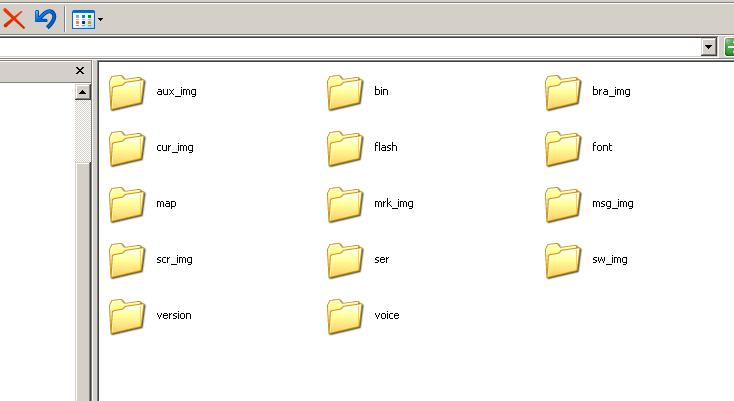
Found my backup files of the NAV HDD files. Below is a screenshot of the folders.
Also let us know which HD did you use. I tried using a few of my laptop drives but the lexus nav wouldnt read it.
Any updates on your end hksnlper?
If anyone wants a crack at editing the files, let me know.
Last edited by sputniknyc; Jul 29, 2008 at 11:24 AM.

 Hd
Hd
i think there is a setting for the navigation volume (up/down) in 1 of those screens. i have to look it up tonight.
For playing dvd movie, how u get that work? since u have 2 partitions in the hard drive, do you have to set the movie partition ACTIVE? vice versa for the navi?
Let us know any latest... THANK YOU for this great job!!!!
For playing dvd movie, how u get that work? since u have 2 partitions in the hard drive, do you have to set the movie partition ACTIVE? vice versa for the navi?
Let us know any latest... THANK YOU for this great job!!!!
Found my backup files of the NAV HDD files. Below is a screenshot of the folders.
Also let us know which HD did you use. I tried using a few of my laptop drives but the lexus nav wouldnt read it.
Any updates on your end hksnlper?
If anyone wants a crack at editing the files, let me know.
Also let us know which HD did you use. I tried using a few of my laptop drives but the lexus nav wouldnt read it.
Any updates on your end hksnlper?
If anyone wants a crack at editing the files, let me know.

so you have the nav system but missing the harddrive?

Guys here is what I used Toshiba Laptop hard drive 4000k with a fresh Format. Only loaded with the vob files. Works like a charm but volume only comes out from Left speaker and its low. After that I kinda gave up. Ill see if I can play around with it any more but I might not get any time plus I am thinking about upgrading to a GS460 soon so I dont know but Ill keep every one posted.

Driver
Joined: Jul 2008
Posts: 185
Likes: 0
From: Alabama
It's odd that the hard drive is only 1.6 gig because the DVD based navi data is over 7 gig by itself.
I have my dvd-based black box out of the car right now as the dvd drive has failed utterly.
If you have pictures of your black box and how the hard drive connects, I'd love to see them!
Thanks,
David
I have my dvd-based black box out of the car right now as the dvd drive has failed utterly.
If you have pictures of your black box and how the hard drive connects, I'd love to see them!
Thanks,
David