








2007 3GS NAV/DVD/CD Override plug-n-play kit test results - it works!

Thread Starter
Pole Position
Joined: Oct 2006
Posts: 290
Likes: 0
From: FL
 2007 3GS NAV/DVD/CD Override plug-n-play kit test results - it works!
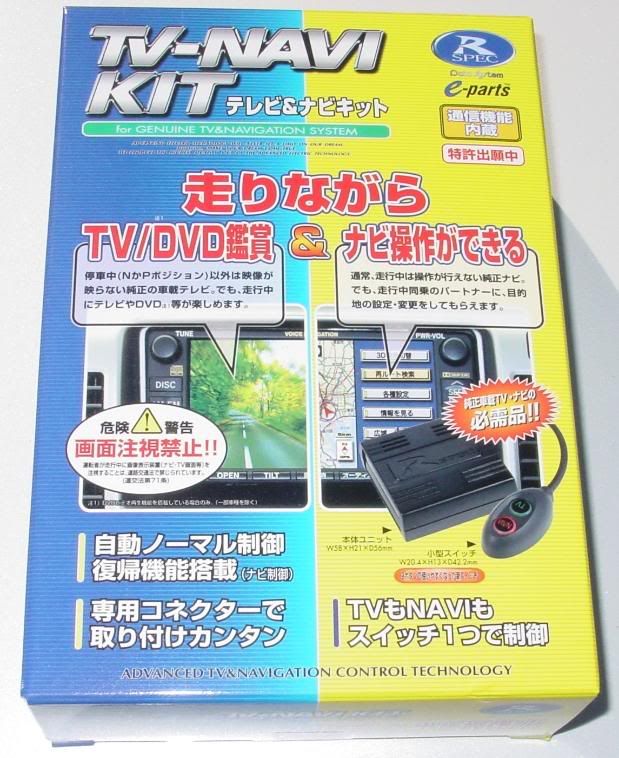
What: Plug-n-Play kit from Japan market for allowing DVD playback, all NAV features (entering address, POI, etc), and CD Changer track/playlist access while vehicle is in motion.
Who: Kit is made by Data System of Japan / R-Spec - http://www.datasystem.co.jp
Importer / Supplier of kit in North America is Prestigious Society - www.prestigioussociety.com
For: 2007 Lexus G350, GS430, GS450h with Navigation and ML Sound System (for DVD playback feature to work)
Cost: Contact <sales "at" prestigioussociety.com> for more information.
Why Use It?: This kit is useful for people who want a plug-n-play solution or who are not willing to perform the wire-cutting mods to their cars. The kit will cost more than the DIY wire-cutting mod, but for some this is an acceptable trade-off.
Test Results: The unit performs as advertised by Prestigious Society from all the tests I could think to run. These covered everything from watching DVD's while in motion and using DVD on-screen controls, using CD changer features like playlist details and track names while in motion, and entering address and POI queries from the NAV systm while the car was in motion.

Installation Time: Roughly 20 minutes from start to end.
Installation Tools: #2 Philips, small flat screwdriver, 10mm socket with 3" extension (for radio removal), needle-nose pliers
Installation Overview:
1. Remove interior trim and pull out radio.
See this thread for details:
(thanks to VVT-i for the great DIY post)
https://www.clublexus.com/forums/sho...d.php?t=156160
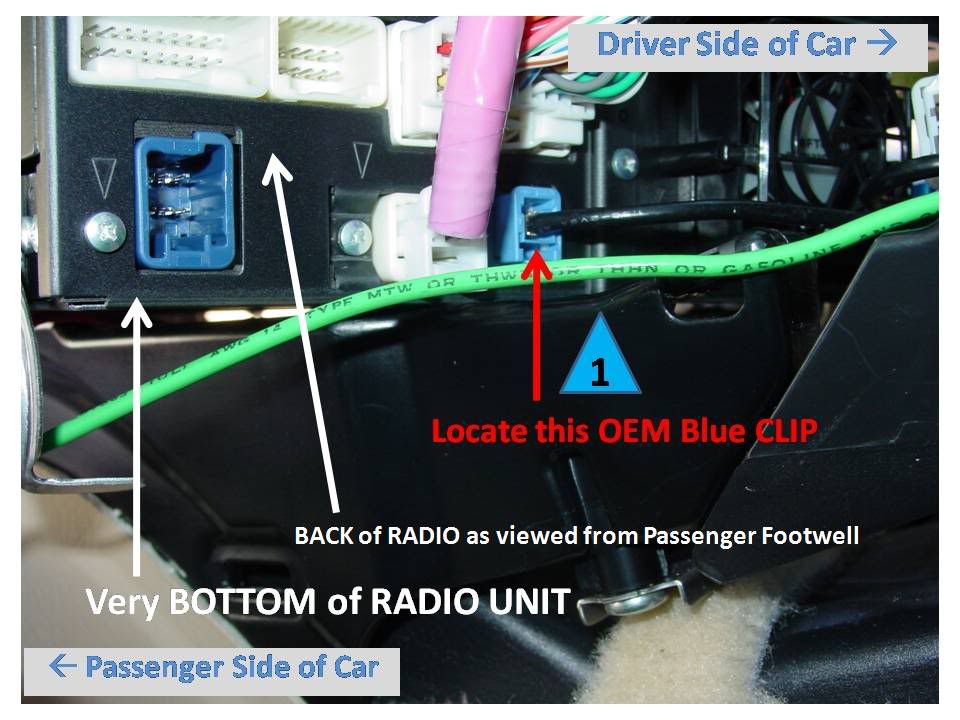
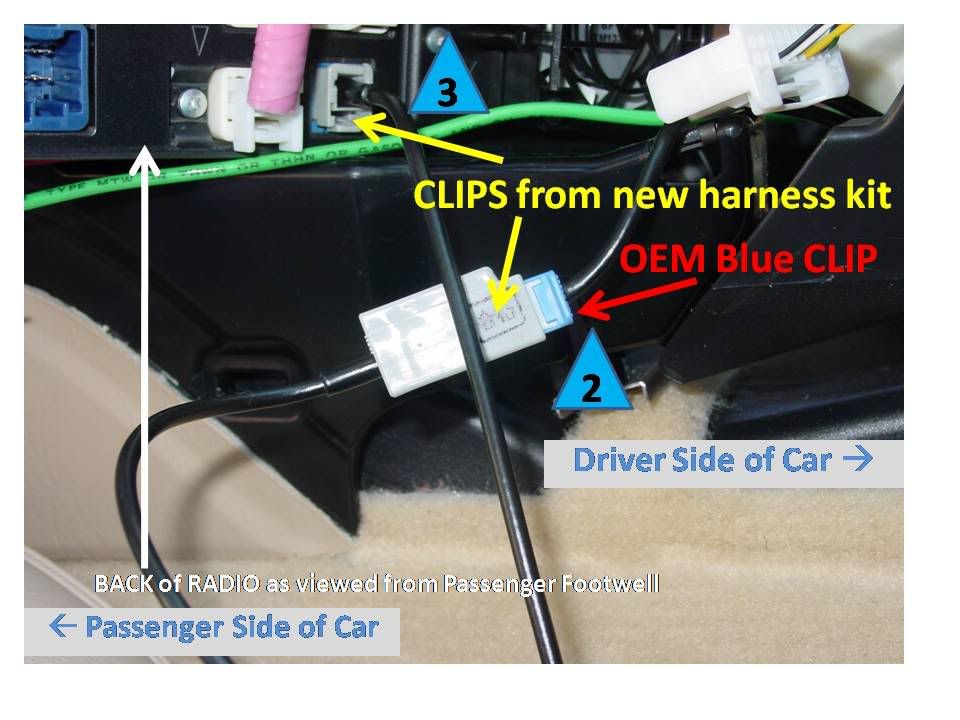
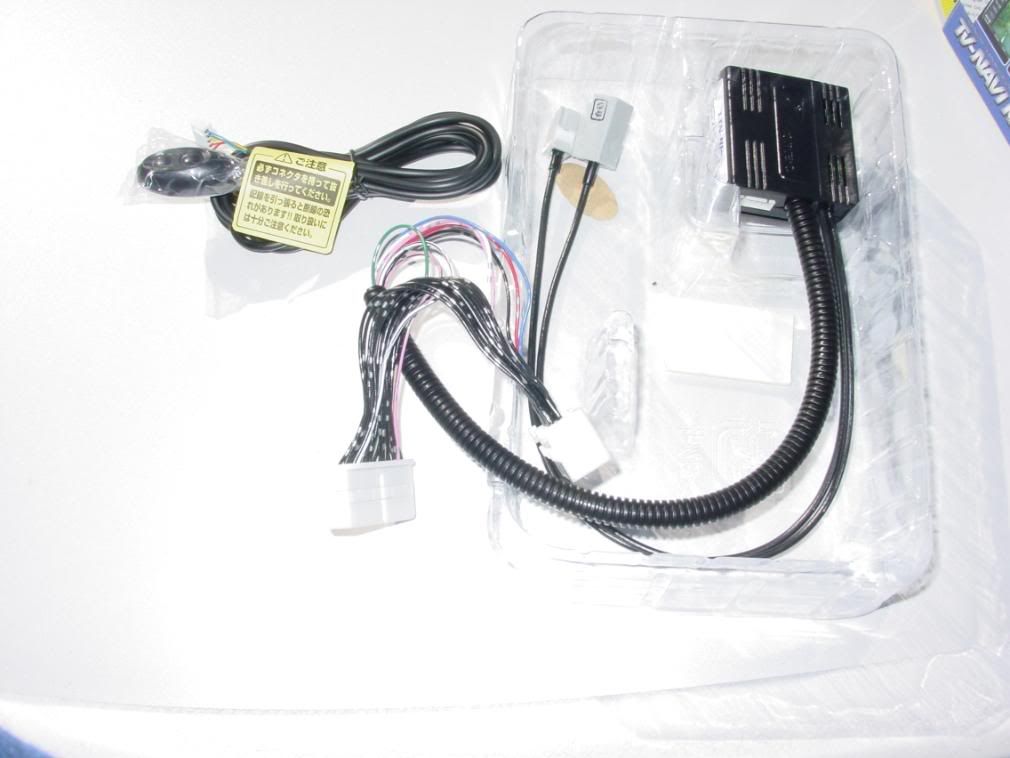
2. Remove OEM signal wire (blue clip in photos below) and insert into gray bypass harness from new override kit. Refer to blue triangles 1, 2 & 3 in photos below. Due to tight fit, you may need to use needle-nose pliers to firmly insert new gray bypass harness kit wire block into back of OEM radio unit (see location near triangle # 3).
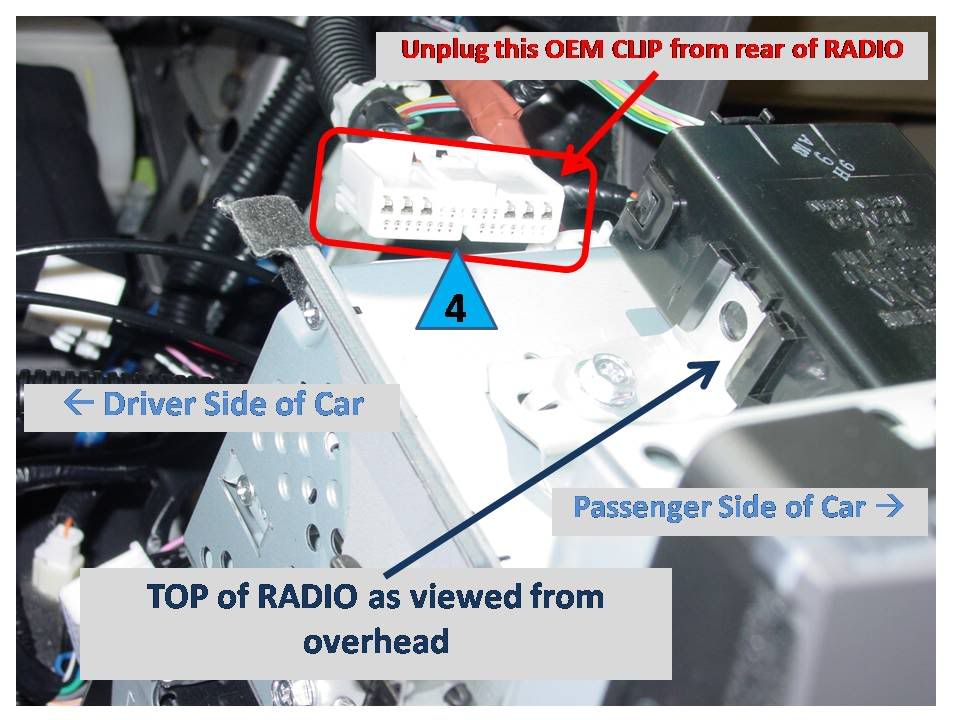
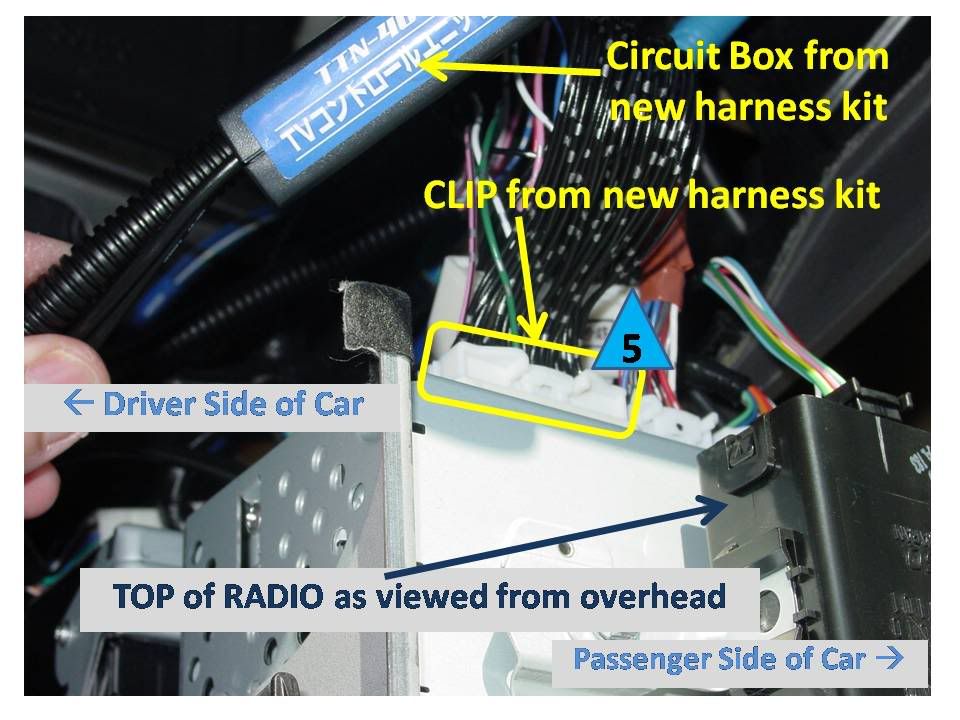
3. Remove OEM Navigation / DVD harness from back of radio and insert into white bypass harness from new override kit. Refer to blue triangles 4 & 5 in photos below.
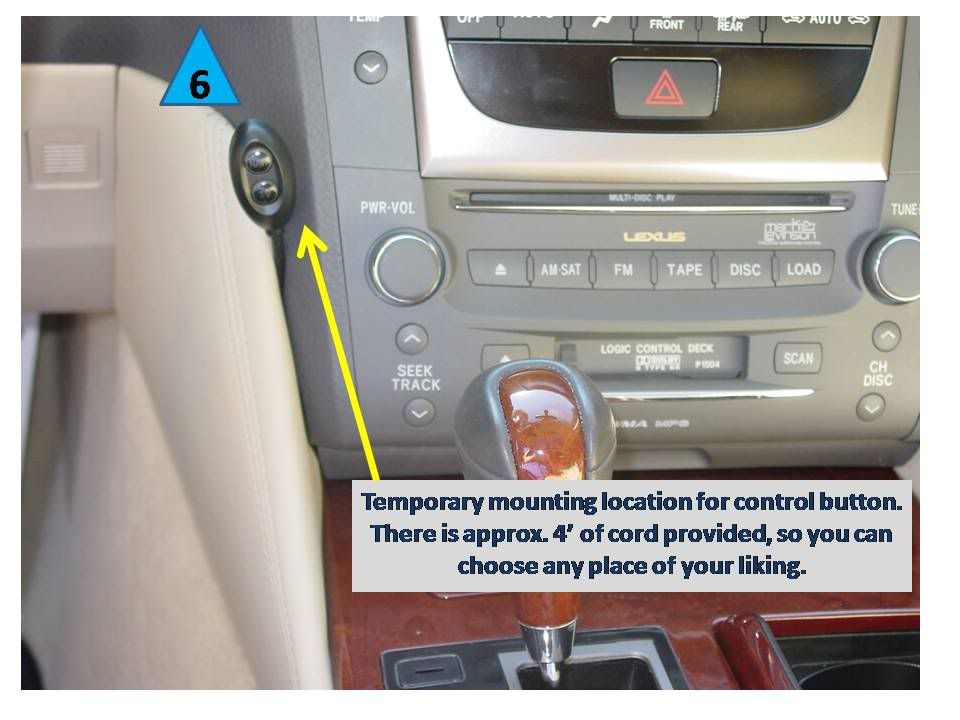
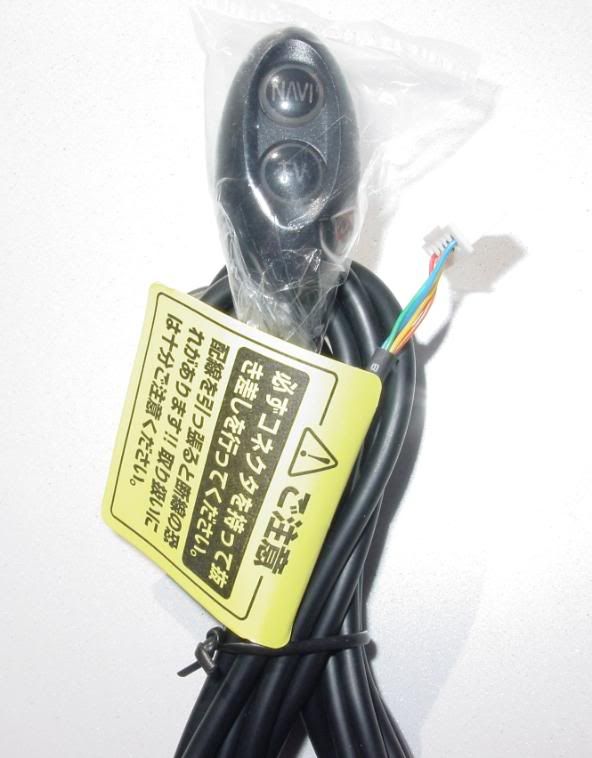
4. Insert button control wire from new kit into override circuit block and decide on mounting location for your car. Refer to blue triangle 6 in photo below.
5. Reverse removal procedures and re-install your radio and trim pieces.
6. Enjoy access to all radio CD Changer / DVD playback, and NAV system features while in motion.
** It should also be noted that in my installation case, this new override unit works just fine with the existing VAIS Tech iPod interface kit already installed. No issues at all with them coexisting.
Operation: Press TV button to view DVD while in motion. Press NAVI button to access locked-out CD radio and Navigation features while in motion. GPS route tracking may not be accurate while this button is active. Press NAVI a second time to return to locked-out state and restore full GPS tracking (takes 8-10 seconds to return to normal). As a side feature, NAVI button turns off automatically after 5 minutes of activation.
Installation Pictures:
Related Pictures:
Who: Kit is made by Data System of Japan / R-Spec - http://www.datasystem.co.jp
Importer / Supplier of kit in North America is Prestigious Society - www.prestigioussociety.com
For: 2007 Lexus G350, GS430, GS450h with Navigation and ML Sound System (for DVD playback feature to work)
Cost: Contact <sales "at" prestigioussociety.com> for more information.
Why Use It?: This kit is useful for people who want a plug-n-play solution or who are not willing to perform the wire-cutting mods to their cars. The kit will cost more than the DIY wire-cutting mod, but for some this is an acceptable trade-off.
Test Results: The unit performs as advertised by Prestigious Society from all the tests I could think to run. These covered everything from watching DVD's while in motion and using DVD on-screen controls, using CD changer features like playlist details and track names while in motion, and entering address and POI queries from the NAV systm while the car was in motion.
Installation Time: Roughly 20 minutes from start to end.
Installation Tools: #2 Philips, small flat screwdriver, 10mm socket with 3" extension (for radio removal), needle-nose pliers
Installation Overview:
1. Remove interior trim and pull out radio.
See this thread for details:
(thanks to VVT-i for the great DIY post)
https://www.clublexus.com/forums/sho...d.php?t=156160
2. Remove OEM signal wire (blue clip in photos below) and insert into gray bypass harness from new override kit. Refer to blue triangles 1, 2 & 3 in photos below. Due to tight fit, you may need to use needle-nose pliers to firmly insert new gray bypass harness kit wire block into back of OEM radio unit (see location near triangle # 3).
3. Remove OEM Navigation / DVD harness from back of radio and insert into white bypass harness from new override kit. Refer to blue triangles 4 & 5 in photos below.
4. Insert button control wire from new kit into override circuit block and decide on mounting location for your car. Refer to blue triangle 6 in photo below.
5. Reverse removal procedures and re-install your radio and trim pieces.
6. Enjoy access to all radio CD Changer / DVD playback, and NAV system features while in motion.
** It should also be noted that in my installation case, this new override unit works just fine with the existing VAIS Tech iPod interface kit already installed. No issues at all with them coexisting.
Operation: Press TV button to view DVD while in motion. Press NAVI button to access locked-out CD radio and Navigation features while in motion. GPS route tracking may not be accurate while this button is active. Press NAVI a second time to return to locked-out state and restore full GPS tracking (takes 8-10 seconds to return to normal). As a side feature, NAVI button turns off automatically after 5 minutes of activation.
Installation Pictures:
Related Pictures:
woohoo! this is awesome bob!!!!!!!! so you ordered and got the kits already (and installed)? that's fast! took me a while to get mine. prestigious society rules! i am glad that everything worked out on your side!
it's great to know that the unit works fine with vaistech as well, that's a big plus.
seems like if i get a gs350 i will have to order another unit
their webpage is www.prestigioussociety.com, can shoot an email to chung@prestigioussociety.com
it's great to know that the unit works fine with vaistech as well, that's a big plus.
seems like if i get a gs350 i will have to order another unit
their webpage is www.prestigioussociety.com, can shoot an email to chung@prestigioussociety.com
This is awesome....Here is a question.....what does the dial pad do when you hit the phone button....do you have to press the navi button to access phone pad ??
On a side note... I am actually confused on why there appears to be a brain to this unit since all the wire mods do is reroute a wire for us.....
On a side note... I am actually confused on why there appears to be a brain to this unit since all the wire mods do is reroute a wire for us.....
Thread Starter
Pole Position
Joined: Oct 2006
Posts: 290
Likes: 0
From: FL
Perhaps this houses the simple timer circuit that shuts off the NAVI button press after 5 minutes. There could also be more in there... I did not open it up to see what the PCB looked like inside or what components were mounted to it.
Thanks for clarifying....so it seems, when you have not pressed any buttons, the vehicle behaves like nothing was ever done.....so for phone as well as mp3 controls, they are locked out unless you press the navi button.
Thread Starter
Pole Position
Joined: Oct 2006
Posts: 290
Likes: 0
From: FL
Correct. Without pressing the NAVI button, the usual OEM behavior (i.e. locked-out while in motion) is present.
Trending Topics
ClubLexus Stories
Celebrating Lexus & Toyota from Around the Globe

Lexus NX 350h: A Fuel-Sipping Secret Hot Hatch???
Michael S. Palmer
5 Best & 5 Worst Lexus Daily Drivers
Joe Kucinski
Top 5 Hottest Lexus & Toyotas in 2026 (Hardest To Buy)
Brett Foote
2026 Lexus IS 350 F Sport Review: The Last of Its Kind Still Rocks
Michael S. Palmer
Top 10 Most Confusing Things Lexus Has Ever Done!
Joe Kucinski
2026 Lexus ES Review: Lexus Re-Embraces Founding Principles
Michael S. Palmer
10 Lexus Bargains That are Cheaper Than a New Toyota RAV4
Joe Kucinski
8 Weirdest Things Lexus Has Ever Built
Verdad Gallardo
10 Lexus Designs That Have Aged Like Fine Wine
Verdad Gallardo

Thread Starter
Pole Position
Joined: Oct 2006
Posts: 290
Likes: 0
From: FL
@sf7307, Joe Z - thanks for the nice words... I am not a great photographer but enjoy trying... this kit was really simple to plug in... the only hard part is thinking of a good spot to mount the button unit... at least each of you can decide where you want it placed and make it happen... there is plenty of cable for almost any mounting spot... I am trying out the center console area now, near that empty swich spot by the seat heater controls...
for the ls460 and 3gs it's easier coz' you have that leather panel where the control can "stick out", the 2is is something i have to look at to make sure.
yes, basically the NAVI button is the mastermind for everything
regarding the brain, for sure it has a timer on the unit on the 5 mins. i don't know what else is in there though.
yes, basically the NAVI button is the mastermind for everything
regarding the brain, for sure it has a timer on the unit on the 5 mins. i don't know what else is in there though.

Lexus Fanatic
iTrader: (10)
Joined: Nov 2004
Posts: 13,441
Likes: 1,083
From: Under an IS F since 2008
@sf7307, Joe Z - thanks for the nice words... I am not a great photographer but enjoy trying... this kit was really simple to plug in... the only hard part is thinking of a good spot to mount the button unit... at least each of you can decide where you want it placed and make it happen... there is plenty of cable for almost any mounting spot... I am trying out the center console area now, near that empty swich spot by the seat heater controls...
Side note: I'm surprised Lexus is still pumping tape decks into 07's..


