


3rd Gen GS Nav Bluetooth DVD mods thread

Thread Starter
Pole Position
iTrader: (5)
Joined: Aug 2005
Posts: 2,733
Likes: 39
From: Alta Loma, CA

Yes, those are for the cigarette lighter and the small light in there, and pop off the bottom of the center shifter console.
Word of advise, in order to shift the car out of park and easily remove the center console, pop off the small plastic above the letter P (park) using a screw driver, then you can easily press down on the plastic tab in there and shift the car into neutral (that way you dont have to press the start button) and hear the annoying beeps....
Word of advise, in order to shift the car out of park and easily remove the center console, pop off the small plastic above the letter P (park) using a screw driver, then you can easily press down on the plastic tab in there and shift the car into neutral (that way you dont have to press the start button) and hear the annoying beeps....
Last edited by EyeKutr; Nov 12, 2007 at 09:32 PM.

Driver School Candidate
Joined: Jul 2006
Posts: 34
Likes: 0
From: VA
Hybrid DVD Navigation Data Ver. 7.1 confirmed to work
Hi Everyone,
I just wanted to confirm for everyone that creating a hybrid Nav DVD with the new 7.1 map data is working perfectly.
After searching the forums from top to bottom I found plenty of information on creating a hybrid disc with a 5.1 loading.kwi and 6.1 map data, but because the disc is so new I've read nothing that says that Denso didn't screw with things in the 7.1 map data to make the 5.1 loading.kwi file inoperable.
Therefore, I'm trying to help everyone out by confirming that they did not. I'm sorry to say that I can't be absolutely 100% positive for everyone here. In my present situation I have three things: A Generation 4 Nav system, an older 4.2 DVD Nav Map disc, and the brand spanking new 7.1 DVD Nav Map disc. Using Sonartech's process to the letter (even used Ones and Memorex DVD's) I made a hybrid DVD that works flawlessly, no hiccups in the process at all.
So currently I CAN'T confirm that: a Generation 5 Nav system + a 5.1 loading.kwi file + 7.1 Map data = Hybrid DVD success.
I CAN however confirm that: a Generation 4 Nav system + 4.2 loading.kwi (Sonartech confirmed for me that there is no difference between this and the 5.1 loading.kwi) file + 7.1 Map data = Hybrid DVD success.
Gen 4 and Gen 5 Nav systems are basically the same, mainly they just did a graphical overhaul.
So for anyone who's looking to take the plunge on updating to 7.1 and making a hybrid DVD (on Gen 4 or 5), I can say with 95% certainty that you'll probably be alright. It would be great if anyone could confirm the Generation 5 question for me so that we can be 100% certain.
Hope this helps,
Inocen1
I just wanted to confirm for everyone that creating a hybrid Nav DVD with the new 7.1 map data is working perfectly.
After searching the forums from top to bottom I found plenty of information on creating a hybrid disc with a 5.1 loading.kwi and 6.1 map data, but because the disc is so new I've read nothing that says that Denso didn't screw with things in the 7.1 map data to make the 5.1 loading.kwi file inoperable.
Therefore, I'm trying to help everyone out by confirming that they did not. I'm sorry to say that I can't be absolutely 100% positive for everyone here. In my present situation I have three things: A Generation 4 Nav system, an older 4.2 DVD Nav Map disc, and the brand spanking new 7.1 DVD Nav Map disc. Using Sonartech's process to the letter (even used Ones and Memorex DVD's) I made a hybrid DVD that works flawlessly, no hiccups in the process at all.
So currently I CAN'T confirm that: a Generation 5 Nav system + a 5.1 loading.kwi file + 7.1 Map data = Hybrid DVD success.
I CAN however confirm that: a Generation 4 Nav system + 4.2 loading.kwi (Sonartech confirmed for me that there is no difference between this and the 5.1 loading.kwi) file + 7.1 Map data = Hybrid DVD success.
Gen 4 and Gen 5 Nav systems are basically the same, mainly they just did a graphical overhaul.
So for anyone who's looking to take the plunge on updating to 7.1 and making a hybrid DVD (on Gen 4 or 5), I can say with 95% certainty that you'll probably be alright. It would be great if anyone could confirm the Generation 5 question for me so that we can be 100% certain.
Hope this helps,
Inocen1

Lexus Test Driver
Joined: Nov 2007
Posts: 1,065
Likes: 2
From: MA
what have you tried? either disconnect the negative battery terminal or pull the fuse for the navi head. and wait several minutes. when you are back up and load the hybrid you should see the loading screen with the progress bar come up. if so you should be good. if that doesn't do it, sorry. no other tips. both of those worked for me.
Lexus Test Driver
Joined: Nov 2007
Posts: 1,065
Likes: 2
From: MA
Hi Everyone,
I just wanted to confirm for everyone that creating a hybrid Nav DVD with the new 7.1 map data is working perfectly.
After searching the forums from top to bottom I found plenty of information on creating a hybrid disc with a 5.1 loading.kwi and 6.1 map data, but because the disc is so new I've read nothing that says that Denso didn't screw with things in the 7.1 map data to make the 5.1 loading.kwi file inoperable.
Therefore, I'm trying to help everyone out by confirming that they did not. I'm sorry to say that I can't be absolutely 100% positive for everyone here. In my present situation I have three things: A Generation 4 Nav system, an older 4.2 DVD Nav Map disc, and the brand spanking new 7.1 DVD Nav Map disc. Using Sonartech's process to the letter (even used Ones and Memorex DVD's) I made a hybrid DVD that works flawlessly, no hiccups in the process at all.
So currently I CAN'T confirm that: a Generation 5 Nav system + a 5.1 loading.kwi file + 7.1 Map data = Hybrid DVD success.
I CAN however confirm that: a Generation 4 Nav system + 4.2 loading.kwi (Sonartech confirmed for me that there is no difference between this and the 5.1 loading.kwi) file + 7.1 Map data = Hybrid DVD success.
Gen 4 and Gen 5 Nav systems are basically the same, mainly they just did a graphical overhaul.
So for anyone who's looking to take the plunge on updating to 7.1 and making a hybrid DVD (on Gen 4 or 5), I can say with 95% certainty that you'll probably be alright. It would be great if anyone could confirm the Generation 5 question for me so that we can be 100% certain.
Hope this helps,
Inocen1
I just wanted to confirm for everyone that creating a hybrid Nav DVD with the new 7.1 map data is working perfectly.
After searching the forums from top to bottom I found plenty of information on creating a hybrid disc with a 5.1 loading.kwi and 6.1 map data, but because the disc is so new I've read nothing that says that Denso didn't screw with things in the 7.1 map data to make the 5.1 loading.kwi file inoperable.
Therefore, I'm trying to help everyone out by confirming that they did not. I'm sorry to say that I can't be absolutely 100% positive for everyone here. In my present situation I have three things: A Generation 4 Nav system, an older 4.2 DVD Nav Map disc, and the brand spanking new 7.1 DVD Nav Map disc. Using Sonartech's process to the letter (even used Ones and Memorex DVD's) I made a hybrid DVD that works flawlessly, no hiccups in the process at all.
So currently I CAN'T confirm that: a Generation 5 Nav system + a 5.1 loading.kwi file + 7.1 Map data = Hybrid DVD success.
I CAN however confirm that: a Generation 4 Nav system + 4.2 loading.kwi (Sonartech confirmed for me that there is no difference between this and the 5.1 loading.kwi) file + 7.1 Map data = Hybrid DVD success.
Gen 4 and Gen 5 Nav systems are basically the same, mainly they just did a graphical overhaul.
So for anyone who's looking to take the plunge on updating to 7.1 and making a hybrid DVD (on Gen 4 or 5), I can say with 95% certainty that you'll probably be alright. It would be great if anyone could confirm the Generation 5 question for me so that we can be 100% certain.
Hope this helps,
Inocen1
based on my attempts, i believe that 7.1 (dvd U22) is somewhat of a major rewrite: there is about a gig LESS data on the 7.1 dvd than there is on the 5.1. most of that diff is in the index files which i presume are used for address/poi searching as inputs are done and there is a 13th file on 7.1 that does not have a companion on the 5.1 version (it has 12 folders or files). rethinking my approach but based on what i had success with and what failed, I'm stuck. if anybody has any ideas, great. but right now, i would say the 5.1/7.1 for Gen4 doesnt work and I can't duplicate the claim that 7.1 works with 4.2. So in my opinion, buyer beware when it comes to Gen4 7.1 if you expect to be able to maintain override features by burning a hybrid.
have been in touch with several members that successfully got a 5.1/7.1 hybrid to work on Gen5 nav systems. Those 7.1 dvds are different than the U22 disc for my Gen4. Odd that a gen5 would work when a gen4 won't but that's where i ended up.
Last edited by ecount00; Dec 1, 2007 at 06:32 AM.
i'm trying the 5.1 / 6.1 combo right now with the Taiwan version DVD, befor i burn the DVD , i found out the LOADING.KWI file from both version have the same size, anyone know if i should just do the same replace the 5.1 LOADING.KWI with 6.1 LOADING.KWI, beside the LOADING. KWI file , 6.1's ALLDATA / GRA256D/ KGRA256 / PCT256D /VAR256D.kwi are all bigger the 5.1's, is that same as the US U20/ U21 ?
i checked with the taiwan's 06 GS and it does have the override option, and my 07 doesnt
Thanks
i checked with the taiwan's 06 GS and it does have the override option, and my 07 doesnt
Thanks

8th Gear

Joined: Jan 2006
Posts: 8
Likes: 0
From: CA
To 6MTIS250: "Same size" is insufficient proof that it can work ... and make sure you do not mix "LOADING.KWI" from different "Generations" of NAV system (for example, Gen4 on 2006 GS versus Gen5 on 2007 GS).
"6.1" refers to the 2006 annual release of updated map data. "5.1" refers to the data disc released in 2005. Each data disc (DVD) of course also contains a "LOADING.KWI" file. The "x.1" does not refer to the NAV generation, nor the vehicle model year. I am not yet clear on what the "U20", "W41", etc., code on the DVD refer to or what exact meaning they have.
You said "... replace the 5.1 LOADING.KWI with 6.1 LOADING.KWI ...". Note that the "LOADING.KWI" is the firmware (function) as opposed to map data. The reason we want to replace 6.1 "LOADING.KWI" with 5.1 (not the other way around as you state) is to get BACK the override function that was available in the LOADING.KWI file on the (same generation NAV) 2005 data disc.
Hope I explained without causing extra confusion.
"6.1" refers to the 2006 annual release of updated map data. "5.1" refers to the data disc released in 2005. Each data disc (DVD) of course also contains a "LOADING.KWI" file. The "x.1" does not refer to the NAV generation, nor the vehicle model year. I am not yet clear on what the "U20", "W41", etc., code on the DVD refer to or what exact meaning they have.
You said "... replace the 5.1 LOADING.KWI with 6.1 LOADING.KWI ...". Note that the "LOADING.KWI" is the firmware (function) as opposed to map data. The reason we want to replace 6.1 "LOADING.KWI" with 5.1 (not the other way around as you state) is to get BACK the override function that was available in the LOADING.KWI file on the (same generation NAV) 2005 data disc.
Hope I explained without causing extra confusion.
To 6MTIS250: "Same size" is insufficient proof that it can work ... and make sure you do not mix "LOADING.KWI" from different "Generations" of NAV system (for example, Gen4 on 2006 GS versus Gen5 on 2007 GS).
"6.1" refers to the 2006 annual release of updated map data. "5.1" refers to the data disc released in 2005. Each data disc (DVD) of course also contains a "LOADING.KWI" file. The "x.1" does not refer to the NAV generation, nor the vehicle model year. I am not yet clear on what the "U20", "W41", etc., code on the DVD refer to or what exact meaning they have.
You said "... replace the 5.1 LOADING.KWI with 6.1 LOADING.KWI ...". Note that the "LOADING.KWI" is the firmware (function) as opposed to map data. The reason we want to replace 6.1 "LOADING.KWI" with 5.1 (not the other way around as you state) is to get BACK the override function that was available in the LOADING.KWI file on the (same generation NAV) 2005 data disc.
Hope I explained without causing extra confusion.
"6.1" refers to the 2006 annual release of updated map data. "5.1" refers to the data disc released in 2005. Each data disc (DVD) of course also contains a "LOADING.KWI" file. The "x.1" does not refer to the NAV generation, nor the vehicle model year. I am not yet clear on what the "U20", "W41", etc., code on the DVD refer to or what exact meaning they have.
You said "... replace the 5.1 LOADING.KWI with 6.1 LOADING.KWI ...". Note that the "LOADING.KWI" is the firmware (function) as opposed to map data. The reason we want to replace 6.1 "LOADING.KWI" with 5.1 (not the other way around as you state) is to get BACK the override function that was available in the LOADING.KWI file on the (same generation NAV) 2005 data disc.
Hope I explained without causing extra confusion.
i thought Hybird Navi DVD is replace the 6.1's loading.kwi to 5.1's loading.kwi
6.1's map data + 5.1's loading = hybird DVD ?
ClubLexus Stories
Celebrating Lexus & Toyota from Around the Globe

Lexus NX 350h: A Fuel-Sipping Secret Hot Hatch???
Michael S. Palmer
5 Best & 5 Worst Lexus Daily Drivers
Joe Kucinski
Top 5 Hottest Lexus & Toyotas in 2026 (Hardest To Buy)
Brett Foote
2026 Lexus IS 350 F Sport Review: The Last of Its Kind Still Rocks
Michael S. Palmer
Top 10 Most Confusing Things Lexus Has Ever Done!
Joe Kucinski
2026 Lexus ES Review: Lexus Re-Embraces Founding Principles
Michael S. Palmer
10 Lexus Bargains That are Cheaper Than a New Toyota RAV4
Joe Kucinski
8 Weirdest Things Lexus Has Ever Built
Verdad Gallardo
10 Lexus Designs That Have Aged Like Fine Wine
Verdad Gallardo
Thread Starter
Pole Position
iTrader: (5)
Joined: Aug 2005
Posts: 2,733
Likes: 39
From: Alta Loma, CA
Lexus Test Driver
Joined: Nov 2007
Posts: 1,065
Likes: 2
From: MA
In my case, i got 5.1loading/6.1 maps to work. i can NOT get 5.1loading/7.1 maps to work on my gen4 nav in 2006 GS. am told by members with gen5 systems they got 5.1/7.1 to work. On my gen4, the system reads the hybrid dvds, i can bring up the override menu, the destination buttons look active but don't advance to the input screen. have been over my technique several times and can't get 5.1/7.1 to work. more details a few posts up. I used U20 dvd 5.1. the 7.1 dvd was marked u22.
8th Gear
Joined: Jan 2006
Posts: 8
Likes: 0
From: CA
TOUGH wiring job !
Well … that was a THRILL RIDE ! Both FUN and SCARY !
I have never taken apart a vehicle, or any part thereof, and I’ve never even changed the oil. Once I changed a tire, and a long time ago I might have changed some light bulbs (through easy-access compartments in the trunk). But … I do have some electronics experience (soldering, building PCs from basic components).
First of all, thank you to all of you who went before me and posted pictures, instructions, hints, or other advice.
I wanted to be well-prepared … I had taken about a week+ to read over all posts with instructions, probably a half dozen times. I decided to cut two wires (not the yellow Parking Brake one --- I don’t have ML DVD ability): purple and pink as illustrated elsewhere, while at the same time minimizing the chance of having to pull the NAV display unit out of the dash more than once. So, since cutting two wire ends up with four points, I pre-built a 4-wire 18 AWG (solid copper) extension harness (33 inches in length – my best guesstimate of what’s required) several days prior to starting actually working on the car. I used bullet-connectors (crimp style) and made sure to match up male/female so that if I ever decided to pull the NAV again and reverse the mod I could just remove my harness and reconnect the original wires. The extension harness would allow me full flexibility of where to put a switch (in-line with purple wire or direct connect purple-to-pink, etc). See below:
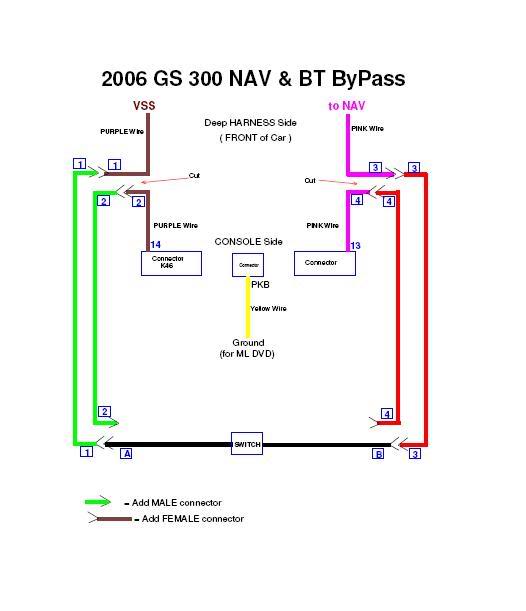
I started at 11:30am parked in the sun (for warmth and better lighting). The entire mechanical part of the “tear-down” operation went smoothly (thanks to https://www.clublexus.com/forums/sho...d.php?t=156160 ) and relatively fast (45 minutes ?). But then I found myself staring at the wiring harnesses into the back of the touch-screen-display unit for some major surprises. First off, I had the unit partially pulled out of the dash and resting on the console (where the shifter is). This allows very little room to reach the wiring harnesses. I was in no mood to completely remove the unit from the vehicle. I could barely reach in, and could NOT comfortably use my standard wire strippers while leaving enough room for error in the confined space. But more importantly I suddenly realized that I am dealing with 26 AWG or less (28+) wire … and I was not equipped (tools) to really do a good job with this. My crimp-style bullet-connectors were made for 18 – 22 gauge. A third problem: the length of exposed wiring (between the original yellow electrical tape and the connectors) was quite short and the tape had been applied professionally to the point of making removal without proper tools a major undertaking. I sat looking at the wiring job ahead of me with trepidation and in a daze lasting probably 15 minutes. I bounced between giving up (just put everything back) or going through with it …
I must explain here that I was fine with using the manual NAV override (screen tapping) for the past 18+ months. The hassle (on the occasions when we wanted to use GPS) did not really bother me a lot. Not having worked on cars before made me not brave enough to attempt the wiring mod. BUT …. What really irked me and ticked me off is a few weeks ago, after giving my wife a new Blue Tooth phone as an anniversary present for hands-free dialing in her car … finding out that those &^%^$UY()@ dudes at Lexus do not allow display of even the speed-dial buttons on the screen. Her choice was either to memorize the numbers assigned to the buttons, or stop the vehicle, or retrieve the brand new phone from her purse to make an outgoing NOT-hands-free call. I should also add that as of July 1, 2008 California REQUIRES hands-free.
With all these issues swirling through my head … I decided “to hell with it” and I proceeded with the re-wiring job. Removal of the yellow electrical tape (and some blue tape on the other harness (K46)) took a while as I was making sure not to cause any accidental damage to the fragile wiring. I had no idea that the wires were this thin … the nice photos at https://www.clublexus.com/forums/sho...2&postcount=92 are so nicely “blown-up” you can’t really tell. And for some reason you don’t get any results searching the forums for “AWG”. In addition the wires are stranded. So with the little amount of exposed wire, then the stripping, and then using crimp-style connectors meant for wire of a much larger size … you get the idea. I guess I could have used a soldering iron … but definitely wanted to avoid using one … one slip of the hot iron and a lot of new damage could occur. Also I wanted the mod to be easily reversible …
It took me probably 1+ hour before I had my wiring harness attached to the cut wires and being able to reverse all of the display-unit-removal procedures. … BUT …. EVENTUALLY … SUCCESS !!
The rest of the install went smoothly. Routing my 33 inch wiring harness to the Heat/Vent/Trac/VSC console was a breeze. My son helped sand-papering the switch from Radio Shack … to make it fit smoothly inside the Lexus “switch-holder” blank. After sawing off the top of the blank (which he tossed in the garbage) I realized it might be useful as it could be used to cover up the new switch … hiding the entire mod from view when I take the car in for service … I will be looking through the trash a little later for it. At around 3pm I did a quick test drive ... and by 4pm the car was all cleaned up.
THE BOTTOM LINE: On Thanksgiving Day I completed my wife’s 2006 GS 300 (NAV but w/o ML) BT/NAV wiring & switch mod.
I don’t want to belabor my trials and tribulations any further … everything works, my wife discovered a side-effect (seat-belt-buzzer MUCH less annoying – more on that later), and I caution anyone wondering whether to attempt this … be prepared to work in a very confined area, with 26+ AWG wire.
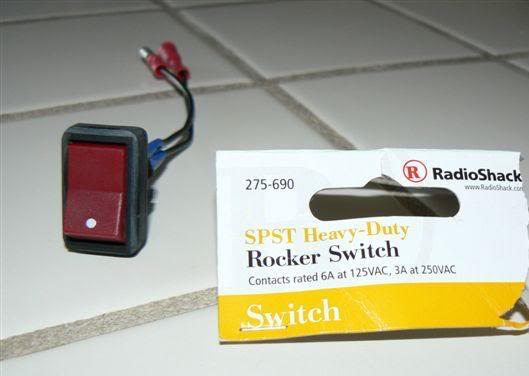
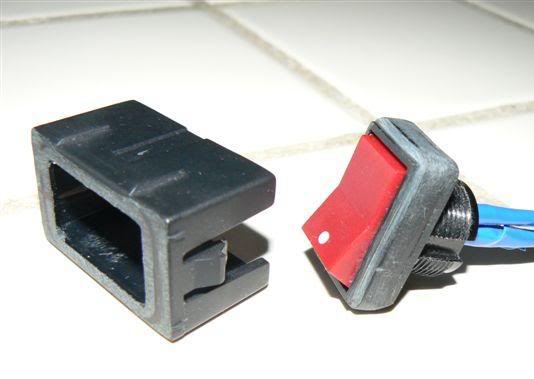
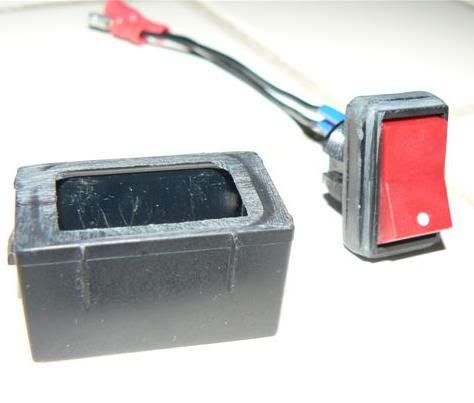
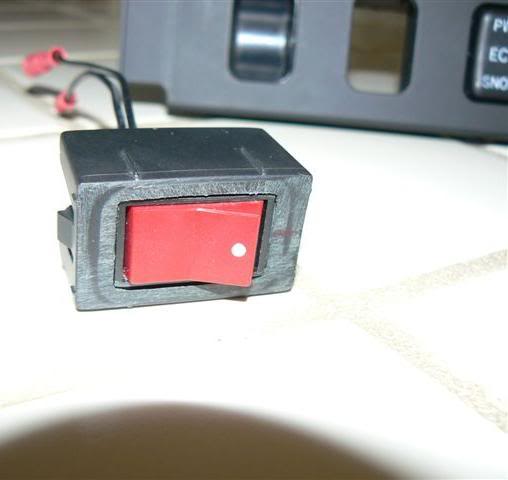
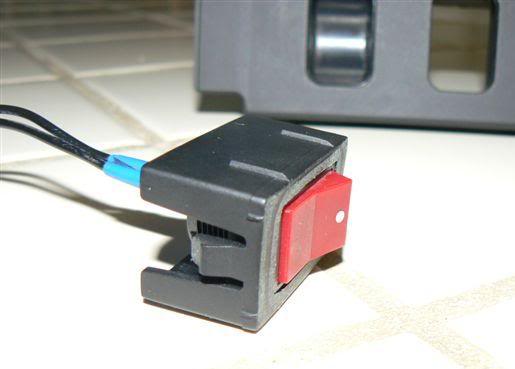
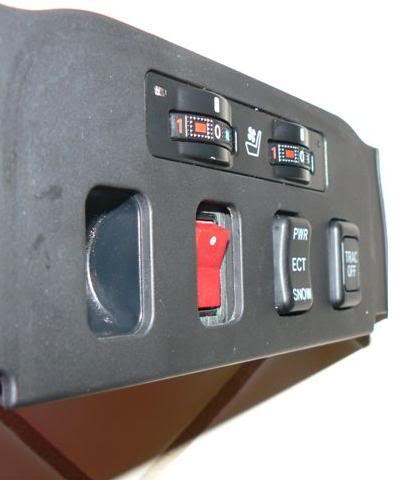
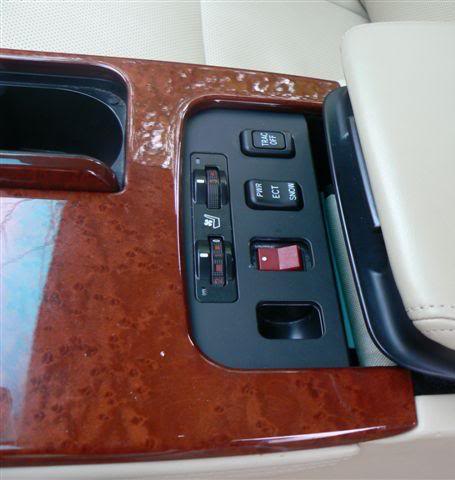
I have never taken apart a vehicle, or any part thereof, and I’ve never even changed the oil. Once I changed a tire, and a long time ago I might have changed some light bulbs (through easy-access compartments in the trunk). But … I do have some electronics experience (soldering, building PCs from basic components).
First of all, thank you to all of you who went before me and posted pictures, instructions, hints, or other advice.
I wanted to be well-prepared … I had taken about a week+ to read over all posts with instructions, probably a half dozen times. I decided to cut two wires (not the yellow Parking Brake one --- I don’t have ML DVD ability): purple and pink as illustrated elsewhere, while at the same time minimizing the chance of having to pull the NAV display unit out of the dash more than once. So, since cutting two wire ends up with four points, I pre-built a 4-wire 18 AWG (solid copper) extension harness (33 inches in length – my best guesstimate of what’s required) several days prior to starting actually working on the car. I used bullet-connectors (crimp style) and made sure to match up male/female so that if I ever decided to pull the NAV again and reverse the mod I could just remove my harness and reconnect the original wires. The extension harness would allow me full flexibility of where to put a switch (in-line with purple wire or direct connect purple-to-pink, etc). See below:
I started at 11:30am parked in the sun (for warmth and better lighting). The entire mechanical part of the “tear-down” operation went smoothly (thanks to https://www.clublexus.com/forums/sho...d.php?t=156160 ) and relatively fast (45 minutes ?). But then I found myself staring at the wiring harnesses into the back of the touch-screen-display unit for some major surprises. First off, I had the unit partially pulled out of the dash and resting on the console (where the shifter is). This allows very little room to reach the wiring harnesses. I was in no mood to completely remove the unit from the vehicle. I could barely reach in, and could NOT comfortably use my standard wire strippers while leaving enough room for error in the confined space. But more importantly I suddenly realized that I am dealing with 26 AWG or less (28+) wire … and I was not equipped (tools) to really do a good job with this. My crimp-style bullet-connectors were made for 18 – 22 gauge. A third problem: the length of exposed wiring (between the original yellow electrical tape and the connectors) was quite short and the tape had been applied professionally to the point of making removal without proper tools a major undertaking. I sat looking at the wiring job ahead of me with trepidation and in a daze lasting probably 15 minutes. I bounced between giving up (just put everything back) or going through with it …
I must explain here that I was fine with using the manual NAV override (screen tapping) for the past 18+ months. The hassle (on the occasions when we wanted to use GPS) did not really bother me a lot. Not having worked on cars before made me not brave enough to attempt the wiring mod. BUT …. What really irked me and ticked me off is a few weeks ago, after giving my wife a new Blue Tooth phone as an anniversary present for hands-free dialing in her car … finding out that those &^%^$UY()@ dudes at Lexus do not allow display of even the speed-dial buttons on the screen. Her choice was either to memorize the numbers assigned to the buttons, or stop the vehicle, or retrieve the brand new phone from her purse to make an outgoing NOT-hands-free call. I should also add that as of July 1, 2008 California REQUIRES hands-free.
With all these issues swirling through my head … I decided “to hell with it” and I proceeded with the re-wiring job. Removal of the yellow electrical tape (and some blue tape on the other harness (K46)) took a while as I was making sure not to cause any accidental damage to the fragile wiring. I had no idea that the wires were this thin … the nice photos at https://www.clublexus.com/forums/sho...2&postcount=92 are so nicely “blown-up” you can’t really tell. And for some reason you don’t get any results searching the forums for “AWG”. In addition the wires are stranded. So with the little amount of exposed wire, then the stripping, and then using crimp-style connectors meant for wire of a much larger size … you get the idea. I guess I could have used a soldering iron … but definitely wanted to avoid using one … one slip of the hot iron and a lot of new damage could occur. Also I wanted the mod to be easily reversible …
It took me probably 1+ hour before I had my wiring harness attached to the cut wires and being able to reverse all of the display-unit-removal procedures. … BUT …. EVENTUALLY … SUCCESS !!
The rest of the install went smoothly. Routing my 33 inch wiring harness to the Heat/Vent/Trac/VSC console was a breeze. My son helped sand-papering the switch from Radio Shack … to make it fit smoothly inside the Lexus “switch-holder” blank. After sawing off the top of the blank (which he tossed in the garbage) I realized it might be useful as it could be used to cover up the new switch … hiding the entire mod from view when I take the car in for service … I will be looking through the trash a little later for it. At around 3pm I did a quick test drive ... and by 4pm the car was all cleaned up.
THE BOTTOM LINE: On Thanksgiving Day I completed my wife’s 2006 GS 300 (NAV but w/o ML) BT/NAV wiring & switch mod.
I don’t want to belabor my trials and tribulations any further … everything works, my wife discovered a side-effect (seat-belt-buzzer MUCH less annoying – more on that later), and I caution anyone wondering whether to attempt this … be prepared to work in a very confined area, with 26+ AWG wire.
Thread Starter
Pole Position
iTrader: (5)
Joined: Aug 2005
Posts: 2,733
Likes: 39
From: Alta Loma, CA
Congrats, I failed to mention the thin nature of the wires. I actually used a similar thin wire for my extensions (only 2 that connect to the switch) and used a solder iron (the needle tip that heats up slowly - not the trigger kind) and soldered to the wires in the dash, I would hate for those to get loose such that you need to pull the thing out again.


Lead Lap
Joined: Apr 2007
Posts: 639
Likes: 0
From: SF Krew
that red switch fits in there, but now people must think it launches missiles when switched.. Nice.. I don't think I have the courage to rewire... software hack is as far as I'd go.  I haven't gotten far with that either.
I haven't gotten far with that either.
Thread Starter
Pole Position
iTrader: (5)
Joined: Aug 2005
Posts: 2,733
Likes: 39
From: Alta Loma, CA
I dont think there is a switch that goes there that is simply on off....there is a suspension switch for the gs430 but i dont know its positions....warranty issues will not go away with a oem switch either way