





OEM Navigation w/Voice Microphone, Remote Control and Command List Guide

Thread Starter
Driver
Joined: Mar 2002
Posts: 125
Likes: 0
From: California
 OEM Navigation w/Voice Microphone, Remote Control and Command List Guide
I consolidated most of the threads regarding Voice Navi Kit, Remote Control and Voice Command List into a more manageable thread.
After getting several PM’s, regarding this mod and constantly referring to several threads here on .Net. I decided to gather all pertinent information from various threads from is300.net and clublexus.com / put up this simplified guide.
What is this all about?
Provide Navi owner's with Voice functionality in their stock IS300 Navigation. Granting owner's access to certain features otherwise restricted while the vehicle is in motion.
The voice navi also control your Stock Radio functions (list of commands available in the download)
I’ve broken down this section into 3 parts:
Parts – Voice Navi Mic Kit/ Remote Control
Installation - Extending wirings/ stereo shop estimates/ Mic and Switch Locations
Voice Command – Installed your new toy now need Voice commands to play with.
Credits:
Jp82729 – is300.net member for original thread and pictures (see below links)
LS430inTX – clublexus member for posting LS430 Voice Command List
And finally to all .net members in the voice-navi threads (see below links)
IS300 Voice Navi Thread
IS300 Voice Navi Thread
IS300 Voice Navi Thread
LS430 Voice Command List
________________________________________________________________________
Parts:
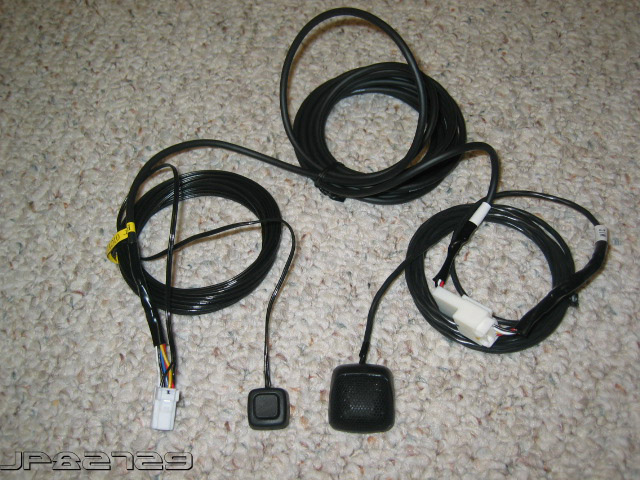
Toyota Japan Voice/Navi Microphone Kit – Toyota Part Number 86750-44020
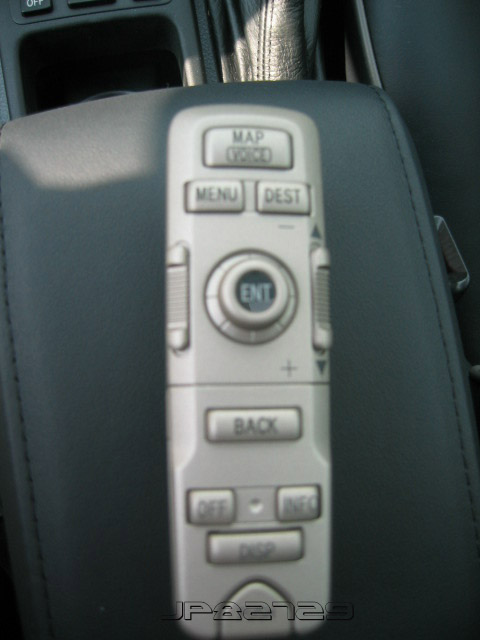
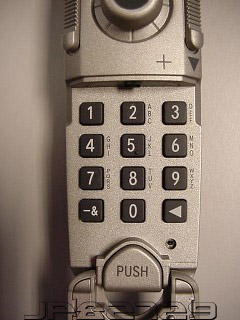
Toyota Avalon Navigation Remote Control – Toyota Part Number 86820-41031
I purchased my Voice/Navi Mic kit from Steve Ganz from Carson Toyota – www.carsontuned.com
You can also check you local Toyota/Lexus Dealership Parts Service Department. Mention the Toyota Part Number(s) above.
Also, check www.irontoad.com and www.lexus-parts.com
_________________________________________________________________________
Installation:
Toyota Avalon Navigation Remote Control: Nothing to cut or Install – Simply install batteries in the remote.
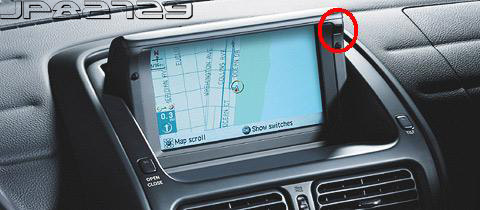
Works with Existing IR Sensor on OEM Navigation Screen (see picture below)
Toyota Voice/ Navi Microphone Kit: Plug into existing pin out in the navigation module located in the trunk. Run Wires through the left pass-thru and into the floorpanels. Through the Driver side kickpanel – From here you have various options where you want to mount the switch button and microphone. See Examples below
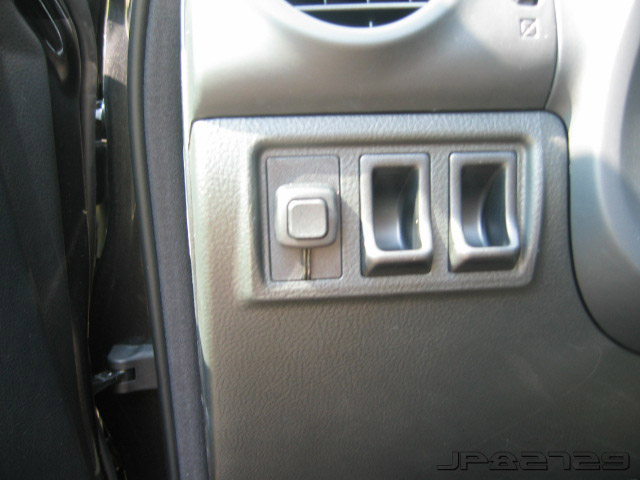
Jp82729 – Voice/Navi Install
Switch button in blank coin holder
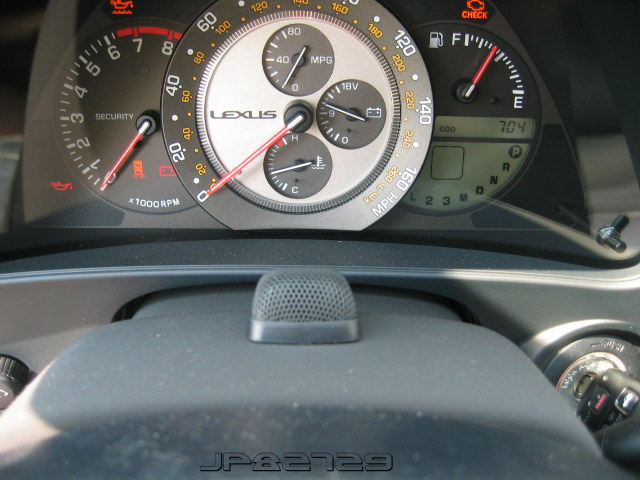
Microphone on top of the steering column
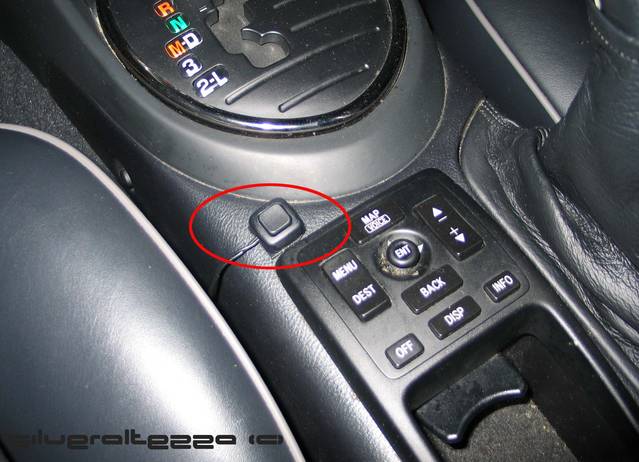
Silveraltezza – Voice/Navi Install
Switch button location above the OEM navigation controls
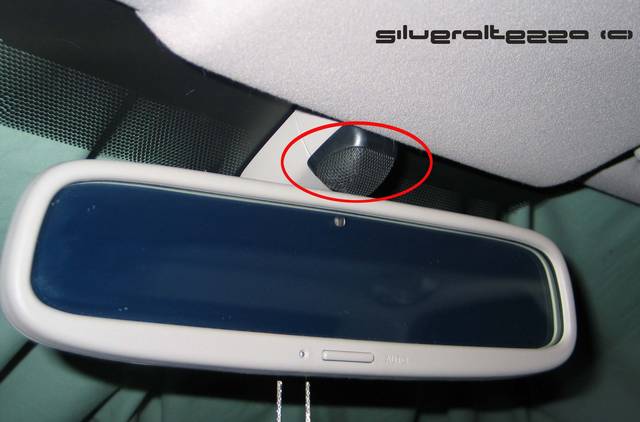
Microphone hiding by the rear view mirror (wires ran through the A-Pillar and Roof Liner.
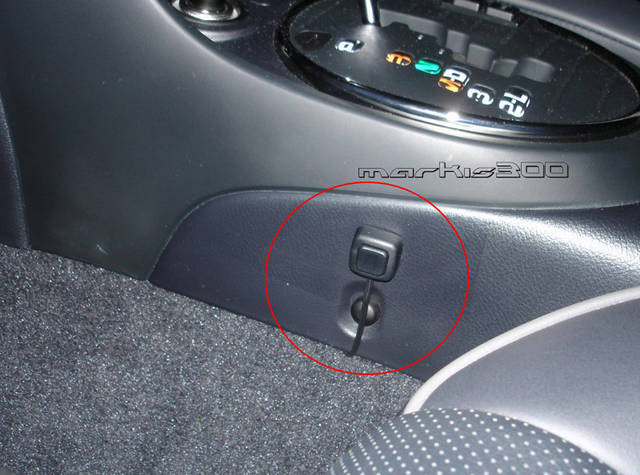
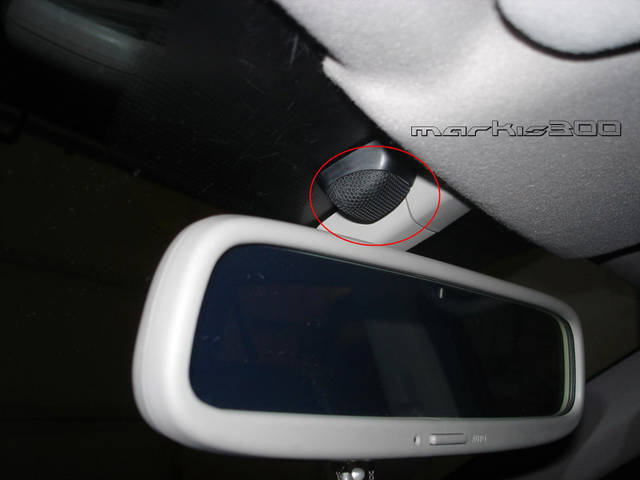
MarkIS300 – Voice/Navi Install (thanks Mark for letting me use your pictures)
Switch button mounted on the side near the automatic shifter
Microphone located near the rear view mirror (install on the side so user could adjust rear view mirrors)
Voice/Navi Kit can be install by DYI’er or have any competent stereo shop install it.
**The Wires on the kit have to be extended**
**I noticed on the Voice/Navi Kit the wires are too short (you’ll need to extend the wires another 8-12 ft.). Extend cables for both Microphone and Switch Button.
Stereo Shop Install prices I’ve gathered from other .net members varies from $45 to $100.
__________________________________________________________________________
Voice Command List:
Now that you have the Voice/Navi Microphone kit installed. You need a list of Voice commands that’ll work with your new toy.
A list of voice commands is also listed on “Quick Reference Guide” for OEM Navigation owners.
Original LS430 Download Zip File:
Clublexus Thread Download file from post #5
Full list of Voice Command Download the Zip File Below (Need Acrobat Reader to Read .PDF files) (credit to Ls430inTX for providing the downloadable .pdfs)
After getting several PM’s, regarding this mod and constantly referring to several threads here on .Net. I decided to gather all pertinent information from various threads from is300.net and clublexus.com / put up this simplified guide.
What is this all about?
Provide Navi owner's with Voice functionality in their stock IS300 Navigation. Granting owner's access to certain features otherwise restricted while the vehicle is in motion.
The voice navi also control your Stock Radio functions (list of commands available in the download)
I’ve broken down this section into 3 parts:
Parts – Voice Navi Mic Kit/ Remote Control
Installation - Extending wirings/ stereo shop estimates/ Mic and Switch Locations
Voice Command – Installed your new toy now need Voice commands to play with.
Credits:
Jp82729 – is300.net member for original thread and pictures (see below links)
LS430inTX – clublexus member for posting LS430 Voice Command List
And finally to all .net members in the voice-navi threads (see below links)
IS300 Voice Navi Thread
IS300 Voice Navi Thread
IS300 Voice Navi Thread
LS430 Voice Command List
________________________________________________________________________
Parts:
Toyota Japan Voice/Navi Microphone Kit – Toyota Part Number 86750-44020
Toyota Avalon Navigation Remote Control – Toyota Part Number 86820-41031
I purchased my Voice/Navi Mic kit from Steve Ganz from Carson Toyota – www.carsontuned.com
You can also check you local Toyota/Lexus Dealership Parts Service Department. Mention the Toyota Part Number(s) above.
Also, check www.irontoad.com and www.lexus-parts.com
_________________________________________________________________________
Installation:
Toyota Avalon Navigation Remote Control: Nothing to cut or Install – Simply install batteries in the remote.
Works with Existing IR Sensor on OEM Navigation Screen (see picture below)
Toyota Voice/ Navi Microphone Kit: Plug into existing pin out in the navigation module located in the trunk. Run Wires through the left pass-thru and into the floorpanels. Through the Driver side kickpanel – From here you have various options where you want to mount the switch button and microphone. See Examples below
Jp82729 – Voice/Navi Install
Switch button in blank coin holder
Microphone on top of the steering column
Silveraltezza – Voice/Navi Install
Switch button location above the OEM navigation controls
Microphone hiding by the rear view mirror (wires ran through the A-Pillar and Roof Liner.
MarkIS300 – Voice/Navi Install (thanks Mark for letting me use your pictures)
Switch button mounted on the side near the automatic shifter
Microphone located near the rear view mirror (install on the side so user could adjust rear view mirrors)
Voice/Navi Kit can be install by DYI’er or have any competent stereo shop install it.
**The Wires on the kit have to be extended**
**I noticed on the Voice/Navi Kit the wires are too short (you’ll need to extend the wires another 8-12 ft.). Extend cables for both Microphone and Switch Button.
Stereo Shop Install prices I’ve gathered from other .net members varies from $45 to $100.
__________________________________________________________________________
Voice Command List:
Now that you have the Voice/Navi Microphone kit installed. You need a list of Voice commands that’ll work with your new toy.
A list of voice commands is also listed on “Quick Reference Guide” for OEM Navigation owners.
Original LS430 Download Zip File:
Clublexus Thread Download file from post #5
Full list of Voice Command Download the Zip File Below (Need Acrobat Reader to Read .PDF files) (credit to Ls430inTX for providing the downloadable .pdfs)
Last edited by silveraltezza; Aug 9, 2005 at 04:38 PM. Reason: Img url changed
Thread Starter
Driver
Joined: Mar 2002
Posts: 125
Likes: 0
From: California
In regards to a couple of PM's I received.
Another extra function of the Voice Navi kit is the ability to control your Stock Radio function. Voice commands identical to the LS430 Radio Voice Commands - list is available in the PDF download above

Another extra function of the Voice Navi kit is the ability to control your Stock Radio function. Voice commands identical to the LS430 Radio Voice Commands - list is available in the PDF download above
Originally Posted by silveraltezza
In regards to a couple of PM's I received.
Another extra function of the Voice Navi kit is the ability to control your Stock Radio function. Voice commands identical to the LS430 Radio Voice Commands - list is available in the PDF download above
Another extra function of the Voice Navi kit is the ability to control your Stock Radio function. Voice commands identical to the LS430 Radio Voice Commands - list is available in the PDF download above
Trending Topics

Driver
Joined: May 2002
Posts: 115
Likes: 2
From: Ga
Are you planning on getting the remote control as well?
ClubLexus Stories
Celebrating Lexus & Toyota from Around the Globe

Lexus NX 350h: A Fuel-Sipping Secret Hot Hatch???
Michael S. Palmer
5 Best & 5 Worst Lexus Daily Drivers
Joe Kucinski
Top 5 Hottest Lexus & Toyotas in 2026 (Hardest To Buy)
Brett Foote
2026 Lexus IS 350 F Sport Review: The Last of Its Kind Still Rocks
Michael S. Palmer
Top 10 Most Confusing Things Lexus Has Ever Done!
Joe Kucinski
2026 Lexus ES Review: Lexus Re-Embraces Founding Principles
Michael S. Palmer
10 Lexus Bargains That are Cheaper Than a New Toyota RAV4
Joe Kucinski
8 Weirdest Things Lexus Has Ever Built
Verdad Gallardo
10 Lexus Designs That Have Aged Like Fine Wine
Verdad Gallardo
Rookie
Joined: Feb 2007
Posts: 62
Likes: 0
From: CA
Ya I was planning on getting it. Do you have it? If so does it work well? How hard was the install on the voice kit? Did you DIY or have a shop?
Driver
Joined: May 2002
Posts: 115
Likes: 2
From: Ga
Driver
Joined: May 2002
Posts: 115
Likes: 2
From: Ga
In the picture of the kit there are 2 white connectors. These plug into the NAV unit in the trunk.
Then simply route the wires to where you want the mic and button. You will most likely need to cut and extend the mic wires but you can use anything for this. I used some extra Cat 5 wire that I had.
It works pretty well.
The remote control doesn't need any extra configuration. Just point it to the screen and control it.
If you do get the remote control, please let me know.
thanks,
tom
Driver
Joined: May 2002
Posts: 115
Likes: 2
From: Ga
I got mine a few years ago so I'm not exactly sure, but I think I ordered it from Carson Toyota in California. The voice kit was $50.
http://www.carsontuned.com/
I don't have the remote, but I think it's around $130.
There is more information about it at http://my.is/
