


Any ultimate lockpick users


Thread Starter
Lexus Champion
Joined: Mar 2012
Posts: 1,812
Likes: 14
From: ★ᚱᚱ²²★
 Any ultimate lockpick users
Do I have to press a button on the ultimate lockpick everytime I want to use the navigation while in motion?
I emailed costaltech asking if I had to press a button and they emailed me back saying great news you can use lockpick 1 or the ultimate lockpick 1 on your vehicle. And gave me the links to buy but didnt answer my question!?
If I do have to press a button is there any module out there that will allow me to use the navigation while in motion without having to press a button?
I emailed costaltech asking if I had to press a button and they emailed me back saying great news you can use lockpick 1 or the ultimate lockpick 1 on your vehicle. And gave me the links to buy but didnt answer my question!?
If I do have to press a button is there any module out there that will allow me to use the navigation while in motion without having to press a button?
Thread Starter
Lexus Champion
Joined: Mar 2012
Posts: 1,812
Likes: 14
From: ★ᚱᚱ²²★
I heard back from costaltech and they said "each time you activate navigation in motion you will need to follow the activation steps". Theres no FAQ on their site that says what the activations steps are.
Is there any module out there that will allow me to use the navigation while in motion without having to press a button on the module?
Is there any module out there that will allow me to use the navigation while in motion without having to press a button on the module?





with some older generation nav (gen4) and if you didn't update your map since 07, there is a finger dancing method to override nav. you do it when you start the car (every time) and then the override is there the whole way until you shut off the car. you don't need to press button every time you use it.
but other than that, there is no way you can do override without having to press a button. just think of how it works, it works by telling the car you are "stopped", so that means the cursor is frozen at that location. you will need to press button to enable / disable so the sat can track you
but other than that, there is no way you can do override without having to press a button. just think of how it works, it works by telling the car you are "stopped", so that means the cursor is frozen at that location. you will need to press button to enable / disable so the sat can track you
Thread Starter
Lexus Champion
Joined: Mar 2012
Posts: 1,812
Likes: 14
From: ★ᚱᚱ²²★
with some older generation nav (gen4) and if you didn't update your map since 07, there is a finger dancing method to override nav. you do it when you start the car (every time) and then the override is there the whole way until you shut off the car. you don't need to press button every time you use it.
but other than that, there is no way you can do override without having to press a button.
but other than that, there is no way you can do override without having to press a button.
I read a thread on there that talking about that:
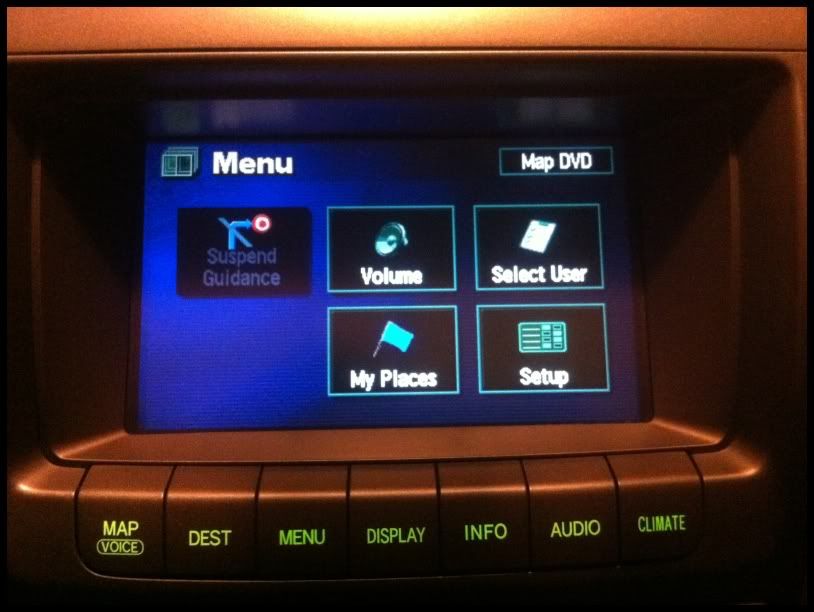
1) Push the "Menu" button below the NAV screen.
2) Select "Volume".
3) Tap the Upper Left corner of the screen, Lower Left corner, Upper Left Corner, and then Lower left corner (you can do all this while you are moving.)
4) A service menu will appear. Press and hold the "Override" soft button until it beeps and is highlighted.
5) Then hit the "back" button at the top of the service menu. You can now use the Navigation when moving...but once you shut the car off, you'll have to do this whole thing again.
I guess since I the older 4th gen, and old nav disc ( I checked and think it was 4.?) I'll just do the above. Thanks for your help!

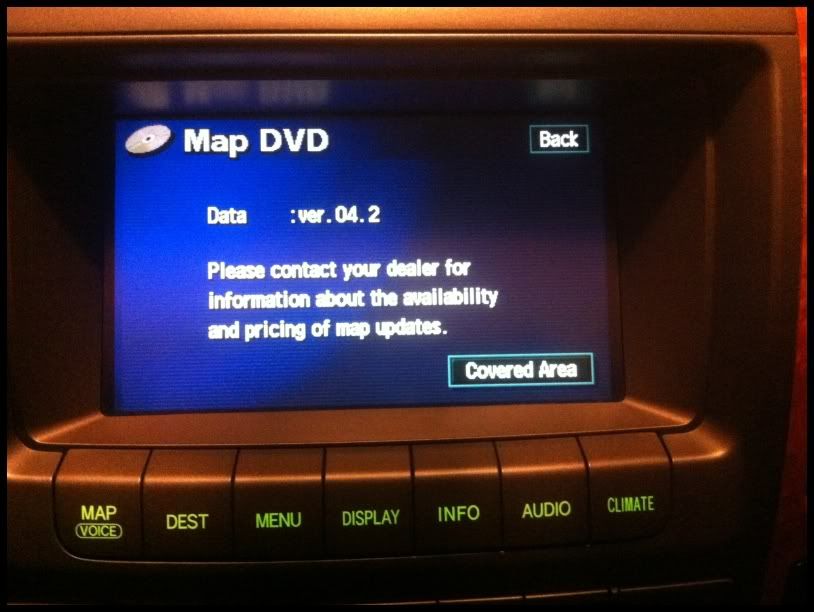
yes that's correct. if you have (i think) 04-06 gx470, that should be gen4. and as long as your map dvd version is 6.1 or below, i think you should be able to do the above trick to override the system. of course, do it before you leave the garage when the car is stopped
Trending Topics

Intermediate


Joined: Feb 2011
Posts: 364
Likes: 45
From: NJ
I read a thread on there that talking about that:
1) Push the "Menu" button below the NAV screen.
2) Select "Volume". Select "DVD"
3) Tap the Upper Left corner of the screen, Lower Left corner, Upper Left Corner, and then Lower left corner (you can do all this while you are moving.)
4) A service menu will appear. Press and hold the "Override" soft button until it beeps and is highlighted.
5) Then hit the "back" button at the top of the service menu. You can now use the Navigation when moving...but once you shut the car off, you'll have to do this whole thing again.
I guess since I the older 4th gen, and old nav disc ( I checked and think it was 4.?) I'll just do the above. Thanks for your help!
1) Push the "Menu" button below the NAV screen.
2) Select "Volume". Select "DVD"
3) Tap the Upper Left corner of the screen, Lower Left corner, Upper Left Corner, and then Lower left corner (you can do all this while you are moving.)
4) A service menu will appear. Press and hold the "Override" soft button until it beeps and is highlighted.
5) Then hit the "back" button at the top of the service menu. You can now use the Navigation when moving...but once you shut the car off, you'll have to do this whole thing again.
I guess since I the older 4th gen, and old nav disc ( I checked and think it was 4.?) I'll just do the above. Thanks for your help!
Last edited by tz693; Mar 21, 2012 at 03:13 PM.

Thread
Thread Starter
Forum
Replies
Last Post
specONE
IS - 3rd Gen (2014-present)
12
Mar 28, 2023 04:18 PM
jackkpts
LS - 3rd Gen (2001-2006)
4
Dec 1, 2013 05:05 AM
RVCAis250
CL of Southern California
8
Aug 27, 2013 01:30 PM
