


Peripheral Ipod Adapter issues


Thread Starter
Driver
Joined: Oct 2008
Posts: 106
Likes: 0
From: Guam
 Peripheral Ipod Adapter issues
After my brief introduction a couple of months ago, I've never made any follow-up threads on my mods.
Funny how it is that most 3GS owners' first mod is an ipod adapter and that is also my first mod to my car. I did pick Peripheral's Ipod adapter. Not really a popular choice here on the board but I might as well try it out.
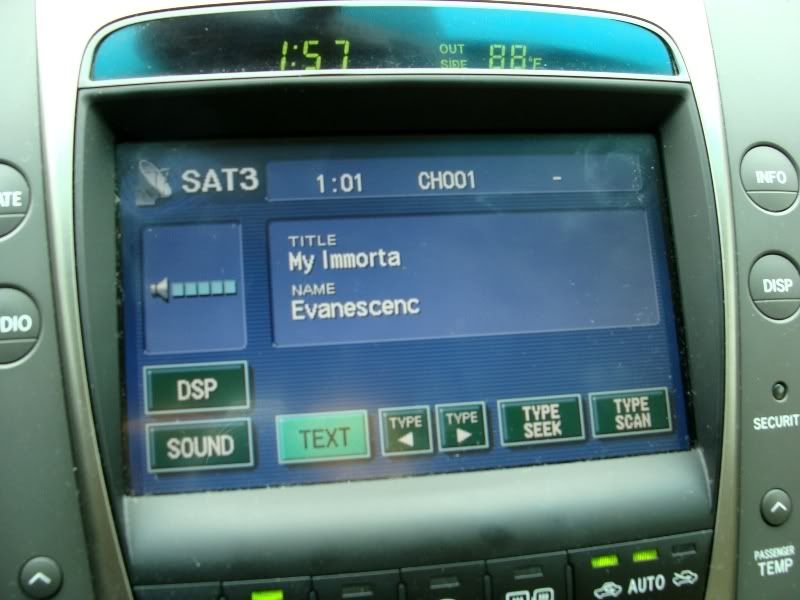
Since I've never seen anyone post pics on how Peripheral's Ipod adapter look like on an '06 display, here are a couple of pics.
As one would notice (and my first issue) is that the display doesn't show complete artist name and title. I've tried my 4th-gen, 1st-gen iTouch, and 3rd-gen Nano with the same results. And yes, they've been updated with the latest software.
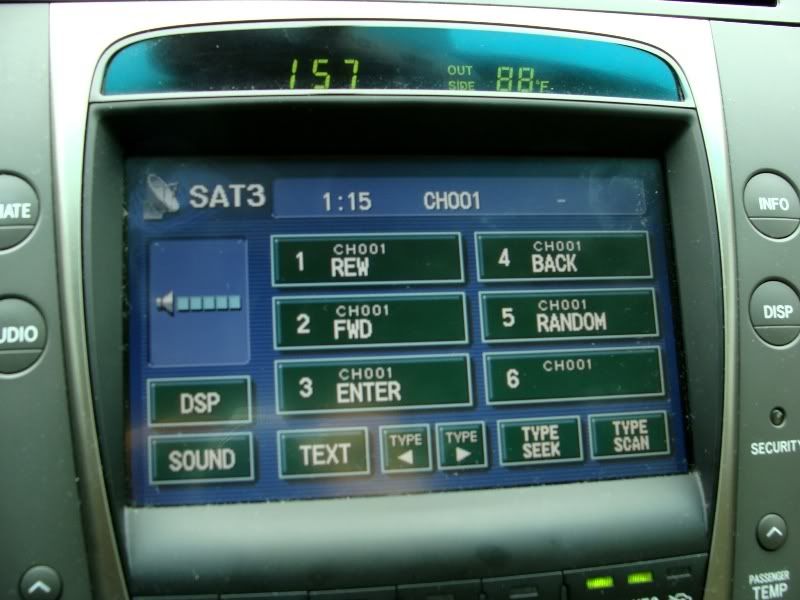
Here's the navigation menu pic. My 2nd issue is that it is quite difficult to navigate (as Peripheral did not include any operating instructions......just installation instructions, it did take some guesswork). I was able to figure it out 80% but I feel that the best way is just to leave it playing at random. Searching for a title would take a lot of time and button-pressing to navigate just like early-generation aftermarket headunits with integrated ipod controls.
And, my third issue. Right after taking these pics and navigating thru the titles (lots of button-pressing), it suddenly went into "aux2" mode of which I couldn't figure out how to get out of (again, no operating manual provided), therefore, no sound is coming out.
I will try to go to Peripheral's website and search for an operating manual.
Anyone is free to provide comments.
BTW, I may change it to another ipod adapter in the near future.
Funny how it is that most 3GS owners' first mod is an ipod adapter and that is also my first mod to my car. I did pick Peripheral's Ipod adapter. Not really a popular choice here on the board but I might as well try it out.
Since I've never seen anyone post pics on how Peripheral's Ipod adapter look like on an '06 display, here are a couple of pics.
As one would notice (and my first issue) is that the display doesn't show complete artist name and title. I've tried my 4th-gen, 1st-gen iTouch, and 3rd-gen Nano with the same results. And yes, they've been updated with the latest software.
Here's the navigation menu pic. My 2nd issue is that it is quite difficult to navigate (as Peripheral did not include any operating instructions......just installation instructions, it did take some guesswork). I was able to figure it out 80% but I feel that the best way is just to leave it playing at random. Searching for a title would take a lot of time and button-pressing to navigate just like early-generation aftermarket headunits with integrated ipod controls.
And, my third issue. Right after taking these pics and navigating thru the titles (lots of button-pressing), it suddenly went into "aux2" mode of which I couldn't figure out how to get out of (again, no operating manual provided), therefore, no sound is coming out.
I will try to go to Peripheral's website and search for an operating manual.
Anyone is free to provide comments.
BTW, I may change it to another ipod adapter in the near future.

Lexus Test Driver
Joined: Nov 2007
Posts: 1,065
Likes: 2
From: MA
The display cutoff is a limitation of the ipod adapter user interface, not the screen. Even on my gen4 screen, the vais adapter displays up to 25 characters even tho my sat radio display is only 10. I was told the sat limitation of 10 was due to the screen and clearly its not.

Thread Starter
Driver
Joined: Oct 2008
Posts: 106
Likes: 0
From: Guam



Thread Starter
Driver
Joined: Oct 2008
Posts: 106
Likes: 0
From: Guam
Does the VAIS show more letters on the display?
go to their website and look at the instruction, they show a lot of screen shots of the system in different cars. 06 has gen4 nav so it's different, i don't know what the limitation is. but on my car, it shows a lot more for sure
and yes, even though they "utilize" the disc button, but you actually toggle between the changer and the ipod. again, this is on my 07 with gen5, not 100% about gen4 but i would assume the same
and yes, even though they "utilize" the disc button, but you actually toggle between the changer and the ipod. again, this is on my 07 with gen5, not 100% about gen4 but i would assume the same
Trending Topics
Thread Starter
Driver
Joined: Oct 2008
Posts: 106
Likes: 0
From: Guam
go to their website and look at the instruction, they show a lot of screen shots of the system in different cars. 06 has gen4 nav so it's different, i don't know what the limitation is. but on my car, it shows a lot more for sure
and yes, even though they "utilize" the disc button, but you actually toggle between the changer and the ipod. again, this is on my 07 with gen5, not 100% about gen4 but i would assume the same
and yes, even though they "utilize" the disc button, but you actually toggle between the changer and the ipod. again, this is on my 07 with gen5, not 100% about gen4 but i would assume the same
Any other feedback or suggestions, please keep 'em coming.
Lexus Test Driver
Joined: Nov 2007
Posts: 1,065
Likes: 2
From: MA
The vias for Gen4 emulates a cd changer. Playlists are disc numbers. You can't see which playlist a disc represents until you touch it. You get full text display for artist or song name across the top of the screen. You do not get the navigate/ipod emulation (ie by artist, etc) that you get on some of the later models or the sat button style emulation you show on your pics.

Thread
Thread Starter
Forum
Replies
Last Post
wednesday
RC - 1st Gen (2015-present)
11
Feb 21, 2018 03:49 AM
