


Manual nav hack switch


Pole Position
Joined: May 2006
Posts: 333
Likes: 1
From: California
 And just in case you were wondering...
Customer (psp) 10/11/2006 07:59 PM
Hi,
Can you please cite the laws, regulations or statutes that require you to impose the speed related lockouts on the navigation system in my 2007 ES350?
Thankyou.
Dear psp:
Thank you for contacting Lexus Customer Satisfaction. We are dedicated to providing superior service. In circumstances that require our attention, we will assist in the resolution process.
The limited functions available while driving at certain speeds is a feature of the vehicle we have installed as a safety precaution. We apologize for any inconvenience this may cause you.
If you require further assistance, please respond to this e-mail, or contact Lexus Customer Satisfaction at 1-800-255-3987, Monday through Friday, 5:00 a.m. to 6:00 p.m., or Saturday, 7:00 a.m. to 4:00 p.m., Pacific Standard Time.
Sincerely,
Marcus Bethay II
Lexus Customer Satisfaction
Hi,
Can you please cite the laws, regulations or statutes that require you to impose the speed related lockouts on the navigation system in my 2007 ES350?
Thankyou.
Dear psp:
Thank you for contacting Lexus Customer Satisfaction. We are dedicated to providing superior service. In circumstances that require our attention, we will assist in the resolution process.
The limited functions available while driving at certain speeds is a feature of the vehicle we have installed as a safety precaution. We apologize for any inconvenience this may cause you.
If you require further assistance, please respond to this e-mail, or contact Lexus Customer Satisfaction at 1-800-255-3987, Monday through Friday, 5:00 a.m. to 6:00 p.m., or Saturday, 7:00 a.m. to 4:00 p.m., Pacific Standard Time.
Sincerely,
Marcus Bethay II
Lexus Customer Satisfaction

Lead Lap


Joined: Nov 2005
Posts: 555
Likes: 12
From: East Bay, CA
Don't you just have to ground the wire like on most other cars with nav??? I dunno I have only done this on aftermarket units that you had to ground the e-brake sensor wire in order to disable the lockout when the car is in motion. Btw I do NOT own an es350 but I want one. This Nav lockout sounds like an annoyance and I probably will just keep my Garmin 2610 and buy the es sans nav.
Last edited by Joelseff; Nov 14, 2006 at 02:58 PM.

Thread Starter
Racer


Joined: Jun 2006
Posts: 1,629
Likes: 12
From: NC
Don't you just have to ground the wire like on most other cars with nav??? I dunno I have only done this on aftermarket units that you had to ground the e-brake sensor wire in order to disable the lockout when the car is in motion. Btw I do NOT own an es350 but I want one. This Nav lockout sounds like an annoyance and I probably will just keep my Garmin 2610 and buy the es sans nav.
If you like your Garmin then I'd say keep it. Coming from a non-Nav background, I'm very glad I bought the Lexus Nav, even with the nanny features.

Driver School Candidate
Joined: Aug 2006
Posts: 33
Likes: 0
From: MA
You'll get most of your money from your Garmin back if you sell it on ebay.
Note that grounding the emergency brake wire, or grounding any single wire, wouldn't solve the nav lockout problem because the nav will still (sometimes) lock you out if you're driving on the highway, with speed measured from the GPS signal. So, you need to be able to turn it off and then turn it back on on-demand.
 Also, it won't show you your ETA with the lockout active.
Thread Starter
Racer
Joined: Jun 2006
Posts: 1,629
Likes: 12
From: NC


Driver School Candidate
Joined: Aug 2006
Posts: 33
Likes: 0
From: MA
You can't just leave the switch off; the nav system will figure out that you're moving and block access to things again. So, you have to be able to turn it off and on.
Thread Starter
Racer
Joined: Jun 2006
Posts: 1,629
Likes: 12
From: NC
The map doesn't update smoothly with the speed sensor disabled - it has a jerky motion. I use the switch for inputting destinations, using the phone book, or viewing song lists while driving. But when I'm using the map the lockouts are always re-enabled so the map scrolls smoothly.

Driver School Candidate
Joined: Jan 2007
Posts: 11
Likes: 1
From: NY
After I do all steps  , Manual Hack failed to run DVD while motion, also Navigation system doesn't work until I turn ON the cutoff switch.
I try to turn it "ON & OFF" "ON & OFF" several time while motion, but I get the same result (stopping the Navigation system and Movie doesn't appear just sound)

Figure out the light blue wire

Cutting light blue wire

Fixing male/female connectors

Then I connect this cutoff switch
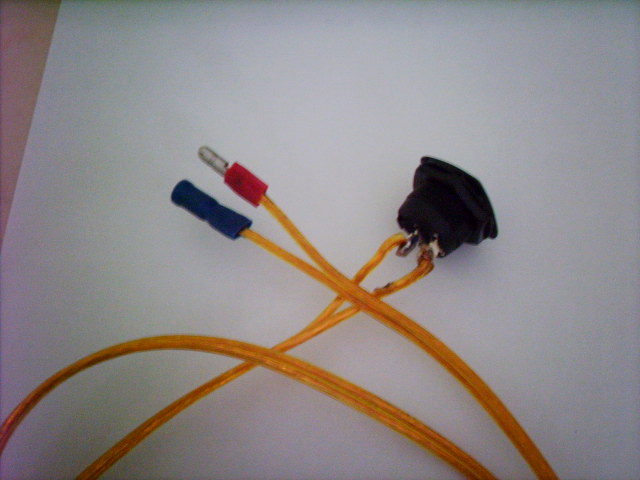
, Manual Hack failed to run DVD while motion, also Navigation system doesn't work until I turn ON the cutoff switch. I try to turn it "ON & OFF" "ON & OFF" several time while motion, but I get the same result (stopping the Navigation system and Movie doesn't appear just sound)
Figure out the light blue wire
Cutting light blue wire
Fixing male/female connectors
Then I connect this cutoff switch
Thread Starter
Racer
Joined: Jun 2006
Posts: 1,629
Likes: 12
From: NC
After I do all steps , Manual Hack failed to run DVD while motion, also Navigation system doesn't work until I turn ON the cutoff switch.
I try to turn it "ON & OFF" "ON & OFF" several time while motion, but I get the same result (stopping the Navigation system and Movie doesn't appear just sound)
, Manual Hack failed to run DVD while motion, also Navigation system doesn't work until I turn ON the cutoff switch. I try to turn it "ON & OFF" "ON & OFF" several time while motion, but I get the same result (stopping the Navigation system and Movie doesn't appear just sound)
First off, the fix I've described does not allow you to view DVDs while driving by itself. You also have to interrupt the parking brake sensor. I don't have the UL edition, so I can't play DVDs anyway, but I did point out to noves350 the appropriate wire and he took it the rest of the way so now he can play DVDs while driving (something I do not encourage). The link to that thread is, https://www.clublexus.com/forums/sho...d.php?t=260233
I don't understand what you mean by the navigation system not working unless the cutoff switch is on. First, let's define terms.
The cutoff switch is on when it is open the speed sensor wire circuit is broken.
The cutoff switch is off when it is closed and the speed sensor wire circuit is enabled (normal operation).
So with the switch off, your nav should operate just as it always has, with the lockouts enabled and a smooth map display update while driving.
With the switch on, you should be able to use all the otherwise grayed out functions (phone book, enter destination, etc.) while driving, and your map display update should have a coarse or jerky look to it.
Is this what is happening?
If not, test your switch to see if it is faulty. You can also take the switch out of the circuit and make your connections to the light blue wire like you did but leave other ends of the two wires (normally attached to the switch) bare. While driving with these wires disconnected your system should operate as if you have a switch installed and on. Pinch the ends of the wires together (complete the circuit) and you should again have normal operation. If this doesn't work, then you know the problem is with the original connections to the light blue wire or in your wiring.
You photos look like everything is in order. Good luck!
Driver School Candidate
Joined: Aug 2006
Posts: 33
Likes: 0
From: MA
However, if it doesn't allow you to use the nav system with the switch in the off position, you must have connected it to the wrong wire. That, or you have an updated nav system (or software) that actively detects the modification and locks you out. Sounds like the switch is working, though.
Where did you put the switch?
Driver School Candidate
Joined: Jan 2007
Posts: 11
Likes: 1
From: NY
I don't understand what you mean by the navigation system not working unless the cutoff switch is on. First, let's define terms.
The cutoff switch is on when it is open the speed sensor wire circuit is broken.
The cutoff switch is off when it is closed and the speed sensor wire circuit is enabled (normal operation).
So with the switch off, your nav should operate just as it always has, with the lockouts enabled and a smooth map display update while driving.
With the switch on, you should be able to use all the otherwise grayed out functions (phone book, enter destination, etc.) while driving, and your map display update should have a coarse or jerky look to it.
Is this what is happening?
The cutoff switch is on when it is open the speed sensor wire circuit is broken.
The cutoff switch is off when it is closed and the speed sensor wire circuit is enabled (normal operation).
So with the switch off, your nav should operate just as it always has, with the lockouts enabled and a smooth map display update while driving.
With the switch on, you should be able to use all the otherwise grayed out functions (phone book, enter destination, etc.) while driving, and your map display update should have a coarse or jerky look to it.
Is this what is happening?
cutoff switch on = mean speed sensor circuit is enabled or copmlete (normal mode, so you CAN NOT use phone book or enter destination while driving).
cutoff switch off = mean speed sensor circuit is broken (modified mode, so you CAN use phone book and enter destination while driving).
please see the following draw:


Driver School Candidate
Joined: Jan 2007
Posts: 11
Likes: 1
From: NY
As someone else mentioned, you need to also do the parking brake wire to watch DVDs.
However, if it doesn't allow you to use the nav system with the switch in the off position, you must have connected it to the wrong wire. That, or you have an updated nav system (or software) that actively detects the modification and locks you out. Sounds like the switch is working, though.
Where did you put the switch?
However, if it doesn't allow you to use the nav system with the switch in the off position, you must have connected it to the wrong wire. That, or you have an updated nav system (or software) that actively detects the modification and locks you out. Sounds like the switch is working, though.
Where did you put the switch?
It's very clear that I cute the light blue wire then I connect the both end to cutoff switch.
I plan to make a hole in the left cover (driver side) and put the cutoff switch there after testing the modification.
Thread Starter
Racer
Joined: Jun 2006
Posts: 1,629
Likes: 12
From: NC
cutoff switch on = mean speed sensor circuit is enabled or copmlete (normal mode, so you CAN NOT use phone book or enter destination while driving).
cutoff switch off = mean speed sensor circuit is broken (modified mode, so you CAN use phone book and enter destination while driving).
please see the following draw:
cutoff switch off = mean speed sensor circuit is broken (modified mode, so you CAN use phone book and enter destination while driving).
please see the following draw:
Without further information I don't know what is wrong or where to begin looking.