


TUTORIAL: How to upload multiple photos in one post..

Thread Starter
Lexus Fanatic


Joined: Sep 2005
Posts: 5,095
Likes: 9
From: The Rotten Apple
 TUTORIAL: How to upload multiple photos in one post..
The screenshots are taken from an Apple computer but it should pretty much be the same for the PC side except for the contextual menus. Feel free to give me input on any revisions that need to be done to make it a better tutorial. Thanks..
here we go...
On the top of the website select "Photo Gallery" under "Community"

Once your in the photo gallery, select "UPLOAD PHOTOS".

You want to select the "Browse" button so that you can access your computer and "show" the website where to find the images you are uploading to your gallery. You can upload up to 5 images in one shot. If you need to upload more than 5, just repeat the process here.
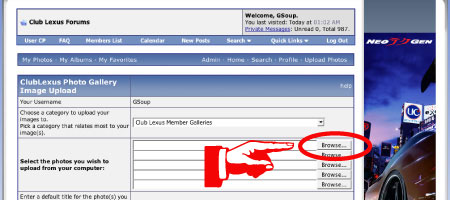
After you select the file(s) you should see the file path to the image.

If it looks correct to you, scroll down and select "upload/submit" button and you should see this.

It will tell you when its done with a preview,double check and press the "Process" button.
When its done uploading it will throw you back into the thumbnail gallery and just double click on the image you want to put in your post.

On the PC you need to right click on the image to get the contextual menu. On a MAC just hold down the control key and click once on the image to pop up the menu.

You want to copy the image location not the actual image. This will copy the URL of the image oppose to the actual image.
Now to get the images in your post you have to select the following icon.

Which will result in this window popping up and you paste the image location here.

here we go...
On the top of the website select "Photo Gallery" under "Community"
Once your in the photo gallery, select "UPLOAD PHOTOS".
You want to select the "Browse" button so that you can access your computer and "show" the website where to find the images you are uploading to your gallery. You can upload up to 5 images in one shot. If you need to upload more than 5, just repeat the process here.
After you select the file(s) you should see the file path to the image.
If it looks correct to you, scroll down and select "upload/submit" button and you should see this.
It will tell you when its done with a preview,double check and press the "Process" button.
When its done uploading it will throw you back into the thumbnail gallery and just double click on the image you want to put in your post.
On the PC you need to right click on the image to get the contextual menu. On a MAC just hold down the control key and click once on the image to pop up the menu.
You want to copy the image location not the actual image. This will copy the URL of the image oppose to the actual image.
Now to get the images in your post you have to select the following icon.
Which will result in this window popping up and you paste the image location here.
Last edited by GSoup; Aug 14, 2006 at 07:24 PM.
Thread Starter
Lexus Fanatic
Joined: Sep 2005
Posts: 5,095
Likes: 9
From: The Rotten Apple
part 2
Once you have done the copy and paste it should look like this inside your post window.
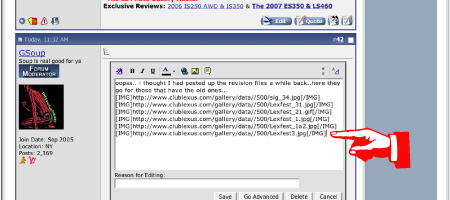
You can only upload a maximum of 10 images per post. If you want to post more pictures than that, just make another post and repeat the process.
If you see anything that needs to be adjusted, submitted or deleted feel free to let me know. Thanks.
C-lo
You can only upload a maximum of 10 images per post. If you want to post more pictures than that, just make another post and repeat the process.
If you see anything that needs to be adjusted, submitted or deleted feel free to let me know. Thanks.
C-lo
Thread Starter
Lexus Fanatic
Joined: Sep 2005
Posts: 5,095
Likes: 9
From: The Rotten Apple
Actually it didn't there is a bug with the upgrade. Check the url on top of your window browser and make sure there is a www. in front of the clublexus.com.
it shouldn't be this -->https://www.clublexus.com/gallery/
it should look like this https://www.clublexus.com/gallery/
If that doesn't work. PM me and I'll try to help you out
it shouldn't be this -->https://www.clublexus.com/gallery/
it should look like this https://www.clublexus.com/gallery/
If that doesn't work. PM me and I'll try to help you out

Lexus Connoisseur


Joined: Mar 2001
Posts: 19,894
Likes: 608
From: USA
Remember... Lexus Related images please. 
Also if you are trying to load multiple photos and especially large ones at the same time, the pics may not upload into the gallery. Please limit your uploads to two at a time or less. We have had several issues with multiple photo uploads in the past:
http://sr1.clublexus.com/forums/showthread.php?t=254831
http://sr1.clublexus.com/forums/showthread.php?t=259036
and etc...
There already is an FAQ on this BTW:
https://www.clublexus.com/forums/sho...&postid=971362
Also if you are trying to load multiple photos and especially large ones at the same time, the pics may not upload into the gallery. Please limit your uploads to two at a time or less. We have had several issues with multiple photo uploads in the past:
http://sr1.clublexus.com/forums/showthread.php?t=254831
http://sr1.clublexus.com/forums/showthread.php?t=259036
and etc...
There already is an FAQ on this BTW:
https://www.clublexus.com/forums/sho...&postid=971362
Last edited by flipside909; Jan 20, 2007 at 02:05 PM.
Trending Topics

Joined: Feb 2001
Posts: 31,944
Likes: 2,737
From: North Carolina
Remember... Lexus Related images please.
There already is an FAQ on this BTW:
https://www.clublexus.com/forums/sho...&postid=971362
There already is an FAQ on this BTW:
https://www.clublexus.com/forums/sho...&postid=971362
The FAQ referenced needs to be updated to the new version of CL, especially the attach image part, but you get the idea..
ClubLexus Stories
Celebrating Lexus & Toyota from Around the Globe

Top 10 Most Confusing Things Lexus Has Ever Done!
Joe Kucinski
2026 Lexus ES Review: Lexus Re-Embraces Founding Principles
Michael S. Palmer
10 Lexus Bargains That are Cheaper Than a New Toyota RAV4
Joe Kucinski
8 Weirdest Things Lexus Has Ever Built
Verdad Gallardo
10 Lexus Designs That Have Aged Like Fine Wine
Verdad Gallardo
8 Tips for Improving Your Hybrid or Plug-in Hybrid's Efficiency!
Michael S. Palmer
10 Best Lexus Models No One Remembers
Joe Kucinski
TRD Off-Road Premium: Best 2026 4Runner, Except This One Thing
Michael S. Palmer
Top 10 Lexus & Toyotas to Drive Before You Die!
Joe Kucinski
Joined: Feb 2001
Posts: 31,944
Likes: 2,737
From: North Carolina
Joined: Feb 2001
Posts: 31,944
Likes: 2,737
From: North Carolina
In your case it was the filename problem https://www.clublexus.com/forums/sho...d.php?t=265172
Click 'edit' to see how I fixed it (I left yours in there too). Basically you linked the URL from the gallery page, not the 'properties' as described in the instructions above.
Click 'edit' to see how I fixed it (I left yours in there too). Basically you linked the URL from the gallery page, not the 'properties' as described in the instructions above.

Driver School Candidate
Joined: Dec 2007
Posts: 14
Likes: 0
From: Hawaii
Aloha Dave,
What is the file size limitation per image? I've taken some pics of my new RX350, but they're all around 1Mb in size. When I attempted to upload a couple of them, I got a webpage indicating that the filesize was too large (which I thought was the case anyway). I can use Preview to resize them, but need to know the limit please.
Mahalo in advance
What is the file size limitation per image? I've taken some pics of my new RX350, but they're all around 1Mb in size. When I attempted to upload a couple of them, I got a webpage indicating that the filesize was too large (which I thought was the case anyway). I can use Preview to resize them, but need to know the limit please.
Mahalo in advance
Thread Starter
Lexus Fanatic
Joined: Sep 2005
Posts: 5,095
Likes: 9
From: The Rotten Apple
Aloha Dave,
What is the file size limitation per image? I've taken some pics of my new RX350, but they're all around 1Mb in size. When I attempted to upload a couple of them, I got a webpage indicating that the filesize was too large (which I thought was the case anyway). I can use Preview to resize them, but need to know the limit please.
Mahalo in advance
What is the file size limitation per image? I've taken some pics of my new RX350, but they're all around 1Mb in size. When I attempted to upload a couple of them, I got a webpage indicating that the filesize was too large (which I thought was the case anyway). I can use Preview to resize them, but need to know the limit please.
Mahalo in advance


Dave i need help here... followed instructions, still getting red X's and i copied the url from the propertie, where did i go wrong?
heres the link https://www.clublexus.com/forums/sho...72#post3730072
heres the link https://www.clublexus.com/forums/sho...72#post3730072